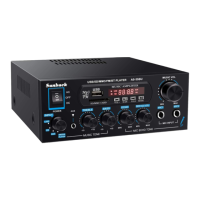
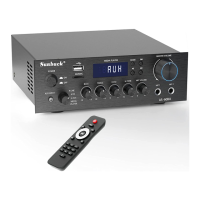
This document is a user's manual for the Sunbuck AS-29BU Hi-Fi Stereo Dual Channel Karaoke Audio Amplifier.
Function Description
The Sunbuck AS-29BU is a stereo dual channel amplifier designed for karaoke and audio playback. It features two microphone input channels, an MP3 player with USB stick and SD card support, FM radio with automatic channel search, and built-in Bluetooth receiving functionality. The amplifier is designed to enhance human voice effects for singing, utilizing a 24-bit, 96 kHz high-speed ADC/DAC chip for natural and beautiful sound.
Important Technical Specifications
Model: AS-29BU
Signal to noise ratio: ≥65dB
Effective frequency range: 60Hz~20KHz
Input sensitivity: 300mV
Overload source electromotive force: ≥1.8V
Tone adjustment (100Hz): +8dB/-8dB (both treble and bass)
Degree of separation: ≥41dB
Crosstalk attenuation: ≥39dB
Channel gain difference: <1dB
Maximum noise: 6mV
MIC input sensitivity: 14mV
MIC overload source electromotive force: >350mV
MIC SNR: ≥65dB
MIC frequency response range: 80Hz~20KHz
Output connection: Left and right channel power output interface
Dimensions (mm): 180(L)×138(W)×55(H)
Attachment: Remote control
Speaker System: 4Ω-16Ω
Power Supply: DC 12V/5A, AC~110V/220V 60Hz/50Hz
Usage Features
Front Panel Controls:
- USB.C: USB Type-C port (likely for charging or data, though not explicitly stated for data in the manual).
- SD MMC.C: SD/MMC card slot.
- TREBLE: Treble adjustment knob (-10 to +10).
- BASS: Bass control knob (-10 to +10).
- MIC.VOL: Microphone volume control.
- MIC1/MIC2: Microphone input jacks.
- VOLUME: Main volume adjustment knob (MIN to MAX).
- POWER: Power switch.
- Function Display Window: Shows current mode and status.
- MP3 Function Buttons:
- MODE: Signal input conversion (switches between modes like USB, SD, FM, Bluetooth, AUX).
- K (Previous Song): Selects the previous song in MP3 mode or previous station in FM mode.
- ►► (Next Song): Selects the next song in MP3 mode or next station in FM mode.
- ►II (Play/Pause): Plays or pauses MP3 playback. In FM mode, initiates automatic station search.
- ** (Repeat Mode):** Toggles between track repeat and single cycle repeat.
Rear Panel Connections:
- AUDIO INPUT: RCA audio input interface (for CD/DVD players).
- SPEAKER SYSTEM 4Ω-16Ω: Left and right sound box output connector clips.
- POWER DC INPUT: DC power supply 12V/5A input jack.
- FM ANT: FM antenna connection.
- BT ANT: Bluetooth antenna connection.
- POWER AC~110V/220V: AC power switch for 110V/220V input.
MP3 Player Remote Control Functions:
The remote control provides comprehensive control over the MP3 player and FM radio.
- Power Button: Standby and power on/off.
- MODE: Input mode conversion.
- CH-/CH+: Last/next station selection in FM mode; backward/forward frequency control; previous/next song in MP3 mode.
- EQ: Selects one of 6 built-in equalizer effects for MP3 playback.
- Volume Up/Down: Increases/decreases player volume.
- Numeric Keys (0-9): Directly select songs or radio stations. For multi-digit numbers, press keys consecutively (e.g., 1 then 2 for song 12).
- Play/Pause: Plays/pauses MP3. In FM mode, initiates/stops automatic station search.
- Repeat Mode: Toggles between single song repeat (ONE) and total repeat (ALL) playback.
Bluetooth Operation:
- Activation: Press the MODE button on the panel until "blue" is indicated on the display. The device will beep and scan for Bluetooth equipment.
- Smartphone Connection:
- Enable Bluetooth on your smartphone.
- Search for devices; the Bluetooth name will appear in available devices.
- Click to connect. The speaker will prompt with a "DU" sound upon successful connection.
- Play music from your phone's music player.
- Control playback (previous/next song, play/pause, volume) using either the phone or the amplifier's panel buttons.
- Non-Android Mobile Phone Connection (with code):
- If your phone requires a pairing code, enter "0000" or "1234" when prompted.
- A "DU" sound confirms successful connection.
- Ensure your phone supports Bluetooth player functionality.
- Call Handling: If a phone call comes in while playing Bluetooth music, the device will stop music playback and switch to phone answer mode or sound amplification for the call. It will not amplify the Bluetooth mobile phone handset in switching mode.
Protection Measures:
- Output short circuit protection system.
- Overheat overload protection.
Maintenance Features
Safety Precautions (General):
- Avoid exposing the device to rain, water, or other fluids to prevent fire or electric shock.
- Ensure the device matches the specified voltage to prevent fire or electric shock.
- Do not cut or modify the power cord. Keep it away from heaters and avoid placing heavy objects on it.
- Install the equipment in a stable position to prevent drops and damage.
- Turn off the power immediately if any irregularities occur (smoke/smell, water/metal ingress, dropping/breakage, damaged power cord, no sound).
- Do not drop metal or combustible objects into ventilation slots.
- Avoid touching the plug or antenna during lightning.
- Do not open the device without permission due to high-pressure components; all repairs must be handled by local dealers.
Safety Precautions (Installation and Usage):
- When unplugging, hold the power plug, not the cord.
- Do not cover vents to prevent overheating.
- Avoid placing the device in moist, dusty, or direct sunlight areas, or where smoke vapor is present, to prevent fires or electric shocks.
- Do not place heavy objects on the equipment to prevent damage.
- If cleaning the device or not using it for more than 10 days, turn off and unplug the power for safety.
- Avoid placing the machine near heaters, heat vents, direct sunlight, or areas with excessive moisture and dust.
- Verify the line voltage matches the rear marking.
- Protect the voltage line; avoid high pressure, stepping on, or excessive pulling/pushing.
- Do not cover vents; blocked vents will increase internal temperature and damage the unit.
- Avoid dropping metal objects (needles, hairpins, coins) into the unit to prevent short circuits.
- Avoid placing the unit in high moisture or dusty environments; do not place flower vases or other liquid containers above it.
- Do not open the cover or back; no user-serviceable parts inside. Refer servicing to qualified personnel.
- Avoid using volatile solutions (alcohol, paint, gasoline) for cleaning.
- Ensure the operating temperature is above 5°C.
Troubleshooting Guide:
The manual provides a troubleshooting guide for common issues:
- No power: Check if the AC power cord is disconnected, if the wall socket connection is poor, or if the wall socket is inactive.
- No sound: Check if speakers/components are disconnected, ensure the correct component is selected, verify volume control is not at the lowest level, and check for speaker wire short or open circuit.
- One master speaker/NO sound: Check for bad/incorrect speaker connections, ensure balance is centered, and check for speaker wire short or open circuit.
- Bad sound: Check if the speaker placement is unfit, if speaker connections are bad/incorrect, or if treble/bass control is too low.
- Microphone no sound: Check if microphone volume is too low, if the microphone is not turned on, or if the microphone wire has a short or open circuit.
- Severe hum or noise: Check if speakers and components are connected securely, and if plugs and jacks are dirty.
Caution:
- Do not use this machine in wet or rainy conditions.
- Do not remove the cover if you are not professional personnel; find qualified maintenance personnel for testing and maintenance.
- All items in the manual are for reference only.
- Designs and specifications are subject to change without notice.
- Use 4Ω-8Ω speakers.

 Need help?

 To Next Page
 General