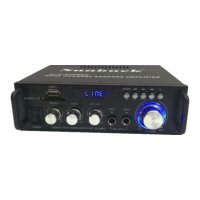
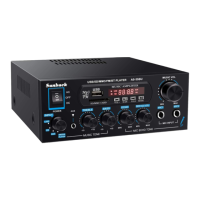
This document describes the Sunbuck AS60BU Stereo Digital Power Amplifier, a wireless BT stereo digital power amplifier designed for both domestic and commercial use.
Function Description
The AS60BU is a compact Class D digital amplifier capable of delivering a powerful 55W (PMPO 300W) maximum output per channel. It features multiple input options and controls, making it a versatile audio solution.
Key functions include:
- Amplification: Boosts audio signals for output through speakers.
- Wireless Audio Streaming: Integrated Bluetooth receiver allows for wireless connection to compatible devices.
- Media Playback: Built-in media player supports USB flash drives and Micro SD cards.
- FM Radio: Includes an FM receiver for radio playback.
- Karaoke Functionality: Two microphone inputs with adjustable volume, tone, and echo controls.
- Audio Input Selection: Multiple wired inputs for various audio sources.
Important Technical Specifications
Power Supply:
- 100-240Vac, 50/60Hz (IEC)
Output Impedance:
Output Power:
- 8Ω: 2 x 35W RMS / 2 x 40W max. (EIAJ Standard @ 1kHz 10% THD)
- 4Ω: 2 x 45W RMS / 2 x 55W max. (EIAJ Standard @ 1kHz 10% THD)
Frequency Response:
SNR (Signal to Noise Ratio):
Input Sensitivity:
- Line: 180-450mV
- Mic: 18mV
Dimensions:
Weight:
Usage Features
The AS60BU amplifier offers a range of features for flexible audio management:
Inputs:
- Wireless: Bluetooth for audio streaming.
- Media Player: USB Plug and Micro SD Plug for direct media playback.
- Analog Audio:
- RCA (L/R) Audio Input (CD Input, LINE Input).
- Extra AUX input (3.5mm jack) for other sound inputs like car audio.
- Microphone: Two MIC inputs (MIC 1, MIC 2) with individual volume, tone, and echo controls.
- FM Antenna Input: For radio reception.
- 12DC Power Input: (Specific use case not detailed, but available).
Controls (Front Panel):
- Power Switch: ON/OFF.
- Media Player Controls: Display screen, MP3 button, MODE, CH-/+, Play/Pause.
- Master Volume: Large knob for overall volume control.
- Tone Controls: BASS and TREBLE adjustment knobs for music listening.
- Microphone Controls: ECHO, TONE, and MIC VOLUME knobs.
- Signal Exchange Knob: For selecting input sources.
Controls (Remote Control):
- ON/OFF: Media Player Switch.
- MODE: Mode exchange, player input channel choose.
- STOP: Resets playback to the first song on USB/SD.
- MUTE: Turns multimedia signal on/off.
- VOL+/VOL-: Volume adjustment.
- CH-/CH+:
- Short press: Last/next song (USB/micro SD/Bluetooth), last/next FM station.
- Long press: Quick backwards/forwards (USB/micro SD/Bluetooth), quick backwards/forwards search (FM stations).
- Play/pause:
- Short press: Pause/resume playback (USB/micro SD).
- Bluetooth mode: Pause/resume play.
- Long press: Bluetooth mode exit connection.
- REPE: Repeat mode switch.
- EQ: EQ mode switch (NORMAL, POP, CLASSICAL, ROCK, JAZZ).
- 0-9: Number Key for direct track selection.
Speaker Connection:
- Supports 4-8Ω impedance output.
- Speakers can be wired in parallel or series.
- Right and Left speaker outputs.
Installation Guidelines:
- Ensure power is switched off and mains unplugged before installation.
- Wire speakers to the amplifier, ensuring correct positive and negative terminals.
- Audio input on the back is through 3 pairs of RCA connectors; ensure left and right signals are correct for stereo output.
- Insert the IEC plug and connect the unit to the mains.
- Before switching on, set master volume to the lowest point to avoid power surge damage.
- Adjust volume to an appropriate listening level.
Maintenance Features
Safety Information:
- Caution: Do not open the device; no user-serviceable parts inside. Risk of electric shock.
- Exposure: Do not expose to rain or moisture.
- Electric Shock Prevention: Non-professionals should not open the shell cover. If repair is needed, qualified service personnel should be consulted.
- High Pressure Machine Memory: Non-electronic professionals should not disassemble the case due to potential serious electric shock from internal electronic components.
- Power: Use only the specified power type.
- Shock Prevention: Prevent water or metal from entering the machine to avoid internal short-circuits.
- Safety Ground Wire: The product is grounded through the power cord grounding conductor for personal safety; ensure reliable grounding.
Troubleshooting Guide:
The manual provides a comprehensive troubleshooting section for common issues:
-
No Power:
- Check mains switch, power lead condition and insertion.
- Check IEC plug insertion on amplifier.
- Check amplifier power switch.
- Check if the fuse is faulty; if frequent blowing occurs, stop use and refer to qualified personnel.
-
No Music Output:
- Check input connection leads on both amplifier and source.
- Verify correct input selection.
- Ensure audio source is playing.
- Check volume levels on both amplifier and audio source.
- Inspect speaker cable for damage, proper stripping, and connection.
- Check for loose strands of speaker cable touching positive and negative terminals, which can trigger short circuit protection.
-
No Mic Output:
- Check if Mic is switched on.
- Check Mic volume on the amplifier.
- Verify if Mic requires phantom power (if applicable).
- Test Mic functionality on another device.
-
Diminishing Output:
- Check speaker polarity connection.
- Ensure audio source volume is turned up.
- Verify speaker impedance is within the specified range.
-
Disrupted Output:
- Ensure output volume is not too high on both audio source and amplifier.
- Check for damage on speaker cable and connection leads.
- Ensure amplifier, audio device, speaker, and connection cables are not near mains power cables or large inductive appliances (e.g., fridge).
Environmental Disposal:
- This product is classified as Electrical or Electronic equipment.
- Should not be disposed of with other household or commercial waste at the end of its life.
- Must be disposed of according to local council guidelines.
FCC Statement:
- Complies with Class B digital device limits (Part 15 of FCC Rules).
- Generates, uses, and can radiate radio frequency energy.
- If interference occurs, users are advised to reorient/relocate receiving antenna, increase separation, connect to a different circuit, or consult a technician.
- Changes/modifications not approved by manufacturer could void authority to operate.
- Operation is subject to two conditions: no harmful interference, and acceptance of any received interference.
- Evaluated for general RF exposure and can be used in portable exposure conditions without restriction.

 Need help?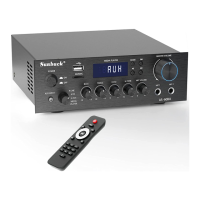

 To Next Page
 General