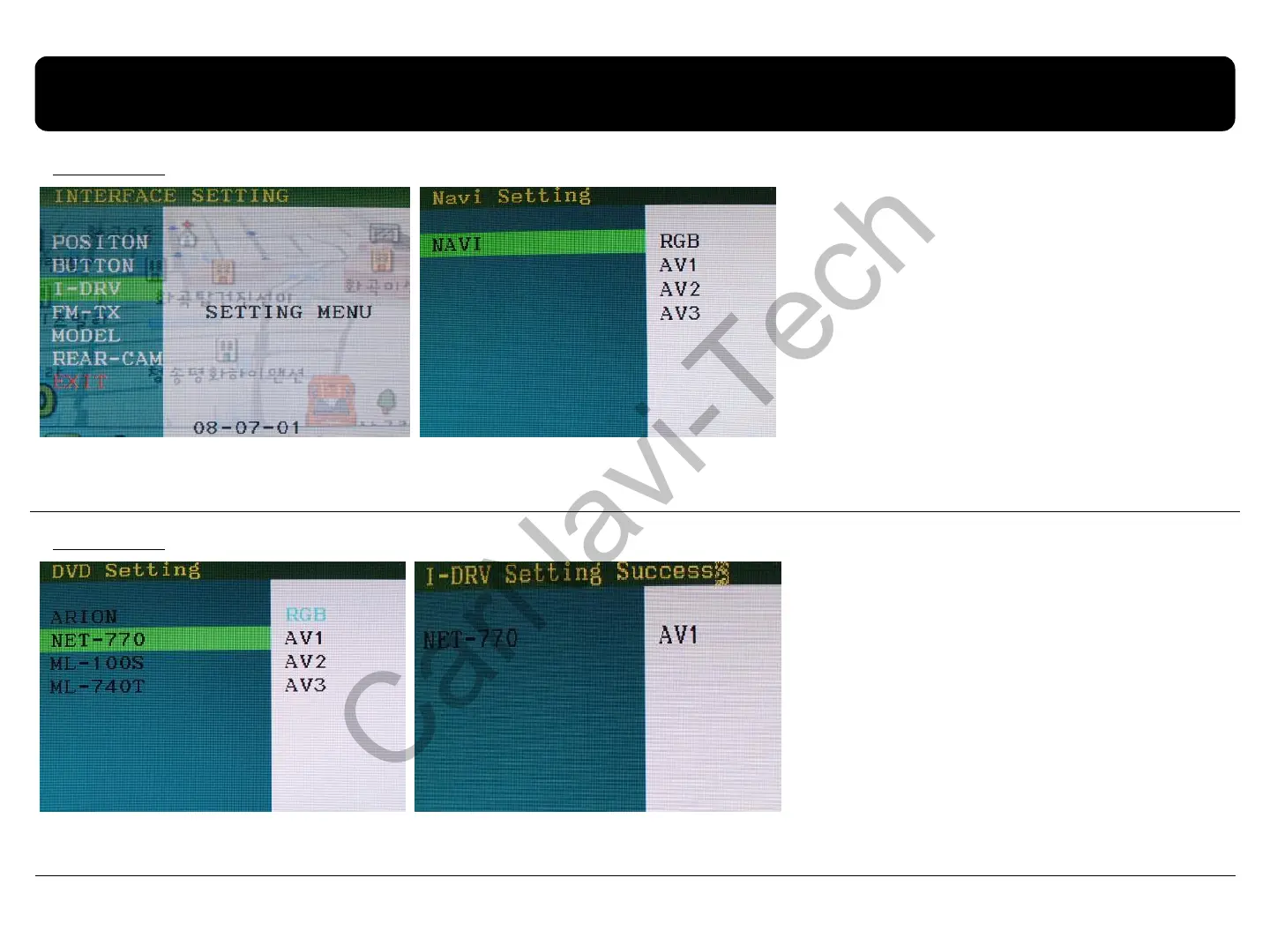
2.6 BMW Handle Button NAVI setting
16
Overseas
Domestic
After implementing FACTORY MODE
(Interface setting), select I-DRV and press
the Sel button of Keypad, and then Navi
Setting window will be displayed as shown
on the right picture.
After select one between RGB, and AV1~3,
press the Sel button of keypad.
(It is fine to select any channel, because
selecting RGB, AV1~3 is useless. But, the
selected channel will be exempted on
next channel settings.)
After the above steps finish, left picture
will appear. ARION, NET-770, ML-100S,
ML-740T are Domestic DTV model.
Select the model you want to use, then
select channel of RGB, AV1~3.
(The channel selected on the above
steps is exempted.)
NET-770 (DTV model) is designated AV1
as shown right.
※This function is not supported at domestic NAVI, but this setting is necessary for implementing Domestic DTV.
※When DVD-IR (Black) wire of RGB-IN cable is connected to IR input wire of DTV, able to operate via handle buttons.



 To Next Page