User's Manual
24
CHAPTER 2
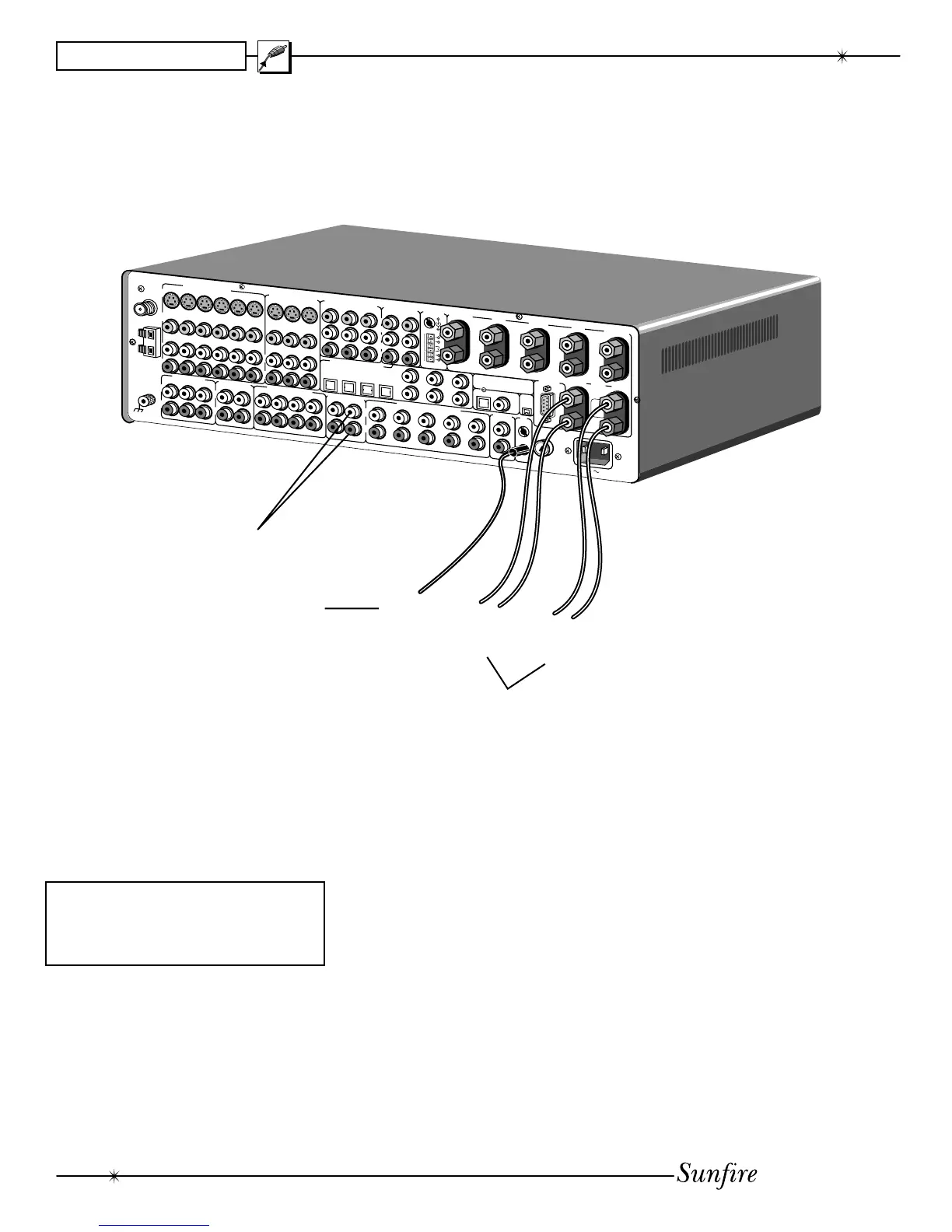
Zone 2 connections
Zone 2 can play stereo analog
sources independently of the Main
Zone, or can play the same source.
Zone 2 can only play a digital source
if the Main Zone is playing the same
source.
Note that Zone 2 has to be enabled
before it can be used. Please see
page 47 for more details of Zone 2
operation.
If you want the Receiver's Aux
speaker-level outputs to run your
Zone 2 speakers, use the AmpliÞ er
OSD menu, under the Speaker menu,
to set Aux to Zone 2 (see page 41).
Long speaker wires are connected to
Speaker-level audio signals
From: Receiver speaker outputs
To: Zone 2 speaker inputs
D
V
D
S
A
T
V
I
D
1
V
I
D
2
V
C
R
C
D
D
V
D
S
A
T
V
I
D
1
V
I
D
2
V
C
R
C
D
D
V
D
S
A
T
V
I
D
1
V
I
D
2
V
C
R
C
D
P
H
O
N
O
D
A
T
T
A
P
E
D
A
T
T
A
P
E
L
E
F
T
L
S
U
R
C
E
N
L
B
S
U
R
F
I
X
E
D
M
A
I
N
Z
O
N
E
2
P
H
O
N
O
D
A
T
T
A
P
E
D
A
T
T
A
P
E
F
I
X
E
D
M
A
I
N
Z
O
N
E
2
R
I
G
H
T
R
S
U
R
S
U
B
R
B
S
U
R
M
A
I
N
V
C
R
V
I
D
2
/
M
O
N
2
M
A
I
N
V
C
R
V
I
D
2
/
M
O
N
2
M
A
I
N
V
C
R
V
I
D
2
/
M
O
N
2
A
U
D
I
O
/
V
I
D
E
O
O
U
T
P
U
T
S
A
U
D
I
O
I
N
P
U
T
S
A
U
D
I
O
O
U
T
P
U
T
S
8
-
C
H
A
N
N
E
L
I
N
P
U
T
S
S
T
E
R
E
O
O
U
T
P
U
T
S
R
I
G
H
T
S
U
R
R
O
U
N
D
R
I
G
H
T
M
A
I
N
D
V
D
S
A
T
V
I
D
1
M
A
I
N
T
R
I
G
G
E
R
S
C
O
M
P
O
N
E
N
T
O
U
T
C
O
M
P
O
N
E
N
T
V
I
D
E
O
I
N
Made in Snohomish, Washington, U.S.A.
L
E
F
T
L
E
F
T
S
U
R
C
E
N
T
E
R
S
U
B
2
L
B
S
U
R
R
I
G
H
T
R
I
G
H
T
S
U
R
S
U
B
1
S
U
B
3
R
B
S
U
R
L
I
N
E
L
E
V
E
L
A
U
D
I
O
O
U
T
P
U
T
S
S
P
E
A
K
E
R
L
E
V
E
L
A
U
D
I
O
O
U
T
P
U
T
S
D
V
D
D
V
D
C
D
S
A
T
D
A
T
V
I
D
1
V
I
D
2
S
A
T
V
I
D
1
C
D
S
u
n
f
i
r
e
U
l
t
i
m
a
t
e
R
e
c
e
i
v
e
r
I
I
D
I
G
I
T
A
L
A
U
D
I
O
I
N
P
U
T
S
C
r
Y
b
C
L
S
I
D
E
A
X
I
S
R
S
I
D
E
A
X
I
S
M
A
I
N
Z
O
N
E
2
S
I
D
E
S
R
S
-
2
3
2
D
I
G
I
T
A
L
O
U
T
I
E
E
E
1
3
9
4
S
U
R
R
O
U
N
D
B
A
C
K
C
E
N
T
E
R
L
E
F
T
M
A
I
N
L
E
F
T
S
U
R
R
O
U
N
D
R
I
G
H
T
L
E
F
T
R
E
P
L
A
C
E
W
I
T
H
O
R
I
G
I
N
A
L
F
U
S
E
T
Y
P
E
A
N
D
R
A
T
I
N
G
A
C
I
N
P
U
T
A
C
F
U
S
E
1
2
0
V
A
C
6
0
H
z
O
P
T
I
O
N
A
L
:
S
I
D
E
-
A
X
I
S
O
R
Z
O
N
E
2
A
M
G
N
D
F
M
7
5
Ω
R
L
R
L
R
L
COMP
VIDEO
S
VIDEO
A
U
D
I
O
/
V
I
D
E
O
I
N
P
U
T
S
R
L
ZONE2
12VDC12VDC
12VDC
MAIN ZONE
M
O
N
2
R
L
I
R
T
O
L
E
F
T
Z
O
N
E
2
S
P
E
A
K
E
R
T
O
R
IG
H
T
Z
O
N
E
2
S
P
E
A
K
E
R
T
O
Z
O
N
E
2
IR
R
E
M
O
T
E
S
E
N
S
O
R
+
+
IR sensor signals
From: Zone 2 IR sensor
To: Receiver Zone 2
IR sensor input
As an alternative to using the
Receiver's internal ampliÞ ers to run
your Zone 2 speakers, you could use
an external power ampliÞ er. Connect
the ampliÞ er's line-level inputs to the
Receiver's Zone 2 stereo outputs.
the Aux speaker outputs as shown,
and are run out to your Zone 2 speak-
ers. These are usually located in
another room or area of your house.
If you have an external power
ampliÞ er to run your Zone 2 speak-
ers, connect the Receiver's Zone 2
line-level stereo outputs to the inputs
of your ampliÞ er. Connect your Zone 2
speakers to the ampliÞ er with speaker
wire. The Receiver's Aux channels
can then be used to power other
speakers, such as the surround back
or side-axis speakers.
The wire from an optional IR sensor
is shown connected to the Ultimate
Receiver's Zone 2 IR input. The Re-
ceiver is compatible with most makes
of IR sensors and equipment.
The sensor can be located in a
suitable area of Zone 2, allowing you
complete control of the volume and
source selection. Zone 2 can also be
controlled from the front panel, using
the remote's Zone 2 buttons.


 To Next Page