User's Manual
26
RECVR CABLE
GUIDE MENU
MODEMODE
EXIT INFO
SYSTEM
+10
POWER
31
64
97
ENTDIS
M3M1
2
5
8
0
M2
PAG E
FAV
MAIN
OFF
VOL CH
MUTE
PREV
CH
CD
AUDIO
MAIN
TAPE
AUX
ZONE2
DVD
VCR
SAT
TV
CHAPTER 3
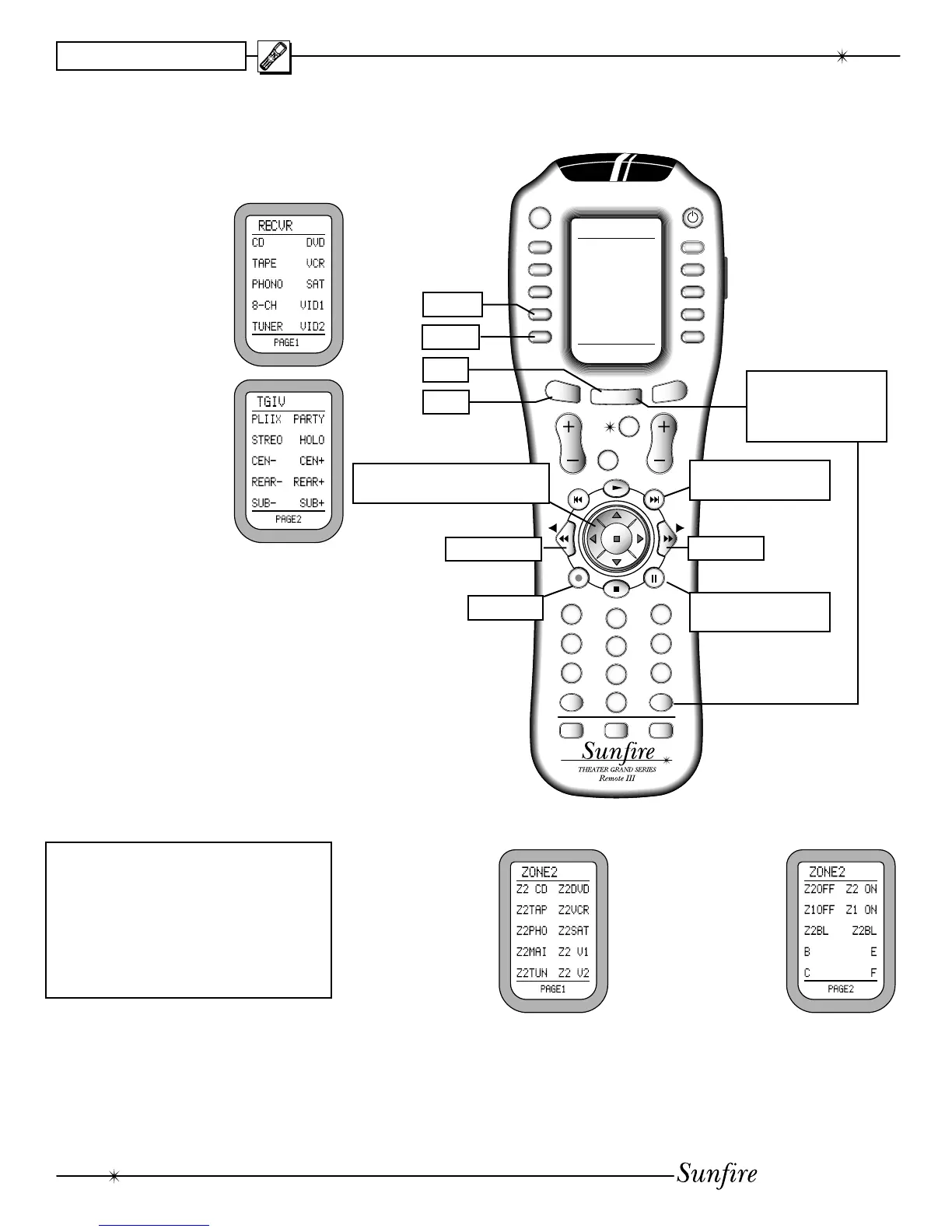
1. Press the remote's MAIN button
to make sure the display is on the
main display menu.
2. Press the RECVR
device button to
set the remote to
operate your Re-
ceiver. The display
chang es to show
the Receiver input
se lec tions:
3. Press PAGE to
reach page 2, which
shows the DOLBY
PRO LOGIC-II,
PAR TY, STE REO,
HO LO GRAM, and
the trims for center,
sur rounds, and sub.
On the right is '+'
(in crease level) and
on the left is '-'
(de crease level).
4. The fol low ing but tons with Þ xed
lables are also pro grammed: Pow-
er, Vol ume up, down and Mute.
The number pad accesses the
tuner presets directly, and CH+/-
steps through them. DIS is the +10
function, and ENT is station enter.
The MODE buttons either side of
the joystick, allow you to select the
different surround modes.
ZONE 2
Note: Zone 2 must Þ rst be enabled
using the OSD (see page 36), or
these controls will have no effect.
Zone 2 can be turned on even if
the Main Zone is off.
See page 47 for more Zone 2 details.
Operating the Ultimate Receiver with the Remote
MAIN
PAGE
RECVR
Previous Mode
Next Mode
Full-page On Screen
Display (OSD)
Momentary status and
information display
OSD Exit
Use the Joystick to navigate
through the OSD (when active)
Hold down MAIN and
ENT for a few seconds
to enter the SETUP
mode. See next page.
ZONE 2
1. From the main
display menu,
press the ZONE2
device button to
access features
of the second
zone. Page 1
shows the input
selections.
2. The hard buttons operate Zone 2,
such as Power, Volume, Mute, and
the Tuner controls and presets.
3. Page 2 shows
Zone 2 on/off,
Zone 1 on/off,
and balance left/
right.


 To Next Page