Need help?
Do you have a question about the Sunfire THEATER GRAND PROCESSOR II and is the answer not in the manual?
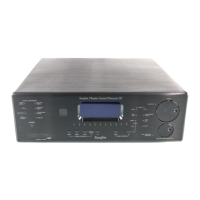
Essential safety advice for operating the Sunfire Theater Grand Processor II.
Critical warnings to prevent fire or electric shock hazards, including moisture precautions.
Lists the extensive audio, video, digital, and control features of the Theater Grand Processor II.
Details FM/AM antenna inputs and audio/video input/output jacks.
Details analog audio inputs, digital inputs, and digital output for recording.
Precautions for placement, AC power, and cleaning the unit.
Step-by-step guide on teaching the remote to control other devices.
Instructions for deleting programmed keys and resetting remote functions.
Explains how to access the setup menu and adjust core parameters like trims and levels.
Explains how bass management redirects bass for improved sound.
How to configure speaker sizes (Large/Small) and crossover frequencies.
Step-by-step guide to setting speaker volume for optimal home theater performance.
Guide to adjusting delay times for surround and center channels for accurate sound imaging.
Guidelines for positioning front and center speakers for best audio performance.
Recommendations for placing surround, subwoofer, and side speakers.
Addresses issues like no sound, hum, tuning problems, and automatic operation failures.
Solves noise, interference, no picture, and tone control problems.
Lists detailed specifications for audio inputs, outputs, and tuner performance.
Details the terms, duration, and exclusions of the Sunfire Corporation warranty.
Provides instructions and contact information for obtaining technical support and service.
 General
| Audio Channels | 7.1 |
|---|---|
| THX Certified | Yes |
| HDMI Inputs | 4 |
| HDMI Outputs | 1 |
| Component Video Inputs | 3 |
| Component Video Outputs | 1 |
| Dolby Digital | Yes |
| DTS | Yes |
| Frequency Response | 20 Hz - 20 kHz |
| Dimensions | 17 x 5.75 x 16.5 inches |
| Weight | 28 lbs |
| Digital Audio Outputs | 1 |

 To Next Page