Electronic Dartboard 23/40
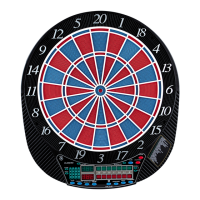
Dartboard Functions
POWER switch/button - Located on the lower right corner on the side of the dartboard. Be sure the
AC Adapter is plugged into the jack on the side of the dartboard. Press the POWER switch to turn
game on or off
.
START/HOLD button - This multi-function button is used to:
· START the game when all options have been selected.
· Put dartboard in HOLD status between rounds to allow player to remove darts from the target area.
GAME GUARD button –After the START button has been pressed and play has begun, the GAME
GUARD feature can be activated. When the button is pressed, all of the keys will ‘lock’. When GAME
GUARD is active, a misguided dart hitting a button will not affecting your game. To deactivate the
GAME GUARD, simply press the button again and the keys will unlock.
BOUNCE OUT button - Decide before play if you want to count darts that do not remain in board
(“bounce-outs”) or not. If not, simply press the BOUNCE OUT button immediately after a bounce out
occurs to deduct the score that registers
DART-OUT/SCORE button - The DART-OUT feature is active only during the “01” games (301,
401, etc.). When a player’s score falls below 160, he/she can press the DART OUT button to get a
suggestion from the dartboard as to the 3 darts needed to finish the game. Note: doubles and triples
are indicated with 2 and 3 dashes to the left of the number respectively. The SCORE feature allows
player to access score not current on display.
SOUND button – Sound level adjustable from 0-7 levels (8 levels).
DOUBLE/MISS button – This button is used to activate the Double In/Double Out and Master Out
options for the “01” games. This function is only active when selecting 301, 401, etc. games. Note: not
all models have Master Out option. The MISS feature is active during play of any game. Press button to


 To Next Page
 Loading...