Mobile App Control Panel
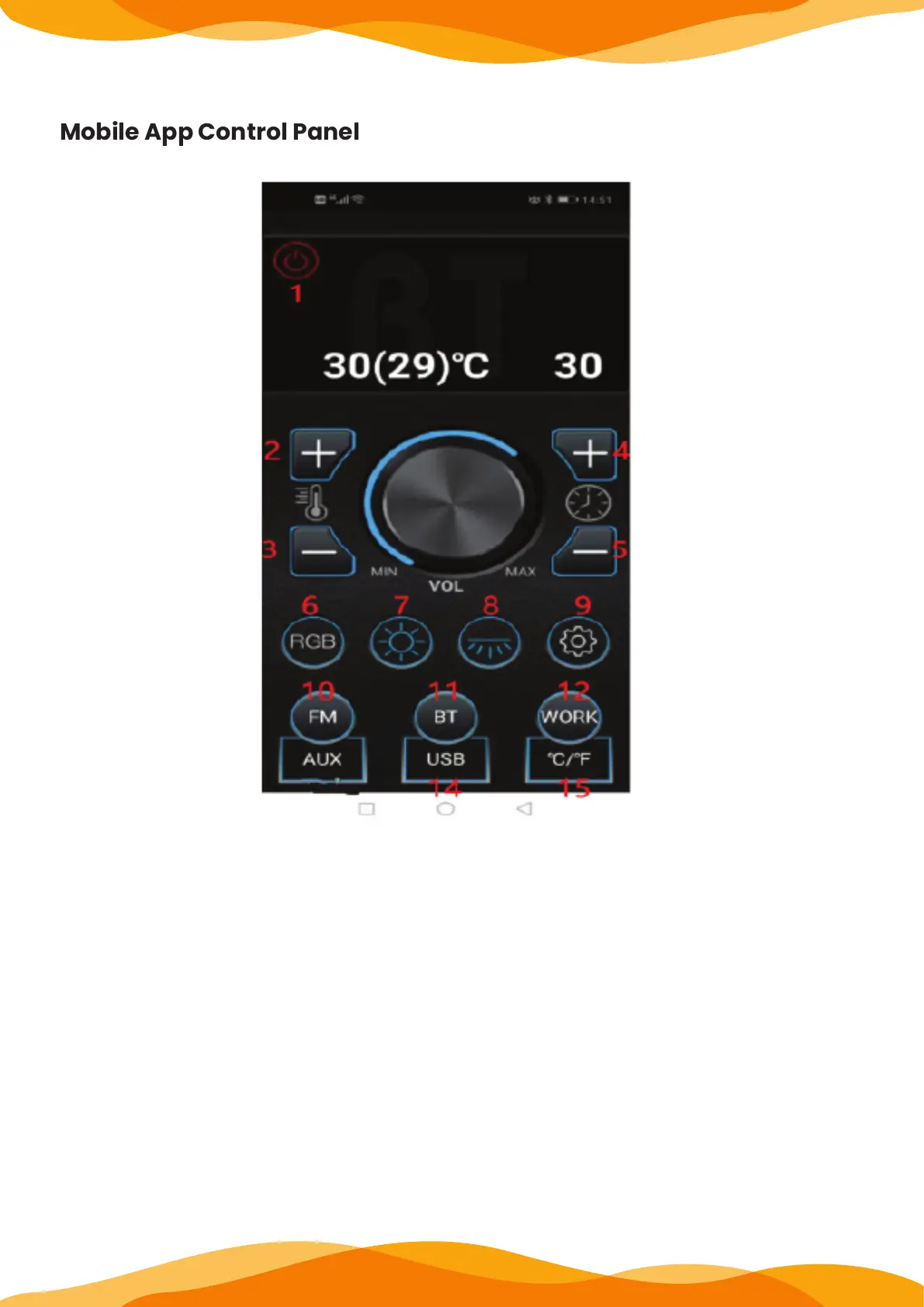
1. Power button: press to start and then press to shut down.
2.Temperature +/ Previous song/manual search: infrared mode is the temperature set-
ting plus key, music mode this key is the previous song, radio mode this key is the
upward manual search.2.Temperature Display: Press arrow UP or DOWN to set desired
temperature. Press the two arrows together to convert Celsius into Fahrenheit.
3. Temperature -/ Next song/manual search: the infrared mode is the temperature set-
ting minus key, the music mode is the next song, the radio mode is the down manual
search.
4. Time +/ Volume + key: infrared mode for the time setting plus key, music and radio
mode for the volume plus.
5. Time -/ Volume - key: Set the reduction key for time in infrared mode, and the volume
reduction for music and radio mode.


 To Next Page