ANDROID CONTROL PAD & SUNLIGHTEN APP GENERAL OPERATING INSTRUCTIONS
SYSTEM UPDATE
19
SCREEN 32-35
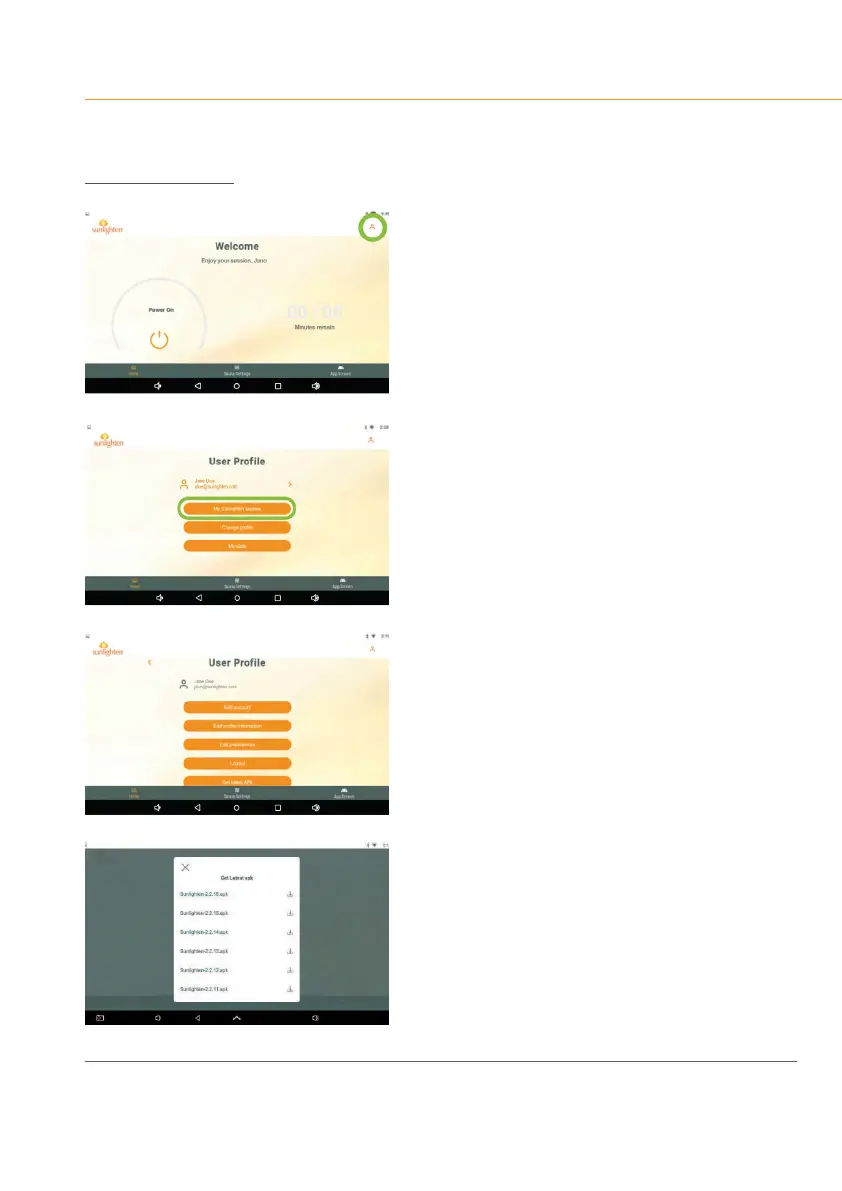
If not running the latest version of the system
software, you may tap the user icon in the upper
right corner of the screen:
•
Selectyouruserprolefromthelistofthose
on the tablet.
•
Scroll to the bottom to select ‘Get latest APK.’
Each update of the app will be listed in
ascending order by the version number.
•
To receive future updates, you will need
to reboot your Android Control Pad daily
by pressing the power button down for
1 second and choosing “Power Off” when
you’renishedusingthesaunafortheday.
This will allow for your sauna to receive
updates automatically.









 To Next Page