Drag: drag on the screen and you can move between magic cube sides or
drag the application icons into the shortcut bar.
How to connect with computer
Note: Turn on your Tablet before connect the Tablet to PC by USB cable.
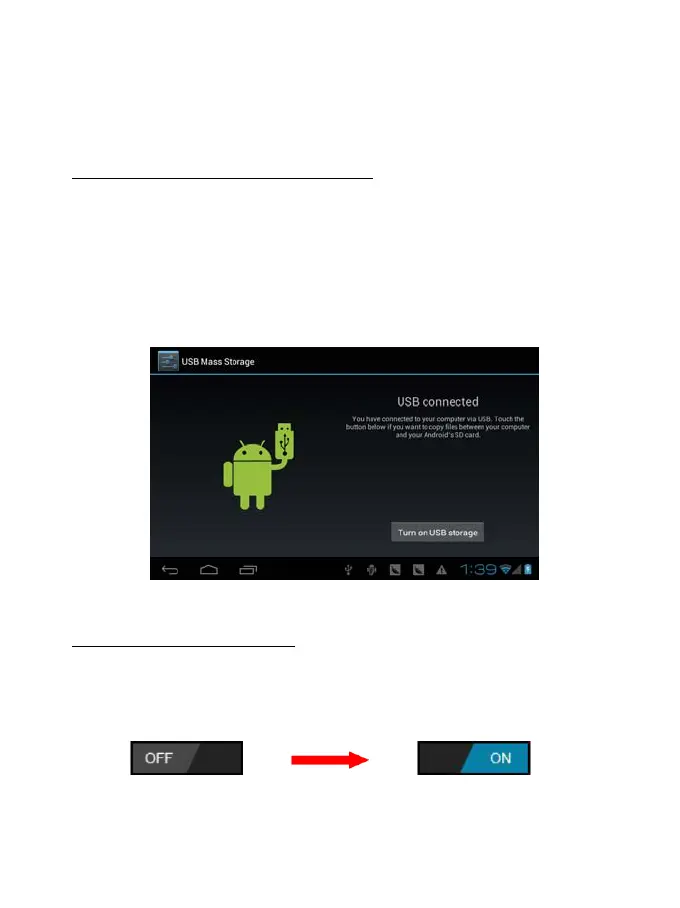
1 Use USB cable to connect MID with computer. System will notice USB
connected on bottom of screen.
2 Press USB connected on the top bar, then click Turn on USB storage, click
OK.
3. Then the USB connection has been successfully.
Connection to Internet
Wireless:
1 Select “ Settings”
2 Select “Wi-Fi” and slide OFF to ON status.
3 All detected wireless networks in the area will be listed, Click to select
desired wireless connection.
9


 To Next Page