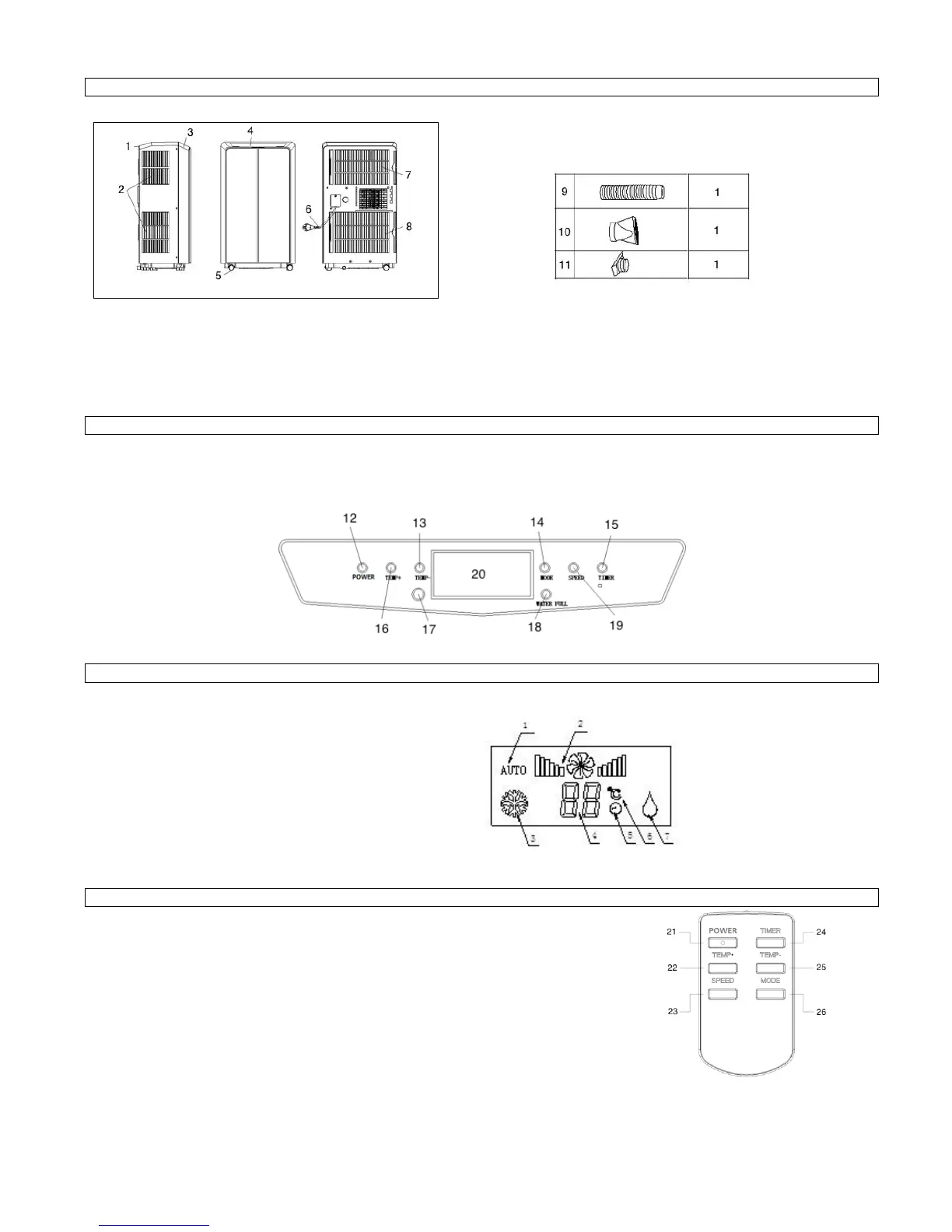
Name of Parts, Figure 1 Spare Parts, Figure 2
1. rear cover 5. caster 9. exhaust pipe
2. air inlet 6. power line 10. flat fixing clip
3. front cover 7. air inlet 11. square fixing clip
4. operation panel 8. air inlet
Appearance and Function of Control Panel, Figure 3
12. POWER Button 15. timer POWER button 18. water full indicator lamp
13. temperature – button 16. temperature + button 19. fan speed adjustment button
14. operation mode button 17. signal receiver window 20. LED Window
Operation Display, Figure 4
1. Auto Mode Icon
2. Fan Speed
3. Cooling Mode
4. Temp. and Timer Setting
5. Timer on
6. Temperature °C
7. Dry Mode Icon
Appearance and Function of Remote Controller, Figure 5
21. POWER Button; press this button will turn the machine on or off
22. Temperature setting button; this button is used to set the room temperature.
Each key press increases the room temperature about 1°C.
23. Speed Button; Press this button will choose high, middle or low ventilation speed.
24. Timer button; press to set the timer on or off
25. Temperature setting button; this button is used to set the room temperature.
Each key press reduces the room temperature about 1°C.
26. Mode Button; press this button will choose the function auto cooling, cooling, or dry.


 To Next Page