3
• Keep packaging materials like plastic bags and polystyrene parts out of the reach
of children. Risk of suffocation!
• Do not use the appliance if it is visibly damaged, broken or otherwise not
functioning correctly.
• Check the appliance, power cable and mains plug regularly for visible damage.
Do not use the appliance under any circumstances if it is visibly damaged. Do not
try to repair the appliance yourself.
• Repairs should be carried out by qualified specialists only.
• Only use the appliance for its designated purpose.
• The appliance has been designed for domestic use only and not for professional
use.
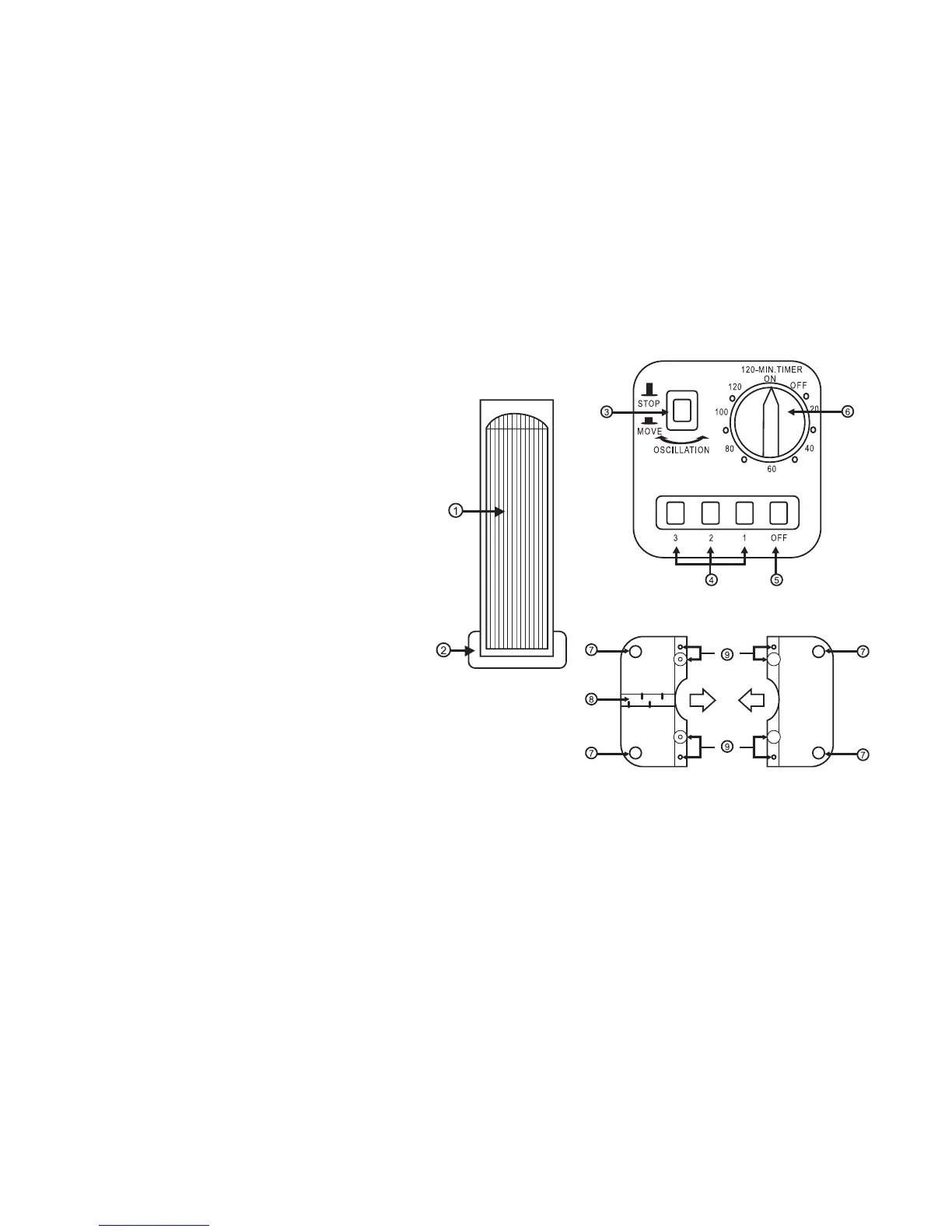
VIEW OF APPLIANCE
Front
1. Fan slits
2. Foot
Controls
3. Rotation on/off
4. Fan speed buttons
5. Off: button
6. Start control and time control
Stand
7. Rotation on/off
8. Fan speed buttons
9. On and Off button
10. Time control
USING FOR THE FIRST TIME
• Remove all appliance parts from the packaging and remove all packaging
materials and inserts.
• Remove the screws from the stand parts. Press the stand together.
TIP: There is a cable channel on the stand. Please first place the fan cable in the
channel and place under the holding pins provided. Then press both stand parts
together.
• Firmly put the stand on the fan.
• Thread all screws through the holes and connect the stand to the fan. Tighten all
the screws. CAUTION: Do not jam the screws.
• Place the fan on the stand.



 To Next Page