EN-5
EN-6
- Press the VOLUME button mark place adjust
volume level..
2.EQ BUTTON
-Press the button to change EQ CD/MP3/USB/
AUX/RADIO's music style.
-When playing the music, Press this button
is in the popular-jazz-FLR-classica-rock.
3.
- In the radio mode, press PRE-DN button mark
to choose the back channel.
- In the mp3 mode, press PRE-DN button mark
to enter the back folder.
4.FUNCTION SELECT
- Select source of sound CD/USB/AUX/TAPE/RADIO.
5.PRE-UP BUTTON
-In the radio mode, press PRE-UP button mark
to choose the next channel.
-In the mp3 mode, press PRE-UP button mark
place enter into the next folder.
6.POWER BUTTON
-Press POWER button to turn on/off power.
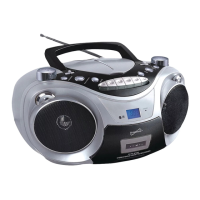
7.CASSETTE RECORDERS KEYS
RECORD ( ) - start recording
PLAY ( ) - start playback
F.FWD ( ) -rewind the tape
toward the beginning.
F.REW ( ) -advance the tape
toward the end.
STOP/EJECT ( ) - stop the tape
- open the cassette compartment
PAUSE ( ) - interrupt recording or
playback
8.CD DOOR OPEN/CLOSE BUTTON
- Press here to open/close the CD door.
9.LCD DISPLAY
- Show the FM dial frequency.
- Show the number of tracks.
- Show the time.
10. STANDBY INDICATOR
11.FM ANTENNA
- To improve FM reception.
1.
PRE-DN BUTTON
VOLUME BUTTON
1
English
CONTROLS
POWER SUPPLY
Top and front panels(see )
Radio reception
1.Press FUNCTION button select RADIO mode.
2.Tune to required station by press BACK、NEXT or PRE-UP、PRE-DN button.
Manual Tuning: Press BACK or NEXT button and then release within 1 sec.
Auto Tuning: Press the PLAY/PAUSE button enter the automatic channel surfing mode, and to be put
automatically sets.
reset Channel:(FM 30 Preset memories)
(1) Press BACK or NEXT button to select desired station.
(2) Press PROGRAM button once , The MEMORY number indicator begins fixed in the display.
(3) Press PRESET-UP OR PRESET DOWN buttons to select the desired number.
(4) Press PROGRAM button to save that station.
(5) Repeat steps (1) to (4) procedures for other stations.
3.After end of program. Press PRE-UP or PRE-DN to start play the frequency that you selected or Press number
key on the remote control .
4.Press [VOL-]or [VOL +] to adjust the volume.
5.Extend TELESCOPIC ANTENNA to its full length if you are listening to FM broadcasting.
6. Turn off the radio by pressing the FUNCTION button select another mode or press the power button to turn
off the unit.
7. The memory frequency still exists , after switching back on the unit.
RADIO
12.REPEAT BUTTON
- Repeat a track CD/MP3/USB program.
- Repeat mode : repeat ->repeat all->
repeat album ->normal
13.STOP BUTTON
- Stop CD/MP3/USB playback; erase a CD program.
14.TIME/PROGRAM BUTTON
-In standby mode, to setup the time of the unit.
-Program and review programmed track numbers.
-In the working mode, press this button can for
CD/MP3/USB/RADIO for programming.
15.PLAY/PAUSE BUTTON
- Start or pause MP3/CD/USB playback.
- In the radio mode, press this button you will enter in
the low end of the manual channel scan mode.
16.MUTE BUTTON
Press the mute button allows CD/MP3/USB
AUX/the RADIO to enter the mute state.
17.TUNING/SKIP- / SKIP+ BUTTON
BACK KNOB
-BACK track selection.
-Rotate and hold more than 1.5 sec BACK
search intra track.
-In the radio mode, rotate BACK will enter
the low end of the manual channel scan mode.
NEXT KNOB
-NEXT track selection.
-Rotate and hold more than 1.5 sec
forward search intra track.
-In the radio mode, rotate NEXT will enter
the high-end manual channel scan mode.
18.USB JACK
-To listen to your USB with Mp3 music files.
19.AUX JACK
-Press FUNCTION button , select AUX station.
Play Mp3, DISCMAN,WALKMAN AUX
insert when no disc.
NOTE: please take out the CD disc.
20.BATTERY DOOR
- To open battery compartment.
21. AC SOCKET
- Inlet for power cord.


 To Next Page
 Loading...