35 —
© 2011 Skier’s Choice, Inc.
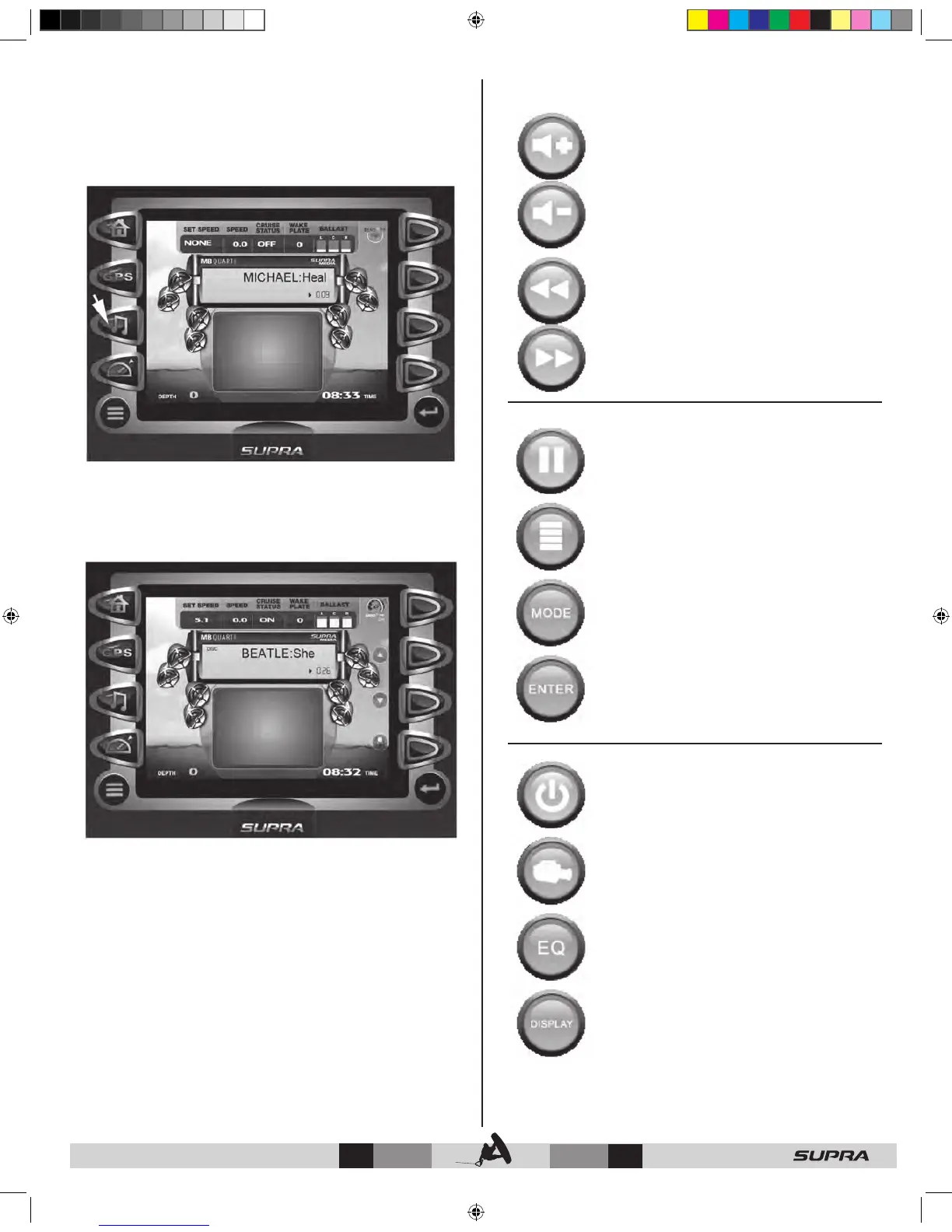
Multimedia Display
Multimedia Display can be accessed by pressing the Quick
Access Key .
This feature provides universal control to the MB Quart Black Box
stereo mimicking all the controls of a standard remote control.
This includes iPod and Thumb Drive music.
Pressing ENTER launches the Soft Key Commands to overlay
the right side of the display.
When Cruise is ‘ON’, the first level of soft keys displayed will
control the speed for Zero Off.
UP – DOWN – increase or decrease the target speed.
SAVE – creates a new user profile from the current cruise
settings.
Multimedia Display - Soft Key Commands
VOLUME UP – VOLUME DOWN – controls the
volume.
PREV TRACK – NEXT TRACK – plays the previous
or next track of the current CD
playing.
PLAY/PAUSE – toggles between Play and Pause
modes when a CD is playing.
UNDEFINED – feature currently unavailable.
MODE – choose between IPOD, USB, and
Stereo.
UNDEFINED – feature currently unavailable.
SOURCE POWER – toggle power On and Off.
VIDEO – video displays in window
EQ – feature currently unavailable.
DISPLAY - feature currently unavailable.



 To Next Page