16
Installation
RS-485 Connection
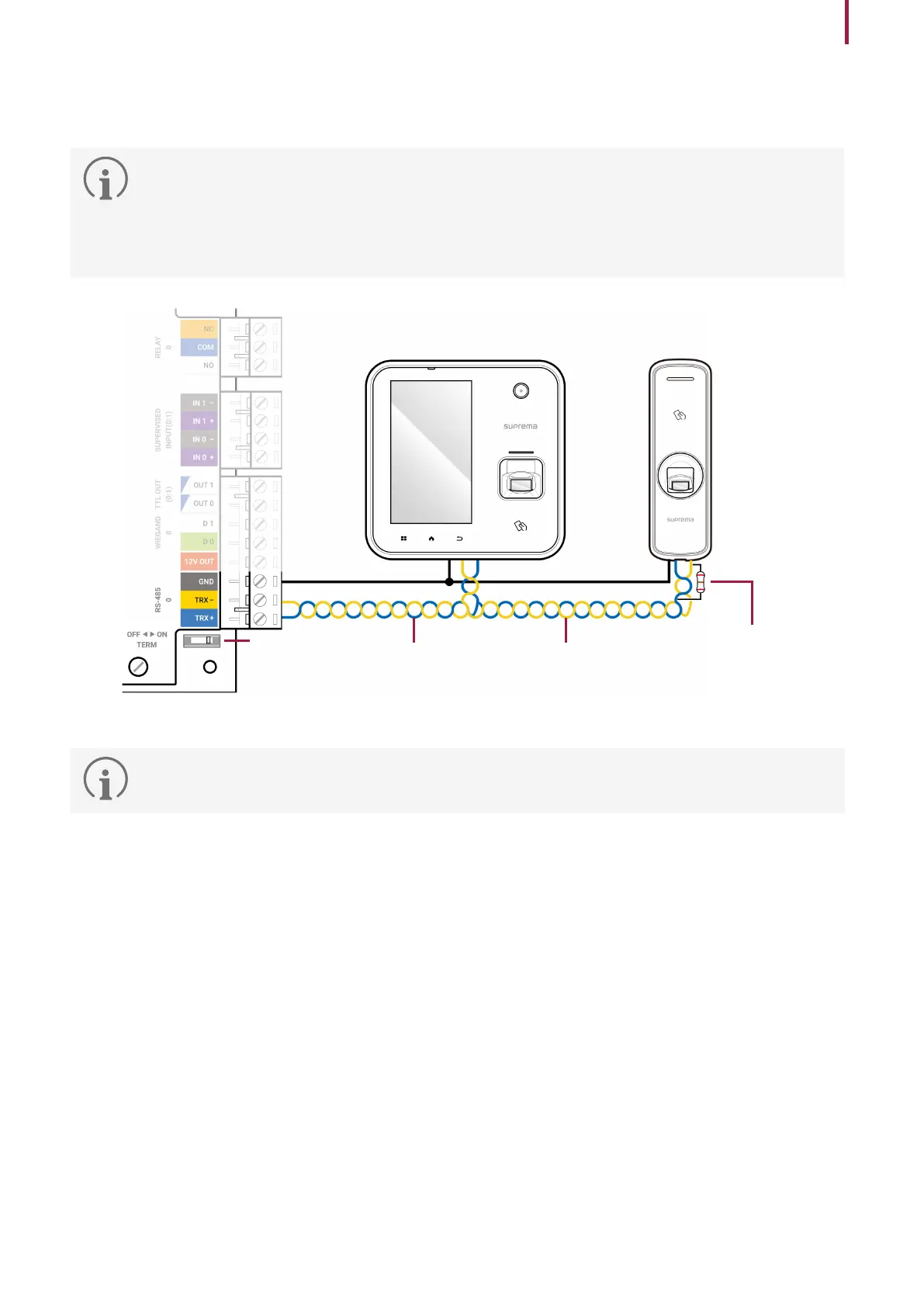
CS-40 supports 5 RS-485 ports, and up to 31 devices can be connected to each RS-485 port.
•
The number of RS-485 devices connected to CS-40 cannot exceed 64.
•
Use an AWG24 twisted pair with a maximum length of 1.2 km for the RS-485 cable.
•
Connect terminating resistance (120 Ω) to both ends of the RS-485 daisy chain connection. If connected to the
middle line, the signal level will weaken and the communication performance will deteriorate. Make sure to
connect it to both ends of the daisy chain connection. Set the termination switch(TERM) to ON for CS-40.
Access control device
Access control device
Terminating
resistance
(120Ω)
RS-485 TRX-RS-485 TRX+
GND
CS-40
Terminating
resistance
switch
•
RS485 wire size shall be over 26 AWG and all wiring must comply with National Electrical Code, ANSI/NFPA 70.


 To Next Page