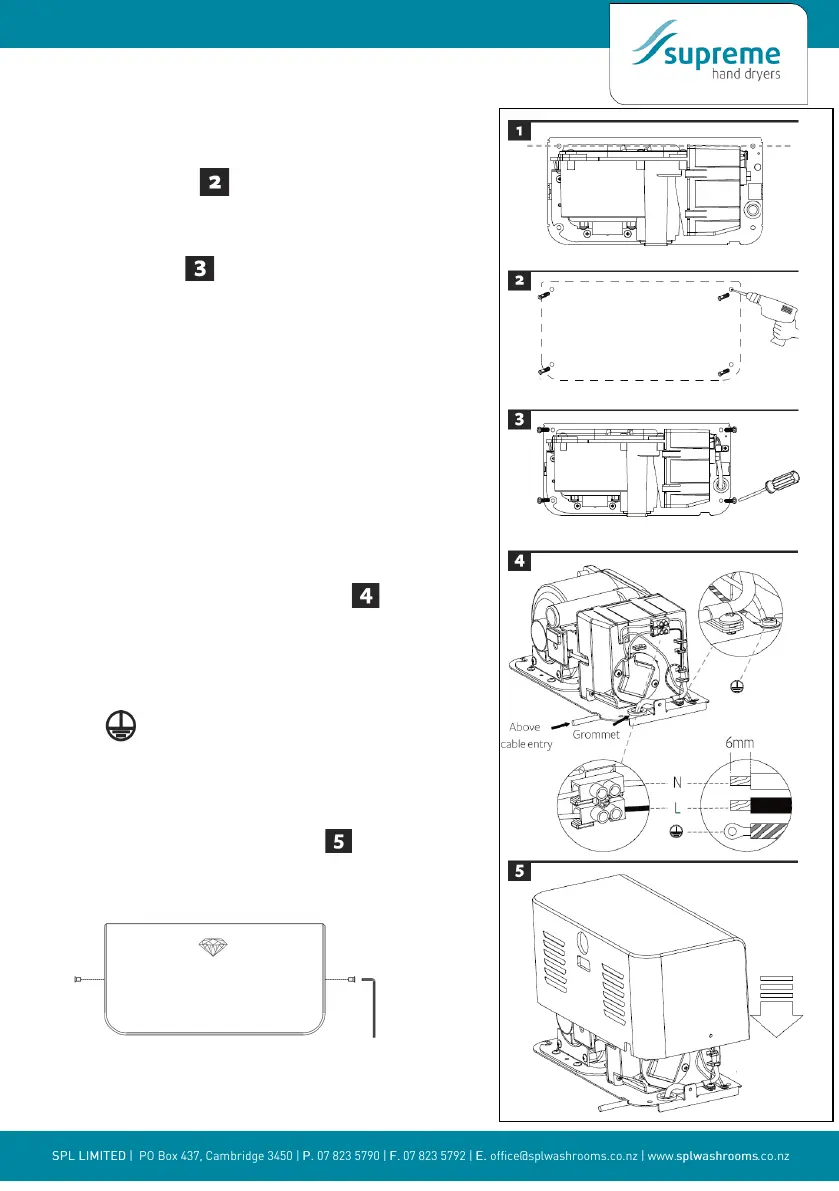
2. POSITIONING
• 2.1 Mark the locaon on the wall with a pencil. Use
the drilling template to mark the locaons for the four
xing points.
• 2.2 Pre-drill the wall in the marked locaons using a
5/16 (8mm) drill, inset the plasc anchors and tap ush
to the wall.
• 2.3 Fix the backplate to the wall. Screw to the wall and
secure with the appropriate ng.
3. INSTALLING THE POWER CABLE & CONNECTION
TERMINAL BLOCK
WARNING: ENSURE POWER IS NOT CONNECTED
3.1 Pull the cable through the grommet. Ensure the cable is
long enough to route correctly through the backplate to the
terminal block.
3.2 The cable must sit in the dedicated channel.
3.3 As shown, connect cable to terminal block
3.4 Screw in terminal block.
3.5 Fix the cable clamp with screw in the backplate.
CAUTION: Connect the earthing wire to the terminal block
marked
4. ATTACHING MAIN BODY
4.1 Posion cover over backplate
4.2 Insert and ghten the (2) security screws into the side of the
main body with the hex key as illustrated below.
4.3 Turn power on.
4.4 Test unit for correct operaon.
6


 To Next Page