1
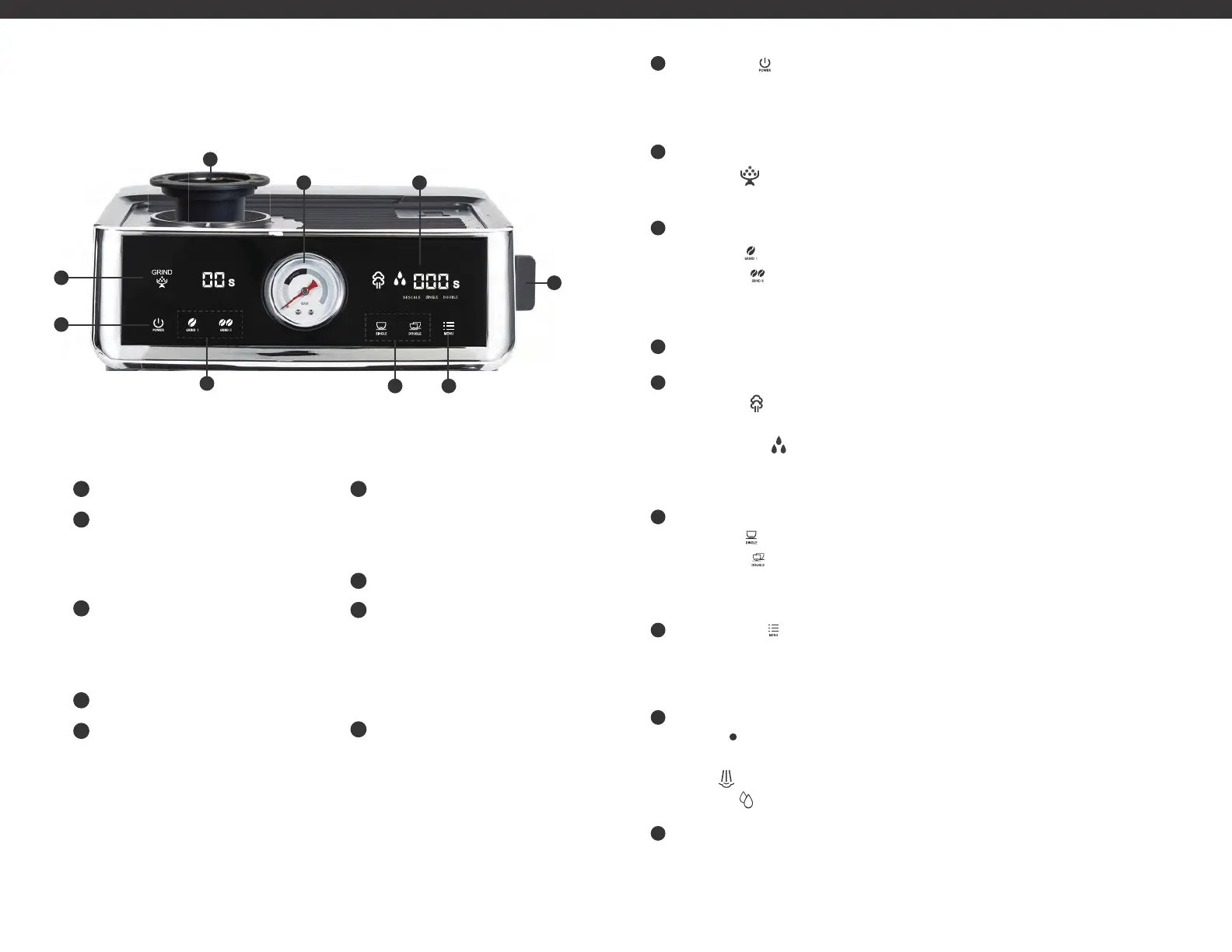
Power Button
2
Display One:
• Grind Icon
• Grinder Count-Down Timer
3
Grinder Shot Selection
• Single Shot
• Double Shot
4
Pressure Gauge
5
Display Two:
•Steam Light
• Hot Water Light
• Brew Count-Up Timer
6
Espresso Extraction Selection
• Single Shot
• Double Shot
7
Menu Selection
8
Dial
• Standby
• Steam
• Hot Water
9
Removable Top Burr
Product may vary slightly from illustration.
Power Button (
)
Press the power button to turn ON/OFF the espresso machine. When the espresso machine is turned
on the display will illuminate. Once the espresso machine has heated up, the espresso extraction
selection buttons will illuminate. The espresso machine will shut off after 15 min of inactivity.
DISPLAY ONE indicates the grinding process.
Grind Icon (
) illuminates when coffee is grinding.
Grinder Count-Down Timer indicates the grinding time.
GRINDER SHOT SELECTION
Single shot ( ): Dispenses one shot of espresso and automatically stops.
Double shot (
): Dispenses two shots of espresso and automatically stops.
Note: You can customize amount of espresso you would like each option to dispense.
See the Customize Grinder Settings section on page 12.
PRESSURE GAUGE
DISPLAY TWO
Steam Light (
):
When flashing, it indicates that the dial is turned to steam and the steam
wand is on.
Hot Water Light (
): When flashing, it indicates that the dial is turned to hot water and hot
water is dispensing.
Brew Count-Up Timer indicates the length of time to dispense the espresso shot.
ESPRESSO EXTRACTION SELECTION
Single Shot (
): Brews one shot of espresso and automatically stops.
Double Shot (
): Brews two shots of espresso and automatically stops.
Note: You can customize how long you want each espresso shot to run for. See the Customize
Espresso Extraction settings on page 12 to learn more.
Menu Selection ( ): This button used in combination with the grinder shot selection or
espresso extraction selection provides you with the flexibility to customize these settings.
See the Customize Grinder Settings and Customize Espresso Extraction settings on page 12
to learn more.
DIAL
Standby (
): When the dial is on the vertical position it is on the standby position. In this
position, the steam and hot water wand are OFF.
Steam (
): When the dial is turn to the LEFT Position, the steam function is turned on.
Hot Water (
):
When the dial is turned to the RIGHT Position, the hot water function is turned on.
Removable Top Burr The top burr removes easily using the handle and turning left.
Remove when cleaning the grinder.
GETTING TO KNOW YOUR
ESPRESSO COFFEE MACHINE
1
2
3
4
5
6
7
8
9
98
1
2
8
76
45
3
9


 To Next Page
 Loading...