3-2
3-33-3
3-33-3
3-3
Switch to Hub
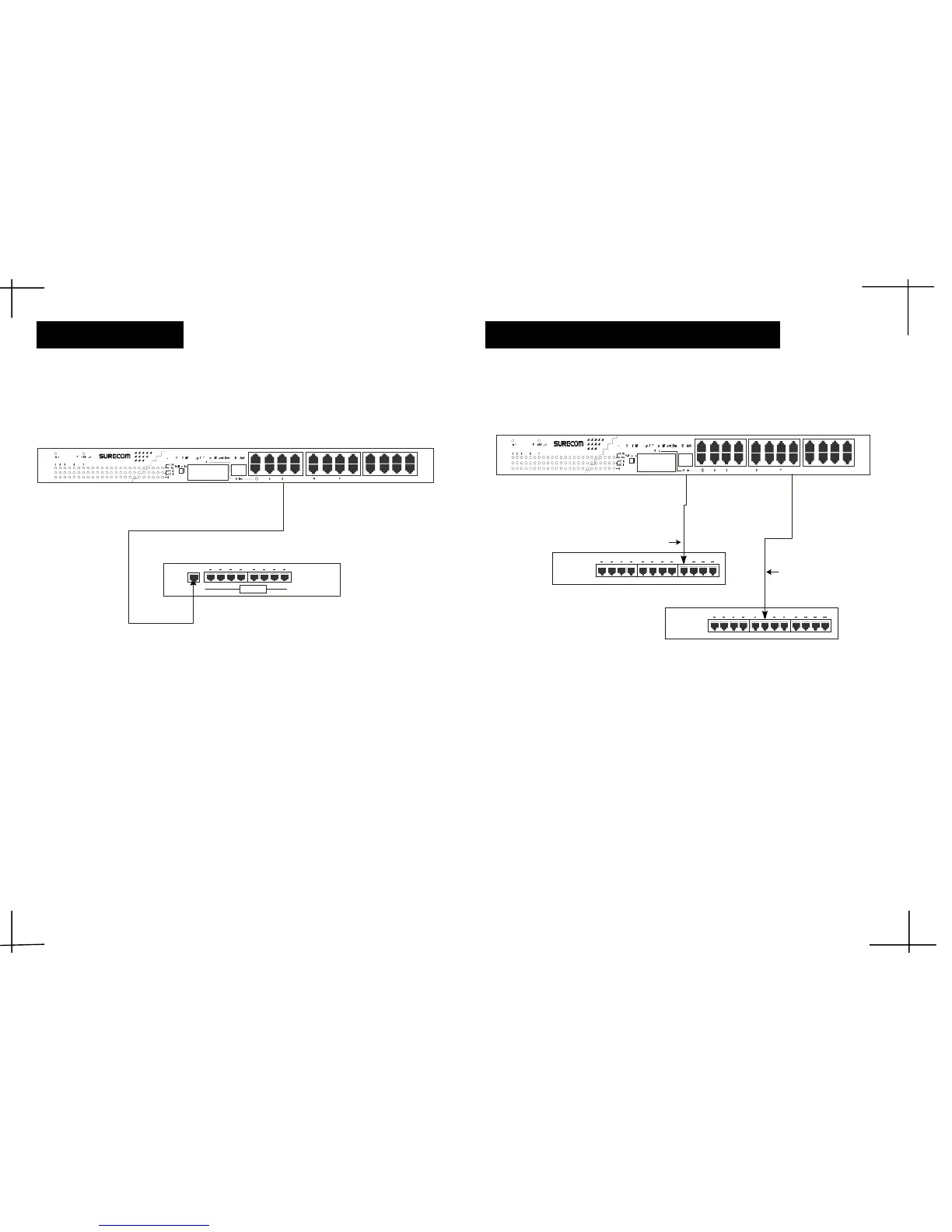
Figure 3-2: 10BASE-T or 100BASE-TX Hub ConnectionFigure 3-2: 10BASE-T or 100BASE-TX Hub Connection
Figure 3-2: 10BASE-T or 100BASE-TX Hub ConnectionFigure 3-2: 10BASE-T or 100BASE-TX Hub Connection
Figure 3-2: 10BASE-T or 100BASE-TX Hub Connection
(10BASE-T Hub)
The Link/Act LED will lightThe Link/Act LED will light
The Link/Act LED will lightThe Link/Act LED will light
The Link/Act LED will light
The FDX/Col LED will be unlightedThe FDX/Col LED will be unlighted
The FDX/Col LED will be unlightedThe FDX/Col LED will be unlighted
The FDX/Col LED will be unlighted
The LED speed LED will be unlightedThe LED speed LED will be unlighted
The LED speed LED will be unlightedThe LED speed LED will be unlighted
The LED speed LED will be unlighted
(100BASE-TX Hub)
The Link/Act LED will lightThe Link/Act LED will light
The Link/Act LED will lightThe Link/Act LED will light
The Link/Act LED will light
The FDX/Col LED will be unlightedThe FDX/Col LED will be unlighted
The FDX/Col LED will be unlightedThe FDX/Col LED will be unlighted
The FDX/Col LED will be unlighted
The LED speed will lightThe LED speed will light
The LED speed will lightThe LED speed will light
The LED speed will light
Hub without Uplink (MDI) Port
If a hub is not equipped with an Uplink (MDI) port, then connection If a hub is not equipped with an Uplink (MDI) port, then connection
If a hub is not equipped with an Uplink (MDI) port, then connection If a hub is not equipped with an Uplink (MDI) port, then connection
If a hub is not equipped with an Uplink (MDI) port, then connection
can be madecan be made
can be madecan be made
can be made
using either straight cable or crossover cable (see Appendix A, using either straight cable or crossover cable (see Appendix A,
using either straight cable or crossover cable (see Appendix A, using either straight cable or crossover cable (see Appendix A,
using either straight cable or crossover cable (see Appendix A,
TT
TT
T
echnical Specifications forechnical Specifications for
echnical Specifications forechnical Specifications for
echnical Specifications for
cable requirements).cable requirements).
cable requirements).cable requirements).
cable requirements).
Figure 3-3: Connecting to a Hub without Uplink PortFigure 3-3: Connecting to a Hub without Uplink Port
Figure 3-3: Connecting to a Hub without Uplink PortFigure 3-3: Connecting to a Hub without Uplink Port
Figure 3-3: Connecting to a Hub without Uplink Port
Using a straight cable
When using a straight cable, the connection can be made from the Uplink port onWhen using a straight cable, the connection can be made from the Uplink port on
When using a straight cable, the connection can be made from the Uplink port onWhen using a straight cable, the connection can be made from the Uplink port on
When using a straight cable, the connection can be made from the Uplink port on
the Switch to any normal port on a Hub (see figure 3-3).the Switch to any normal port on a Hub (see figure 3-3).
the Switch to any normal port on a Hub (see figure 3-3).the Switch to any normal port on a Hub (see figure 3-3).
the Switch to any normal port on a Hub (see figure 3-3).
Using a crossover cable
When using a crossover cable, the connection can be made from any RJ-45 portWhen using a crossover cable, the connection can be made from any RJ-45 port
When using a crossover cable, the connection can be made from any RJ-45 portWhen using a crossover cable, the connection can be made from any RJ-45 port
When using a crossover cable, the connection can be made from any RJ-45 port
(MDI-X) port on the Switch to any normal on a Hub (see figure 3-3).(MDI-X) port on the Switch to any normal on a Hub (see figure 3-3).
(MDI-X) port on the Switch to any normal on a Hub (see figure 3-3).(MDI-X) port on the Switch to any normal on a Hub (see figure 3-3).
(MDI-X) port on the Switch to any normal on a Hub (see figure 3-3).
Hub A
Hub B
Straight Cable
Crossover Cable
Hub
100/10M
YY
YY
Y
ou can connect any RJ-45 (MDI-X) station port on the Switch to the Uplink port of aou can connect any RJ-45 (MDI-X) station port on the Switch to the Uplink port of a
ou can connect any RJ-45 (MDI-X) station port on the Switch to the Uplink port of aou can connect any RJ-45 (MDI-X) station port on the Switch to the Uplink port of a
ou can connect any RJ-45 (MDI-X) station port on the Switch to the Uplink port of a
Hub via straight cable with RJ-45 plugs at both ends. Use 100 Category 3, 4 or 5Hub via straight cable with RJ-45 plugs at both ends. Use 100 Category 3, 4 or 5
Hub via straight cable with RJ-45 plugs at both ends. Use 100 Category 3, 4 or 5Hub via straight cable with RJ-45 plugs at both ends. Use 100 Category 3, 4 or 5
Hub via straight cable with RJ-45 plugs at both ends. Use 100 Category 3, 4 or 5
cable for standard 10Mbps Ethernet connections, or 100 Category 5 cable forcable for standard 10Mbps Ethernet connections, or 100 Category 5 cable for
cable for standard 10Mbps Ethernet connections, or 100 Category 5 cable forcable for standard 10Mbps Ethernet connections, or 100 Category 5 cable for
cable for standard 10Mbps Ethernet connections, or 100 Category 5 cable for
100Mbps Fast Ethernet connections.100Mbps Fast Ethernet connections.
100Mbps Fast Ethernet connections.100Mbps Fast Ethernet connections.
100Mbps Fast Ethernet connections.
£[£[
£[£[
£[
£[£[
£[£[
£[
When a attached 10BASE-T/100BASE-TX Hub is powered on or reset:When a attached 10BASE-T/100BASE-TX Hub is powered on or reset:
When a attached 10BASE-T/100BASE-TX Hub is powered on or reset:When a attached 10BASE-T/100BASE-TX Hub is powered on or reset:
When a attached 10BASE-T/100BASE-TX Hub is powered on or reset:


 To Next Page
 Loading...