2
Navigating around your Sureshotgps™
Play Golf > Select Course Play
Resume
Map Course > Start Mapping
> Edit Course
> Delete Course
Analyse Game > Select Game Score
Statistics
Back 9/Front 9
Features > Setup Units
Scoring
Backlight
Date/Time
> Status GPS Information GPS Signal
Navigation
Battery Status
Capacity
Registration
Reset Unit
> Demo View
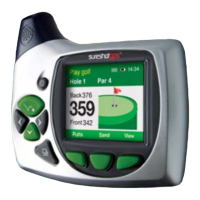
Your Sureshotgps™ is extremely easy to use. Most operations can be performed with
the press of one or two keys. The soft keys change their function depending on the
screen display. The function of each soft key is shown in the green bar at the bottom of
the display. The menu key is used to display the main menu or exit from sub-menus.


 To Next Page