5
TIP: Additional cables are available at most consumer electronic stores.
1
2 3 4 5
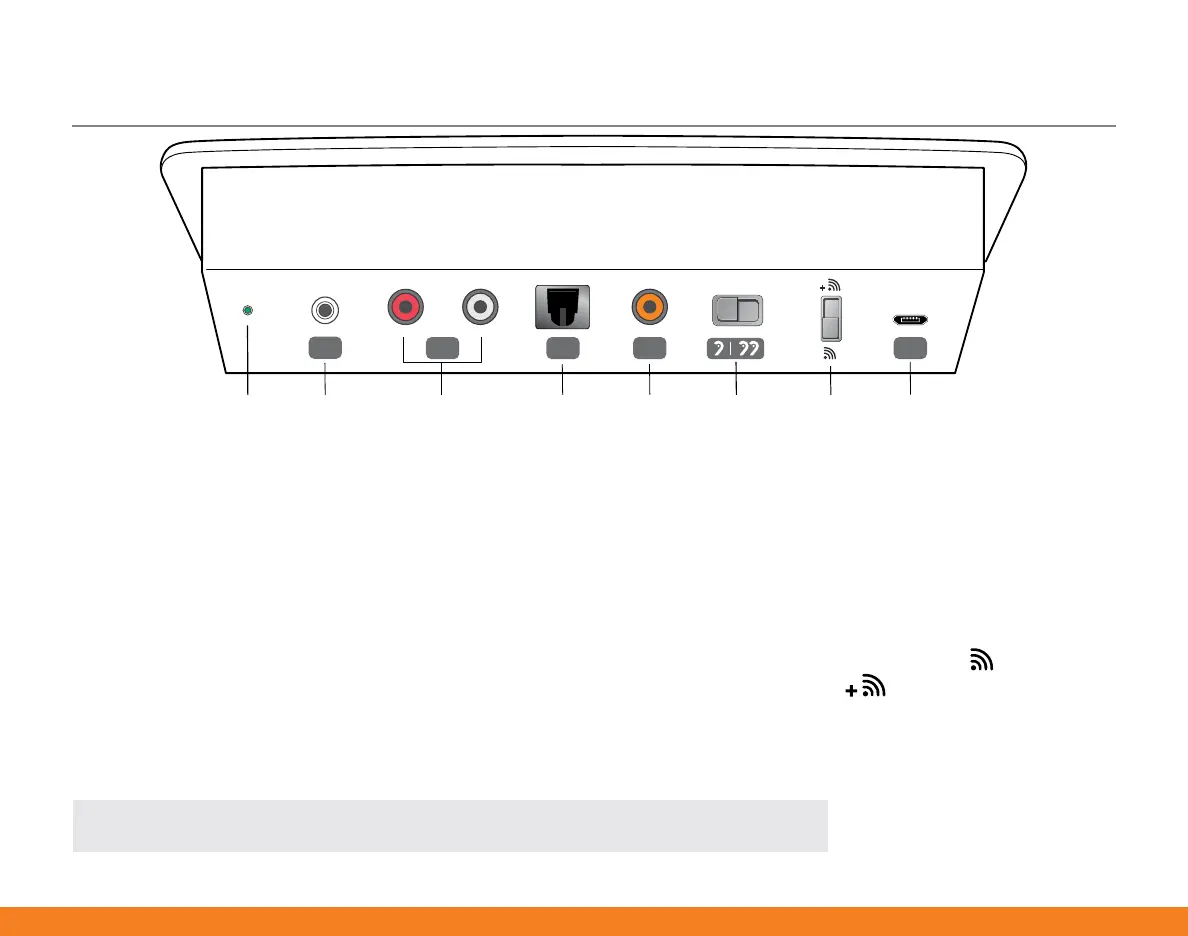
Microphone RCA Jacks Optical
TOSLINK
Coaxial
S/PDIF
Mono/
Stereo
Audio
Fidelity
LED Power
Supply
Rear Panel Overview
LED: The LED indicator provides helpful information
about the current state of SurfLink Media 2�
1. Microphone Jack: Mono external microphones
can be obtained from your hearing professional (ask
for part #52640-000)�
2. RCA Jacks: This cable can be obtained from
your hearing professional (ask for part #90969-000)�
3. Optical TOSLINK Jack: This cable can be
obtained from your hearing professional (ask for
part #90972-000)�
4. Coaxial S/PDIF Jack: This cable can be obtained
from your hearing professional (ask for part #90971-000)�
Mono/Stereo Switch: Mono is appropriate for one
hearing aid, and Stereo is appropriate for two
hearing aids�
Audio Fidelity Switch: All wireless hearing aids
can stream audio from bottom position ( )� Only
hearing aids marked with ( ) can stream audio
from top position�
5. Power Supply Jack: A power adaptor is provided�


 To Next Page