
 Need help?
Do you have a question about the Suvie SV301 and is the answer not in the manual?
Essential safety precautions for operating the Suvie appliance to prevent electrical shock, burns, and fire hazards.
Warns about spilled food causing burns and the need to keep children away from the appliance and cord.
Details FCC compliance for Class B devices and measures to mitigate radio interference.
Alerts users about potential RF energy generation and the risks of unauthorized modifications.
Explains the meaning of DANGER, WARNING, CAUTION, and NOTICE symbols used throughout the manual.
Provides the official email address for customer inquiries and concerns.
Prohibits operating a damaged Suvie and advises immediate contact for examination or repair.
Covers safe placement, accessory use, steam hazards, hot surfaces, and child supervision.
Advises on careful handling of pans, avoiding modifications, and proper cleaning methods.
Lists physical dimensions, weight, power consumption, and cord length for the Suvie unit.
Outlines certification marks, Suvie pan volume capacity, and control panel features.
Identifies key parts of the Suvie appliance, including cooking zones, reservoir, and controls.
Explains automatic recipe downloads and manual cooking options using 'My Cook' functions.
Specifies required spacing around the Suvie for proper ventilation and appliance function.
Warns against blocking vents, unstable placement, and placing near heat sources for safety.
Explains the necessity of grounding the appliance and the use of a 3-conductor cord.
Stresses the use of GFCI outlets and precautions to prevent spills near electrical connections.
Discusses the provided short power cord and guidelines for using extension cords safely.
Guides users through setting date/time, connecting to Wi-Fi, and downloading recipes.
Illustrates the interface for Wi-Fi network selection and time zone adjustments.
Describes the final setup phase, automatic updates, and the system reboot process.
Details automatic account registration upon Wi-Fi connection and the login portal.
Lists benefits such as ordering meals, updating shipping, and managing billing information.
Instructions for filling the reservoir with distilled water to the specified max/min lines.
Explains that water bubbling during cooking is normal and recommends distilled water.
Explains the water-based cooling method and FDA guidelines for food storage.
Advises on allowing the appliance to cool down after cooking for optimal refrigeration.
Details the process of preparing and timing meals from refrigerated ingredients.
Explains how Suvie determines pre-heat and cook times, including for frozen items.
Describes the two Suvie pans and roasting rack, noting their dishwasher-safe nature.
Instructs users to fill the water reservoir only when the display prompts them.
Guides on choosing a bottom zone function for Suvie Meals or custom ingredients.
Details how to choose a top zone function, noting compatibility with the bottom zone.
Explains how to add ingredients to the zones, including sous vide preparation.
Provides instructions for utilizing the optional Starch Cooker function.
Details how to optionally broil meals for a desired finish and texture.
Addresses food safety related to temperatures and the risk of foodborne illness.
Illustrates allowed top zone functions based on the selected bottom zone function.
Explains Suvie's ability to automatically thaw and cook frozen ingredients.
Explains how to use the Tap Zone to scan meal cards for automatic recipe setup.
Guides on adjusting cook times and temperatures for personalized meal preferences.
Details how to modify cook settings within the first 10 minutes of starting a cook.
Explains how to cancel a cooking process using the 'End Cook' option.
Describes how Suvie relays programming information to the mobile app for remote control.
Explains how to track meal status and completion via the app or control panel.
Describes the standby screen, menu navigation, and water filling prompts.
Provides instructions for spot cleaning and preventing scale buildup with distilled water.
Addresses frequent issues like water bubbling, meal card scanning, and refrigeration errors.
Lists the website and email for accessing troubleshooting guides and contacting support.
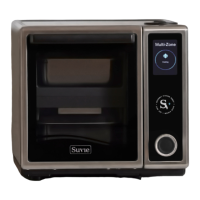
The Suvie Kitchen Robot, Model No. SV301, is a multi-zone cooking and refrigeration appliance designed for household use. It functions as a personal chef, offering a range of cooking methods and the convenience of scheduled meals.
The Suvie appliance utilizes water and two independent temperature-controlled zones to cook ingredients. It incorporates a water-based cooling method, similar to a household refrigerator, to keep food items cold until they are ready for cooking. This refrigeration system is designed to maintain food temperatures below 41°F, adhering to FDA safe storage guidelines, and can refrigerate a meal for up to one day prior to cooking.
The core functionality revolves around its "cool-to-cook" process. Users can load ingredients into the Suvie in advance, either in the morning or the evening, and schedule a desired meal completion time. The appliance then rapidly cools the ingredients to create a safe environment. When the scheduled cook time approaches, Suvie stops cooling and begins to heat the water surrounding the cooking zones to the precise temperature required for the chosen cooking method. This meticulous calculation ensures a perfectly prepared and timed meal.
The Suvie offers a variety of cooking functions for both its top and bottom cooking zones, including:
It's important to note that while both zones can perform all functions, some combinations are restricted. For instance, if Sous Vide or Slow Cook is selected for both zones, they must operate at the same temperature.
A unique feature of the Suvie is its ability to cook from frozen. When prompted, users can indicate if their ingredients are frozen, and the appliance will automatically adjust cook settings to account for thawing. For Suvie's Rapid Cook Meals, the device can rapidly thaw and cook ingredients in as little as 25 minutes after scanning a meal card.
The Suvie is designed for ease of use, integrating a control panel with an LCD display and a push-button rotary dial for navigation.
The Suvie is designed with maintenance in mind, leveraging its steam-based cooking process to aid in cleanliness.
The Suvie Kitchen Robot emphasizes convenience, precision, and safety, making it a versatile appliance for modern kitchens.
 General
| Category | Kitchen Appliances |
|---|---|
| Cooking Zones | 4 |
| Refrigeration | Yes |
| Capacity | 6 Quarts |
| Water tank capacity | 1.5 Liters |
| Power | 1200W |
| Wattage | 1200W |
| Voltage | 120V |
| Control Type | Touchscreen |
| Wi-Fi Connectivity | Yes |
| App Control | Yes |
| Cooking Functions | Bake, Broil, Steam, Reheat |

 To Next Page
