EasyManua.ls Logo

Suzhou Kunteng Electronics KT-LCD2 - User Manual

Default Icon
2 pages
Print Icon
To Next Page IconTo Next Page
Loading...
KT-LCD2 eBike Display User Manual V2.5
Dear customer, please read this manual before you use KT-LCD2 instrument. The manual will guide
you use the instrument correctly to achieve a variety of vehicle control and vehicle status display.
Functions and Display
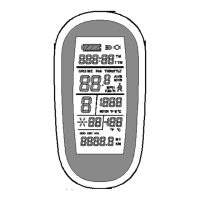
Instruments using the structure form of instrument body portion and the operation buttons are
designed separately.
1
UP Button
6
TM
Single trip time
2
SW Button
TTM
Total trip time
3
DOWN Button
7
6Km/H push power assist
4
Battery capacity indicator
8
Km
Distance(metric)
5
Km/H
Riding speed(metric)
Mil
Distance (imperial)
MPH
Riding speed (imperial)
DST
Trip distance
MXS
MAX speed
ODO
Total distance
AVS
Average speed
9
ASSIST
Pas level
Operation
1. ON/OFF
Hold button long to turn on the power, and hold long for a second time to turn off the
power. When the motor stops driving and when the e-bike is not used for a consecutive 5 minutes, it will
automatically shut down and turn off the motor power supply.
2. Display interface
Hold button to start up and enter display interface.
2.1 Turn on backlight and headlights
Hold long to turn on backlight and headlights (the controller should have headlight drive
output function); hold long again to turn off the backlight and headlights.
2.2 Assist ratio gear (ASSIST) switch
Hold or shortly to switch 1-5 file gear. Gear 1 is
for the minimum power, gear 5 is for the highest power. Each
startup will automatically restore the gear shutdown last time.
Gear 0 is without booster function.
2.3 6Km/H assist promotion function
Hold and flashes, the vehicle drives at the speed
not more than 6Km/h. Release button, the function is
invalid.
2.4 Display and delete of single data
After power on for 5 seconds, hold and at the
same time, single trip riding time (TM) and single trip distance
(DST) flash, hold button shortly, the content of both is
cleared. If failed holding the button within 5 seconds, it will
automatically return the display interface after 5 seconds, original content is preserved.
2.5 Display of total trip time and distance
Hold button shortly to display of total trip time (TTM)
and total trip distance (ODO). hold button shortly again to
return the display interface. In the riding mode after 5 seconds,
automatically returns to display interface.
2.6 Display of single maximum speed and average speed
In the display of total trip time and distance, hold or
shortly to display of single maximum speed (MXS)and
average speed (AVS). hold button shortly again to return
the display interface. In the riding condition, 5 seconds later,
automatically returns to display interface.
2.7 Battery capacity indicator display
The meter can automatically identify the battery capacity
when the battery capacity indicator is supporting use with the
Question and Answer IconNeed help?

Do you have a question about the Suzhou Kunteng Electronics KT-LCD2 and is the answer not in the manual?

Summary

Functions and Display

Operation and Controls

Explains how to turn the display on/off and manage backlight/headlights.

Assist Ratio Gear Switch

Details on switching between power assist levels (1-5) and gear 0.

6 Km;H Assist Promotion

Describes the function that activates a 6Km/H walk assist mode.

Single Data Display and Deletion

Instructions for viewing and clearing single trip time (TM) and distance (DST).

Total Trip Time and Distance Display

Guide to viewing total trip time (TTM) and total distance (ODO).

Maximum and Average Speed Display

How to view the single maximum speed (MXS) and average speed (AVS).

Battery Capacity Indicator

Explanation of the battery level display and low voltage warnings.

Error Code Display

Error Code Definitions

Lists and defines error codes related to electronic control system failures.

General Project Settings

Maximum Riding Speed Setting

Procedure to set the maximum riding speed for the e-bike.

Wheel Diameter Setting

Guide to setting the wheel diameter specifications for accurate readings.

Metric Units Setting

How to select metric units for speed (Km/H) and distance (Km).

Outline Drawings and Dimensions

Instrument Body Dimensions

Provides the physical dimensions of the instrument body.

Wiring Diagram

Illustrates the wiring connections for the display and controller.

Suzhou Kunteng Electronics KT-LCD2 Specifications

General IconGeneral
Display TypeLCD
Voltage24V/36V/48V
Handlebar Size22.2mm
Operating Temperature-20°C to 60°C
Waterproof RatingIP65
FunctionsSpeed, Battery Level, Assist Level
CompatibilityKunteng controllers

Related product manuals