EasyManua.ls Logo

Suzohapp SCAN COIN SC 303 - User Manual

Suzohapp SCAN COIN SC 303
55 pages
Print Icon
To Next Page IconTo Next Page
Loading...
013447-101_rev-07
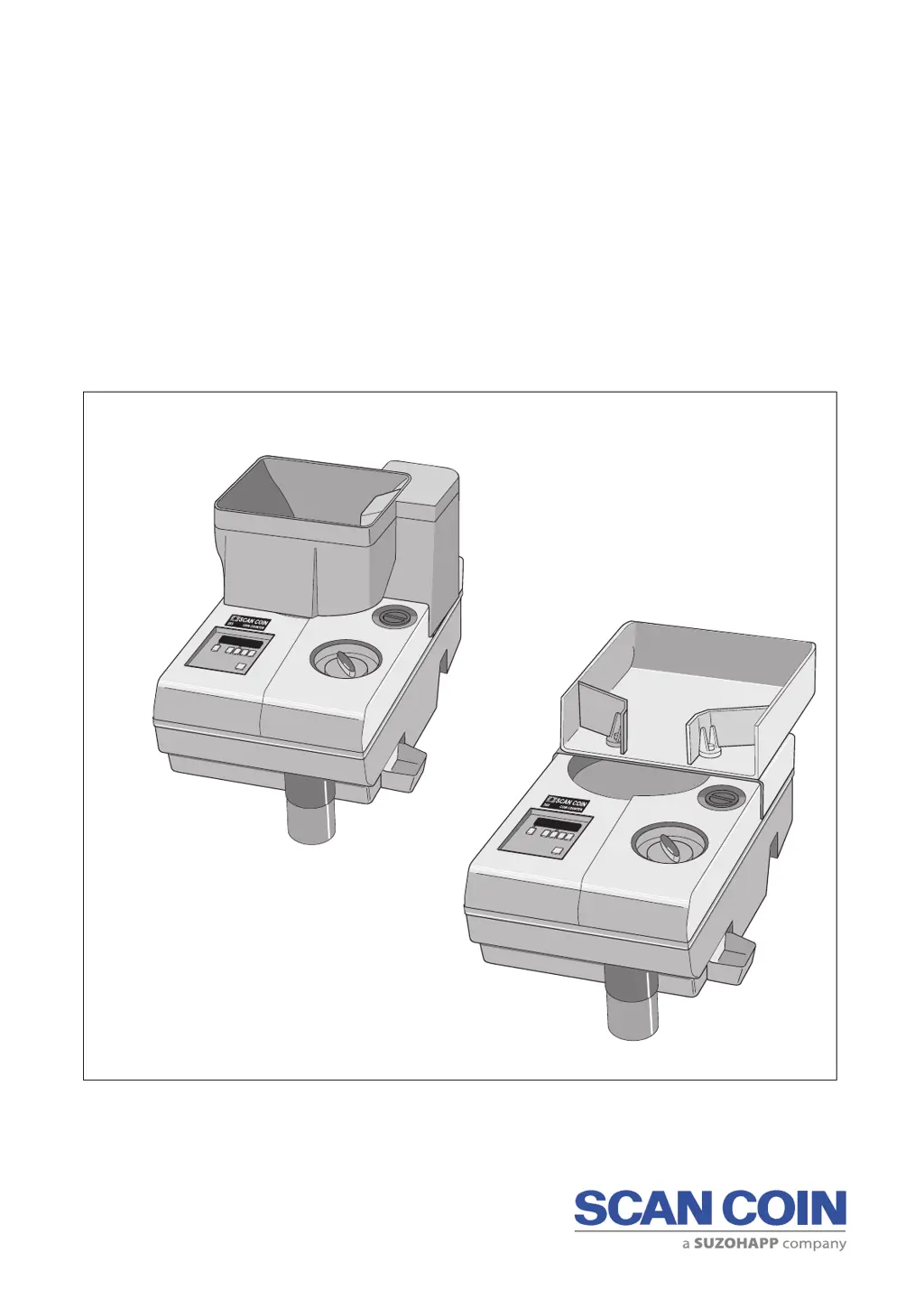
SCAN COIN SC 303/313
Coin Counters
Service Manual

Questions and Answers

  • B
    Belinda LambertAug 14, 2025
    What to do if my Suzohapp SCAN COIN SC 303 machine does not start and has no display?
    • D
      Dawn JimenezAug 14, 2025
      If your Suzohapp Cash Counters & Coin Sorters machine doesn't start and there's no display, here's what you can check: * **Mains cable:** Ensure the mains cable is properly connected and functional. * **Fuse:** Check the mains fuse at the socket, the fuse on the PSU (Power Supply Unit), and the PSU board connectors. * **+5V DC:** Verify the +5V DC voltage on CPU CN2, pin 1 to negative. If these checks don't resolve the issue, the PSU or CPU board may need to be exchanged.
  • R
    Reginald ThomasAug 18, 2025
    Why does the motor of my Suzohapp SCAN COIN SC 303 not start?
    • A
      alicia44Aug 18, 2025
      If the motor of your Suzohapp Cash Counters & Coin Sorters machine does not start, consider the following: * **+24V DC:** Check for +24V DC on CPU CN2, pin 8 to negative. * **Relay/Triac:** A defective relay or triac on the PSU board could be the cause. If so, exchange the board. * **Connection:** Inspect the CN2 connector for bad connections. * **Start Switch:** The start switch might be faulty; consider exchanging it or the CPU. * **Motor:** The motor itself could be defective and require replacement.
  • K
    Kenneth CooperAug 21, 2025
    How to fix a Suzohapp SCAN COIN SC 303 motor that stops?
    • T
      Tiffany DavidsonAug 21, 2025
      If the motor of your Suzohapp Cash Counters & Coin Sorters stops, it could be due to the following reasons: * **Overheating:** The motor winding may be overheating (140°C ± 5%). If this is the case, turn off the machine at the mains and allow it to cool for 15-20 minutes. * **Repeated Cut-outs:** If the machine repeatedly cuts out, the motor may need to be exchanged for a new one.
  • K
    Kelsey KingAug 25, 2025
    Why are coins jamming at the coin rail in my Suzohapp SCAN COIN SC 303 Cash Counters & Coin Sorters?
    • J
      Jon BrownAug 25, 2025
      If coins are jamming at the coin rail of your Suzohapp Cash Counters & Coin Sorters, check the following: * **Diameter Adjustment:** Ensure proper diameter adjustment. * **Worn Rails:** If the rails are worn, exchange the left and right sorting rails.
  • J
    Jennifer DavisAug 27, 2025
    How to improve the counting speed of my Suzohapp SCAN COIN SC 303 Cash Counters & Coin Sorters?
    • M
      Maria HardingAug 27, 2025
      If your Suzohapp Cash Counters & Coin Sorters machine has a low counting speed, check the coin disc, out-feed belt, and thickness block adjustments.
  • J
    Jennifer RiosAug 31, 2025
    What causes the motor to reverse on my Suzohapp SCAN COIN SC 303 Cash Counters & Coin Sorters?
    • A
      anthony36Aug 31, 2025
      If the motor of your Suzohapp Cash Counters & Coin Sorters starts but then reverses, the relay on the PSU board may be the issue. Exchange the board.
  • B
    Benjamin CannonSep 3, 2025
    How to resolve coin jamming at the coin disc in Suzohapp SCAN COIN SC 303 Cash Counters & Coin Sorters?
    • B
      Bobby McdanielSep 3, 2025
      If coins are jamming at the coin disc or thickness guide block of your Suzohapp Cash Counters & Coin Sorters, check the adjustments on the thickness guide block to ensure it is parallel with the coin disc.
  • A
    Ashley ChavezSep 7, 2025
    What causes overcounting in batch mode on Suzohapp SCAN COIN SC 303?
    • W
      wcuevasSep 7, 2025
      If your Suzohapp Cash Counters & Coin Sorters overcounts in batch mode, check CN4 on the PSU and consider exchanging the solenoid.
  • M
    Mark CunninghamSep 10, 2025
    What to do if Suzohapp SCAN COIN SC 303 Cash Counters & Coin Sorters undercounts in the first batch?
    • D
      Daniel AndersonSep 10, 2025
      If your Suzohapp Cash Counters & Coin Sorters undercounts in the first batch, it may be due to operator failure. Ensure the last batch from the previous count was even and reset register 'B'.

Summary

General Information

Declaration of Conformity

Declares conformity with relevant standards and directives for the product.

Environmental Compliance

Notes on battery disposal and WEEE directive compliance for equipment.

Responsibility

Supplier's disclaimer regarding injury, damage, and warranty voidance.

Safety Precautions

Hazard Notices

Explains the meaning of warning and caution symbols used throughout the manual.

Installation, Service and Maintenance

Warns about risks of electric shock and ESD during machine servicing.

Introduction

General

Overview of SC 303/313 models, their differences, and basic operation.

Controls

Refers to the User's Guide for detailed information on machine controls.

Positional References

Defines positional terms like left, right, upper, lower, rear, relative to the machine.

Machine Label

Provides an example of information found on the machine's identification label.

Modes of Operation

Refers to the User's Guide for details on the machine's operational modes.

Accessories

Lists and describes various accessories available for the machine.

Installation

Installation Requirements

Specifies requirements for machine placement, environment, and electrical connection.

Technical Description

Mechanical Construction

Describes the machine's chassis, covers, and motor-powered components.

Electronics

Overview of CPU and PSU boards, power supply, and key electronic functions.

Count Sensor Input

Explains coin sensor signal processing and filtering for accuracy.

Permanent Memory

Details the serial EEPROM used for storing data during power interruptions.

PSU Board

Describes the Power Supply Unit board, its components, and operational revisions.

Technical Data

Physical

Provides physical specifications including dimensions and weight for SC 303/313.

Environmental

Lists environmental operating conditions such as temperature, humidity, and noise.

Functional

Details functional specifications like counting rate, coin diameter, and thickness ranges.

Disassembly and Assembly

Exchanging Fuses

Step-by-step guide for safely replacing fuses in the machine.

Plastic Covers

Instructions for removing plastic covers to gain access to internal components.

SC 313 Hopper Unit

Procedure to access the interior of the SC 313 model's hopper unit.

Coin Disc

Instructions for the removal and replacement of the coin disc.

Exchanging the Out-feed Belt

Guide for replacing the out-feed belt, recommended after 1 million coins counted.

CPU Board

Detailed steps for removing and replacing the CPU board.

PSU Board

Instructions for replacing the PSU board, noting revision compatibility requirements.

Periodic Maintenance

Cleaning

Guidance on daily cleaning practices to maintain machine operation.

Mechanical Checks

Checks for belt tension, diameter, and thickness settings to ensure proper function.

Adjustments

Coin Disc

How to set the coin disc level for optimal coin flow and counting speed.

Out-feed Belt

Instructions for adjusting the tension of the out-feed belt.

Level Adjustment

Procedure to set the feeding belt level relative to the thinnest coin.

Channel Drive Belt

How to check and adjust the tension of the channel drive belt.

Coin Sensor

Procedure to adjust the coin sensor for accurate pulse width detection.

Master Reset

Steps to perform a master reset, returning settings to default values.

Program Version

Instructions to display the current software program version.

Troubleshooting

Motor Stops

Explanation of motor thermal cut-off and when to consider motor replacement.

Removing a Coin Blocking the Coin Exit

Procedure for clearing a coin that has become jammed at the coin exit.

Troubleshooting Table

A table listing common faults, their causes, and recommended actions.

Circuit Diagrams and Layouts

Electrical Interconnection Diagram

Diagram showing the electrical connections between major machine components.

PSU Board Layout

Visual layout of components on the PSU board for different revisions.

PSU Board Circuit Diagram

Detailed schematic diagram of the PSU board's circuitry.

CPU Board Layout

Visual layout of components on the CPU board.

CPU Board Circuit Diagram

Detailed schematic diagram of the CPU board's circuitry.

CH 45 Control PCB Layout

Visual layout of components on the CH 45 Control PCB.

CH 45 Control PCB Circuit Diagram

Schematic diagram of the CH 45 Control PCB circuitry.

Spare Parts

Top Covers

Lists part numbers for top covers, scales, and related components.

Bottom Cover Assembly

Lists part numbers for the bottom cover and its associated parts.

Motor Assembly

Lists part numbers for transformers, motors, capacitors, and idle mechanisms.

Main Plate Assembly

Lists part numbers for sorting guides, sensors, cams, and solenoids.

Thickness Guide Block

Lists part numbers for the thickness guide block, knob, and bottom plate.

Feed Mechanism Assembly

Lists part numbers for belts, chutes, pulleys, springs, and feed mechanisms.

Drive Assembly

Lists part numbers for cone kits, nuts, discs, shafts, gears, and belts.

Electronics

Lists part numbers for PSU boards, CPU boards, displays, and switches.

SC 313 Hopper Unit

Lists part numbers for the SC 313 hopper unit's main plate and coin sensor.

Suzohapp SCAN COIN SC 303 Specifications

General IconGeneral
TypeCoin Sorter
ModelSC 303
BrandSuzohapp SCAN COIN
Sorting SpeedUp to 600 coins/minute
Coin Capacity300 coins
Hopper Capacity300 coins
Coin DenominationsUp to 8 denominations
Power Supply230 V AC, 50 Hz

Related product manuals