ENG
3
E-245B
User Manual
DESCRIPTION
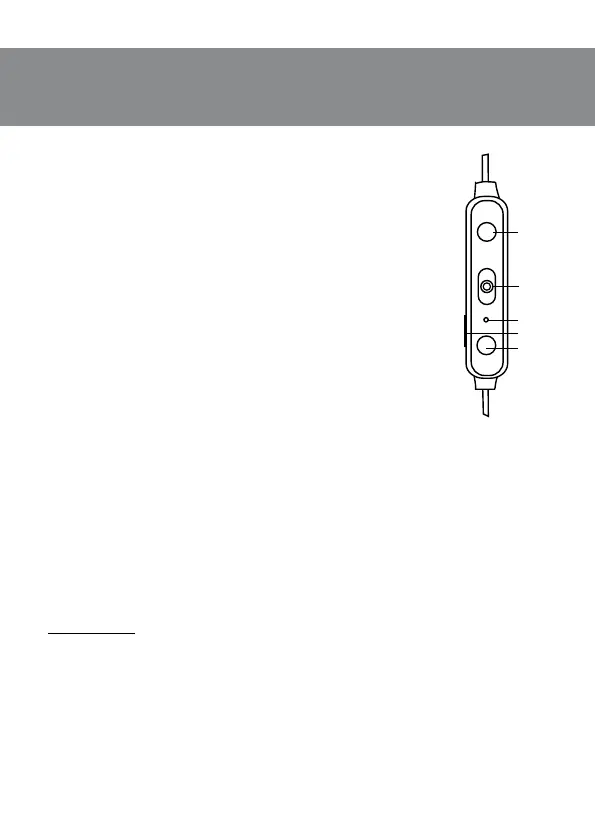
a Volume up button (short press);
Next track (long press, ~ 2 seconds)
b ON/OFF button;
Call control button;
Рlay/Рause
c LED indicator
d Micro USB jack for battery charging
e Volume down button (short press);
Previous track (long press, ~ 2 seconds)
CONNECTION AND OPERATION
Attention! The built-in battery must be charged completely prior
tothe headphones application.
Headset charging
• Connect the headphones to a USB port of PC or USB charger using
USB-А/micro USB cable (included). During battery charging the indi
-
cator c is red.
• When the device is charged in full, the indicator c goes out.
• There is a short periodic double beep signal when the battery
charge level is low and the LED indicator c will be red alternately.
• The battery in the headphones is used as an integral part ofthede-
vice, therefore do not try to extract or replace it, because this can
result in the warranty cancellation or the device damage.
Device switching on/o
• In order to turn on the headphones press and hold the button b
before you hear a beep signal. When the device is turned on, the LED indicator c will start
blinking blue and red (search mode) or blinking blue (connecting mode). In order to turn o
the device, press once more and hold the button b before you hear a beep signal. When
thedevice is turned o, the LED indicator c will blink red.
Control buttons
When connected to a telephone:
• in order to receive an incoming call press the button d; press the button d once again
tonish the call;
• in order to reset the call, press and hold the button d (~2 seconds)*;
• when the button b, is pressed shortly twice, the call function of the last number dialed*
is switched on.
* Depending on telephone/smartphone conguration.
Bluetooth technology
• Wireless data transfer via the Bluetooth protocol enables to connect wireless headphones
to compatible devises. Maximum radius of action of data transfer is 10 m. Such obstacles
aswalls or other electronic devices can interfere with the signal transfer.
+
-
Fig. 1. Control
description



 To Next Page