Backlight Settings
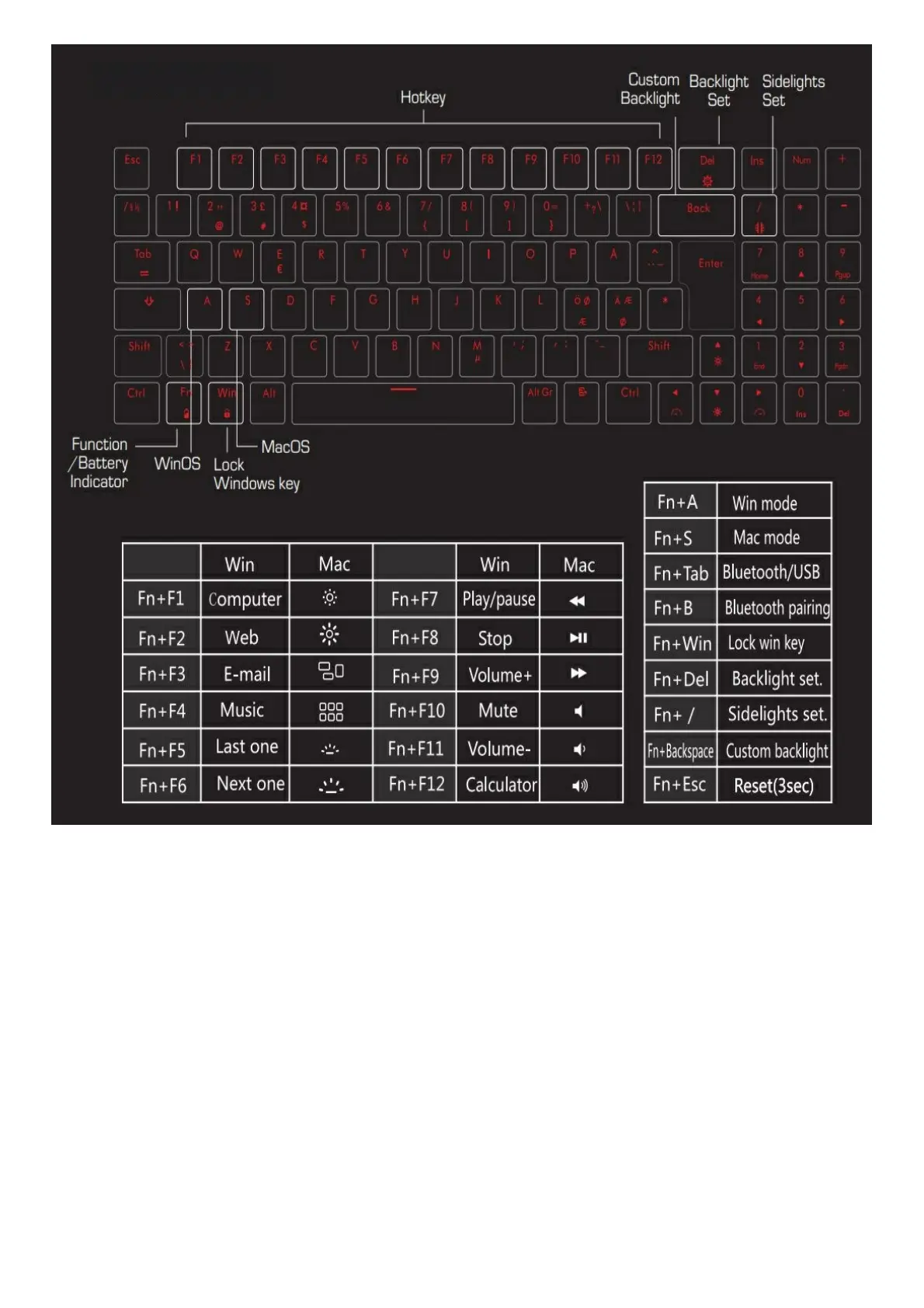
Fn+ l FPS Game mode; 6 keys glow (W/A/S/D/ / / / ).
Fn+2 LOL Game mode; 14 keys glow (1/2/3/4/5/6/Q/W/E/R/A/S/D/F).
Fn + 3 Office mode, 26 character & Punctuation key glow.
Fn+ backspace Custom backlight While in one of the three modes mentioned above, press Fn+ backspace to turn
on the custom backlight settings. Click to light up, press again to turn off; after setting , press Fn+ backspace again
to save and exit.
Fn +Delete 17 backlight effects available.
Fn+↑ Increase backlight brightness; five-stage adjustment.
Fn+↓ Decrease backlight brightness; five-stage adjustment.
FN+← Decrease backlight speed; five -stage adjustment.
Fn+→ Increase backlight speed; five-stage adjustment.
Fn+/
Other settings
Fn+ Esc Reset (Press 3 secs).
Fn+ Win Lock/ Unlock the Windows key function.


 To Next Page