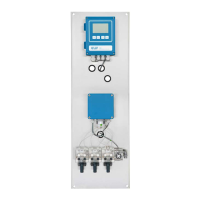
The SWAN USB Interface is an accessory designed for AMI (Analytical Measuring Instrument) transmitters, specifically models A-81.420.040 (V1) and A-81.420.042 (V2). This interface enhances the functionality of the AMI transmitter by enabling data logging and firmware updates via a USB stick.
Function Description:
The primary function of the USB Interface is to provide a convenient method for data management and system maintenance for SWAN AMI transmitters. It acts as a bridge between the transmitter's internal system and an external USB stick.
For data logging, the interface allows the transmitter to record various operational data, including event history, calibration history, and general logger data, directly onto a connected USB stick. This stored data can then be easily transferred to a computer for analysis, record-keeping, or troubleshooting.
For firmware updates, the USB Interface facilitates the process of uploading new firmware versions to the AMI transmitter. This is crucial for keeping the instrument up-to-date with the latest features, bug fixes, and performance enhancements. The update process involves copying the firmware files to a USB stick, inserting the stick into the interface, and initiating the update through the transmitter's menu.
Important Technical Specifications and Compatibility:
The USB Interface comes in two versions, V1 (A-81.420.040) and V2 (A-81.420.042), each with specific compatibility requirements for the AMI transmitter's mainboard and firmware.
-
A-81.420.040 (V1):
- Function: USB support.
- Requirement: Compatible with Mainboard versions 2.0 to 2.4 and Firmware V5.00 or higher.
- Important Note: This version must not be used with Mainboard 2.5 or higher, as it can cause a short circuit and potential damage to the equipment.
-
A-81.420.042 (V2):
- Function: USB support and 3rd signal output. The "3rd signal output" indicates an additional capability beyond just USB data transfer, likely for specific control or monitoring applications.
- Requirement: Compatible with Mainboard 2.0 or higher (for USB support) and Firmware V5.00 or higher. For the 3rd signal output functionality, it specifically requires Mainboard 2.5 or higher and Firmware V6.00 or higher.
- Important Note: This version can be operated in parallel with other components, provided the mainboard is 2.5 or higher and the firmware is 6.00 or higher.
Both versions are designed to be installed internally within the AMI transmitter housing. The installation kit includes the USB interface PCB (Printed Circuit Board) and a compatible USB stick.
Usage Features:
Once installed, the USB Interface integrates seamlessly with the AMI transmitter's user interface. New menu options appear under "Main Menu Operation" (Logger) and "Main Menu Installation" (Interface).
-
Data Logging:
- Users can configure the "Log Interval" (e.g., 30 Minutes) and "Clear Logger" function through the "Logger" menu.
- The "Eject USB Stick" option is available to safely prepare the USB stick for removal, ensuring all data is properly written.
- A push-button (G) on the USB interface PCB serves two functions:
- Copies calibration history and event history to the USB stick.
- Deactivates the USB stick, preparing it for safe removal.
- LED indicators provide status feedback:
- Blue LED (H): On when the USB stick is installed and ready for data recording. Off when is activated or the push-button is pressed.
- Green LED 1 (I): Blinks during the internal installation sequence of the USB Interface.
- Green LED 2 (J): Blinks when the USB stick is active. Steady on if the USB stick is ejected but remains in the socket. Off if the USB stick is removed.
-
Firmware Upload:
- Firmware files (with extensions like .a37 or .hex) are copied to the root directory of the USB stick using a computer.
- The USB stick is then inserted into the AMI transmitter.
- The firmware update is initiated through the "Installation" > "Miscellaneous" > "Load Firmware" menu.
- After the update, the transmitter restarts, and all settings are reset to default values, requiring the user to re-enter customer-specific settings.
Maintenance Features:
- Installation: The installation process involves opening the transmitter housing, inserting the USB interface PCB into a dedicated slot on the mainboard, and then inserting the USB stick into the interface's USB socket. Proper precautions for handling electrostatic discharge sensitive devices must be observed.
- Removal of USB Stick:
- Recommended Method (with power interruption): Navigate to the "Operation/Logger" menu, select "Eject USB stick," switch off power, open the housing, press the USB interface down, and pull out the USB stick. This method ensures data integrity and safety.
- Alternative Method (without power interruption): Open the transmitter housing, press the push-button (G) on the USB interface, wait for the blue LED to switch off, press the USB interface down, and pull out the USB stick. This method requires trained professionals and adequate safety precautions due to electrical shock hazards.
- Reading Logger Data: After safely ejecting the USB stick from the AMI transmitter, it can be inserted into a notebook or PC to copy the event history, calibration history, and logger data files.
- Firmware Update Procedure: The detailed steps for firmware update involve backing up current settings, downloading logger data, removing the USB stick, copying new firmware files to the stick, reinserting the stick, closing the housing, switching on power, and navigating through the menu to initiate the update. Post-update, resetting to default values and re-entering custom settings is required.
Safety Considerations:
The manual emphasizes several safety warnings:
- CAUTION: Risk of damage to the equipment. Users must observe compatibility notes to prevent damage.
- CAUTION: Observe precautions for handling electrostatic discharge sensitive devices. This is crucial during installation to protect the electronic components.
- WARNING: Electrical shock hazard. Before opening the AMI Transmitter, the power must be switched off. Work without power interruption should only be performed by trained professionals with adequate safety precautions.
Overall, the SWAN USB Interface is a vital accessory for managing data and maintaining the firmware of AMI transmitters, designed with user convenience and system integrity in mind, provided all compatibility and safety guidelines are strictly followed.

 Need help?
 General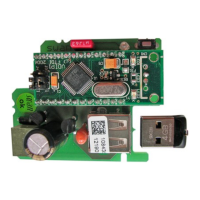

 To Next Page