USB Interface installation 108498 - 05/16 6
Remove the USB Stick
To remove the USB stick proceed as follows:
Variant 1 with power interruption (recommended)
1. Navigate to menu Operation/Logger.
2. Select <Eject USB stick> and press <Enter> (Details see p. 7, Read Logger Data).
3. Switch power off.
4. Open the transmitter housing.
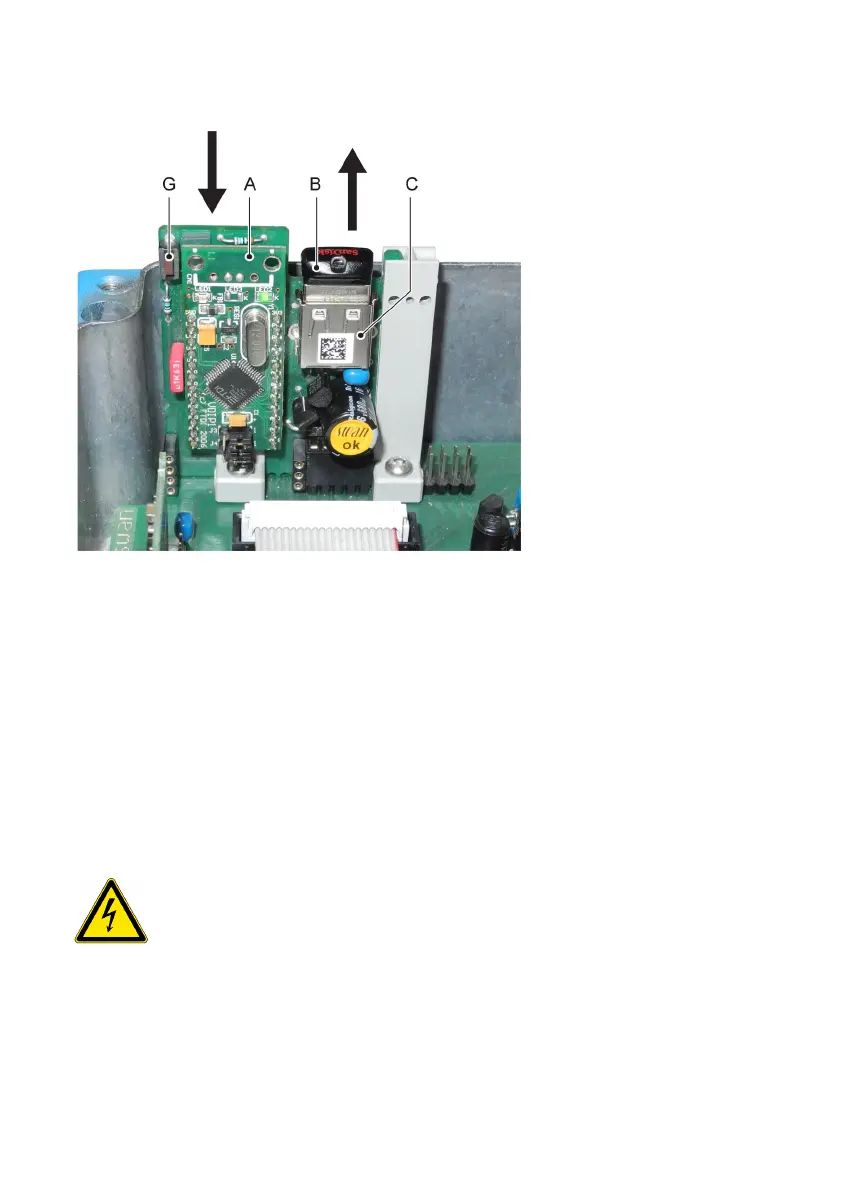
5. Press the USB interface [A] down while pulling out the USB stick [B].
WARNING!
Electrical shock hazard
This work may only be performed by trained professionals .
Take adequate safety precautions before opening the transmitter housing
Variant 2 without power interruption
1. Open the transmitter housing.
2. Press the push-button [G] on the USB interface.
3. Wait until the blue LED is switched off.
4. Press the USB interface [A] down while pulling out the USB stick [B].


 To Next Page