USB Interface installation 108498 - 05/16 5
After the USB stick has been installed, in the firmware the following two menus are
added:
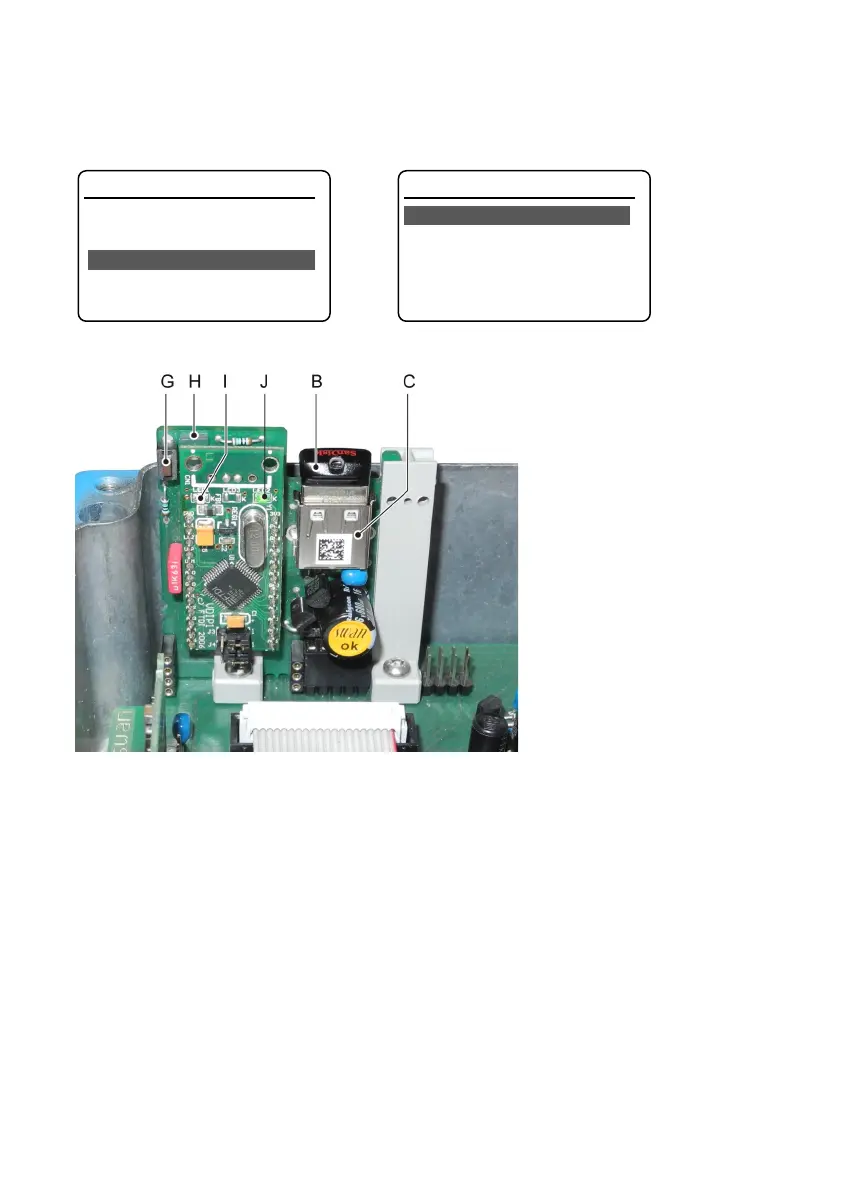
Status LEDs and Operating Elements
Logger 4.3.1
Log Interval 30 Minutes
Clear Logger no
Eject USB Stick <Enter>
Interface 5.5.1
Protocol USB Stick
Main Menu Operation Main Menu Installation
A –
B USB stick
C USB socket
D –
E –
G The push button (G) has the following two functions, if it is pressed down:
• the calibration history and the event history are copied to the USB stick
• the USB stick is deactivated.
H The blue LED is on if the USB stick is installed and ready to record data.
The blue LED is off if the function <Eject USB stick> has been activated or the push-
button has been pressed.
I LED 1 (green) is blinking during the internal installation sequence of the USB Interface
J LED 2 (green) is blinking if the USB stick is active
is steady on if the USB stick is ejected but remains in the socket.
Is off if the USB stick is removed from its socket


 To Next Page