EasyManua.ls Logo

Swann PRO-640 - Connection Guide; Connecting Directly to TV

Swann PRO-640
24 pages
Print Icon
To Next Page IconTo Next Page
To Previous Page IconTo Previous Page
Loading...
4
Connection Guide
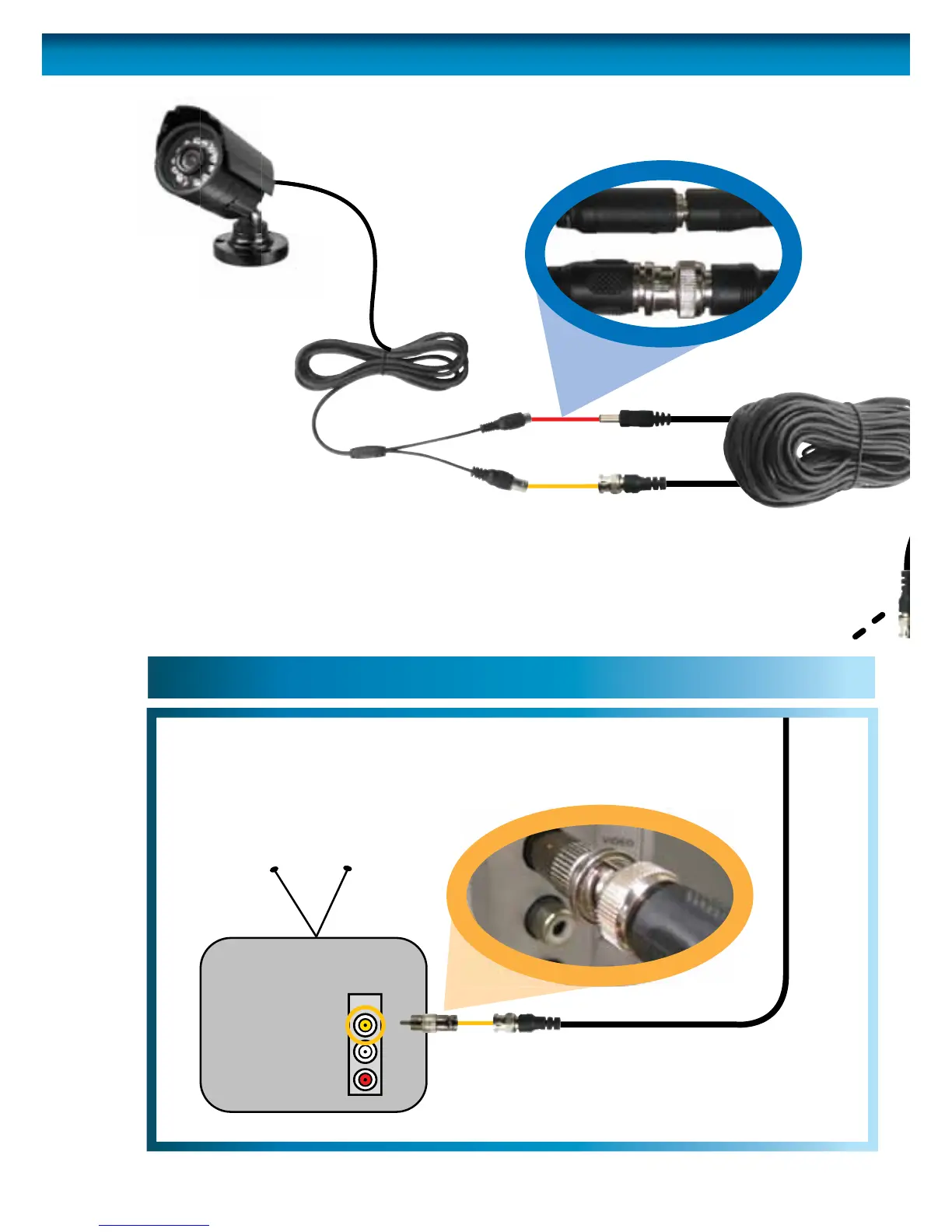
Plug in the camera
power adapter into
a wall socket
4
Connect the camera’s DC
and BNC socket cable to the
extension cable’s DC and BNC plugs
1
FOR A SINGLE CAMERA
Connect the extension cable’s
DC socket to the DC plug on
the power adapter
3A
FOR 4 CAMERA PACKS
Connect the extension cable’s
DC socket to one of the four
sockets on the power splitter.
Then, plug the single end of the
power splitter to the DC plug
on the power adaptor.
3B

INPUT
2A. Connecting Directly to TV
2B. Connecting to Your Existing DVR
Connect a BNC to RCA
adapter and connect to video
input on your TV or VCR
2
Connect the BNC extension
cable to an open channel on
the back of the DVR
2

Other manuals for Swann PRO-640

Related product manuals