EasyManua.ls Logo

SwedeSolutions CFE Plus - P3;V40 2011-2018 Installation Procedure; Remove Sensus Screen Cover and Connector; Remove Sensus Screen Torx Screws; Detach Sensus Panel and Connectors

Default Icon
13 pages
Print Icon
To Next Page IconTo Next Page
To Previous Page IconTo Previous Page
Loading...
INSTALLATION MANUAL
CFE-Plus MY 01-04
Harness
© 2020 SwedeSolutions the Netherlands - info@swedesolutions.com - www.swedesolutions.com
Instruction# 1697
Version# 1.06
Part# ntbp
EAN#
FOR P3 (S60/V60) 2011-2018 (With Sensus or Sensus Connect)
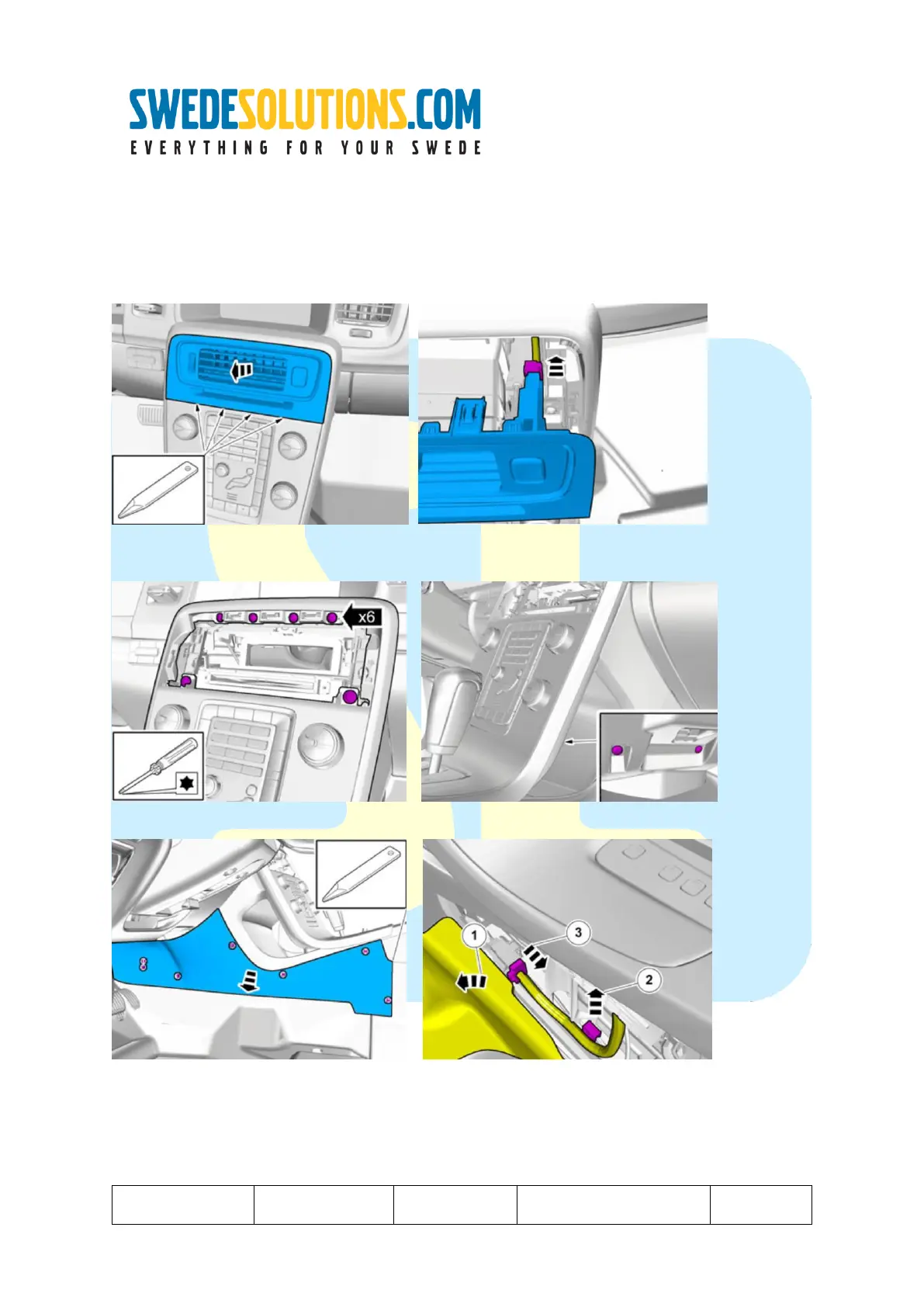
Independent of what will be connected to the available video sources on the Sensus screen, the sensus screen
has to be temporary removed from the bracket.
Step 1 : Remove the cover and remove the connector.
Step 2: Remove the torx screws
Step3: Remove the panel (both sides) and disconnect connectors:

Other manuals for SwedeSolutions CFE Plus