Design and specifications are subject to change without notice.
Remote Control for SDS/SWL/SWLT-series
(FR5)
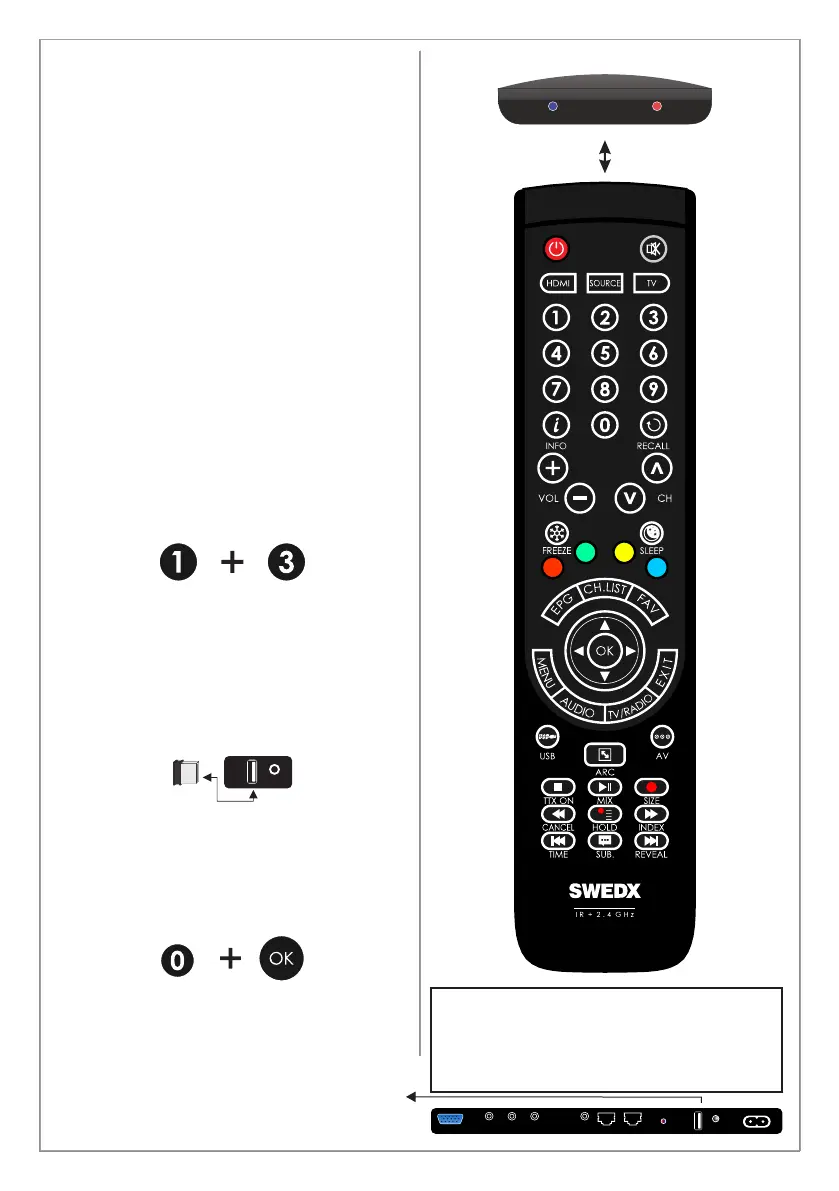
The remote control is based on both 2.4 GHz and
Infrared.
The remote control is equipped with LED
indicators. The RED indicator states that the
remote is in Infrared mode and the BLUE
indicator is for 2.4 GHz mode. Recent products
from SWEDX uses 2.4 GHz receivers.
The 2.4 GHz technology allows the remote to
control the TV without targeting it because the
receiver is built inside the product. Each SWEDX
product has a pre-configured remote control
meaning that if you have several SWEDX produts
then the remote control for one of the products
will function only with that particular product and
not with the other products.
To switch between Infrared and 2.4 GHz mode
press and hold the buttons for 5 seconds. The
Red LED will flash 3 times and switch from the
current mode to the other one.
To pair the remote with the product follow the
steps below
1. Disconnect the product from power outlet
2. Make sure that the remote is in 2.4 GHz
mode
3. Make sure that the USB Remote
Receiver is inserted in the screen
4. Press and hold the buttons 0 and OK on
the remote control simultaneously for
about 5 seconds. The BLUE LED will
flash 5 times indicating that the remote is
now in pairing mode with the product
5. Connect the product to power. The
remote will pair auto,atically and the
BLUE LED light will stop flashing
A On/Off key is also available in recent SWEDX
products.
08
COPMONENT
POWER INPUT
AC 100-240 V ~ 50/60 Hz
AV
DS-K8-UHD-2
PC
PC
AUDIO
RS232 INRS232 OUT
IR LED
ON/OFF
The remote control “FR5” is included in
the SDS-series (digital signage screens).
For the MX/UMX-series the included
remote control is model “FR” (see page 9)
ON/OFF
REMOTE
RECEIVER
REMOTE
RECEIVER



 To Next Page