GLOBAL
We reserve the right to alter specifications. 20170744
12
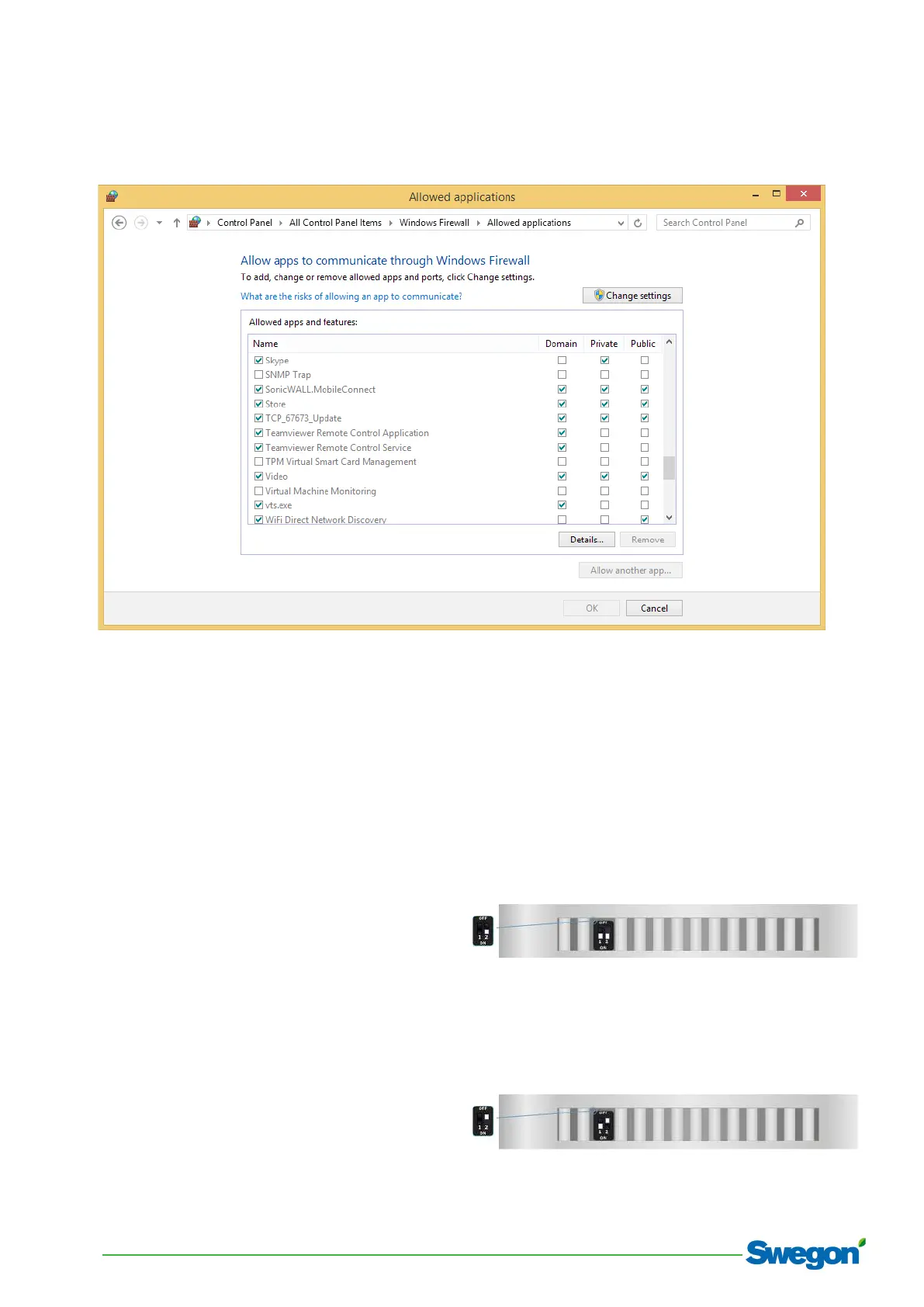
9. Check that the firewall allows the update software to
go through it. Here is an example with Windows 10 ©:
10. Try to repeat the operations for the updating;
Try to restart the PC;
If using Windows Seven or Vista,7, 8 or 10, make sure to
have the administrator privileges;
Check the LAN settings.
Try with another PC.
5.4 Resetting the IP address:
The gateway comes with default IP address 192.168.1.9.
If this address has been changed later on and the address
is not known anymore, follows this procedure to set the
back the factory address.
1. Turn off the Device;
2. Put Dip2 of ‘Dip-Switch A’ at ON position (Fig.1)
3. Turn on the device
4. Connect the Ethernet cable;
5. Insert the IP “192.168.2.205”;
6. Press the “Ping” button, must appear “Device Found!”
7. Press the “Next” button;
8. Check all operations;
9. Press the “Execute update firmware” button to start
the upload;
10. When all the operations are “OK” turn off the Device;
11. Put Dip2 of ‘Dip-Switch A’ at OFF position (Fig.2)
12. Turn on the device.
13. Upload a configuration (see 5.2).
Fig.1
Fig.2


 To Next Page
 Loading...