Need help?
Do you have a question about the Swegon BlueBox Blueye and is the answer not in the manual?
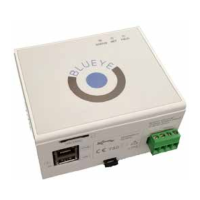
The Blueye device is a versatile electronic board designed for continuous and automated management of a wide variety of technical installations. It serves as a central unit for remote control and management, offering robust connectivity and data processing capabilities.
The Blueye device is an innovative solution that integrates a peripheral electronic board with various communication interfaces. It is equipped with RS485 serial communication ports and an Ethernet port, enabling it to detect data through Modbus RTU / Modbus TCP protocols. Additionally, it can transmit data through 2G/3G modems or xDSL networks to relevant servers, making it suitable for diverse network environments.
The device is designed to be user-friendly, allowing users to monitor and work on its operation without needing to set up their own control center. It can connect to the internet via the www.blueboxcooling.com website, where users can log in to view real-time information transmitted by the remote station. Access to the platform requires a request to cantaranasrl@swegon.it.
The Blueye device also implements the Modbus Master protocol, which interrogates slave devices (up to 5) with a polling time of up to 5 seconds. The peripheral analyzes the data received and sends it to the server depending on a settable polling time or when alarm conditions occur.
Platform: CPU ARM 9 i.Mx25 @ 400 MHz Operating System: Linux (3.3) RAM: 64MB DDR2-266 FLASH memory: 256MB NAND Flash Power supply: 12-36Vdc (12-24Vac +/-10%) Power consumption: ~5W (Max 150mA @ 24Vac) Operating temperature: -20 to +60 °C Signals:
Dimensions:
Modbus Functionality: The device supports Modbus RTU and Modbus TCP protocols.
Connections: The Blueye device offers multiple connection points:
Internet Connection:
SIM Card Features:
VPN Connection: The device supports connection to the Internet through a VPN (Connect) function, allowing access to units provided with the Blueye device. Each Blueye device is configured with an IP class dedicated to its LAN, for example 172.16.222.0/24. This means the router can address up to 253 devices in the IP 172.16.222.1 – 172.16.222.254 range. Client configuration involves setting up a VPN connection on a personal computer, which will be able to simultaneously use the normal connectivity to the Internet and the VPN tunnel to access the remote devices wired on the Blueye VPN.
Indicator LED Operation:
Factory Reset: The device can be restored to factory default settings. This involves pressing the little button [R] down with a pointed object and waiting for three LEDs to flash sequentially (about 20 seconds). If the device is already on, the reset will not work; it must be switched off and then on again. This operation, any configured IP addresses, APNs, and all settings regarding communication with the SIM Card are erased. After about 5 seconds, the sequence stops and then releases the button. The device restarts and shows the three LEDs flashing simultaneously (first configuration).
Firmware Reprogramming: The firmware can be updated remotely (Over the air), ensuring the device stays current with the latest features and bug fixes.
Troubleshooting: The device provides error signalling through its LEDs. In case of an error, the device interrogates the slave peripherals via Modbus, and some read errors persist. If the FIELD LED is steady red, it means the Blueye device is not communicating with the field devices through Modbus protocol. If the NET LED is fast flashing, it indicates a hardware failure of the modem. In these cases, contacting the technical support department is recommended.
Disposal: The device is subject to European waste management directives. It must not be disposed of as non-separated municipal waste and must be collected separately. The owner can return the EEE to the dealer at the end of its life when purchasing new equivalent equipment. Incorrect disposal may lead to penalties. The symbol of a crossed-out wheelie bin indicates separate collection of EEE.
 General
| Brand | Swegon |
|---|---|
| Model | BlueBox Blueye |
| Category | Control Unit |
| Language | English |

 To Next Page