54
Charging
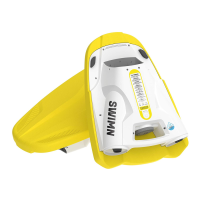
1. Remove the charger port cover by rotating the lock counterclockwise.
2. Charge SWIMN S1 with the provided charger.
3. Disconnect the power cable after SWIMN S1 is fully charged.
4. Replace the cover on the scooter by rotating the lock clockwise.
Note: When the charger is plugged in, the power indicator will illuminate blue for one second to indicate that charging has begun.
Attention:
• Please use the charger provided, and do not use other charging models.
• Please do not charge SWIMN S1 immediately after use. The temperature inside the battery could be high after using and trigger
the Over-Temperature Protection. In this status, you cannot use or charge it until the battery cools down.
• Make sure the charging port is dry before charging. If there are water droplets, please clean them before charging.
• Please charge the product indoor as the charger is not waterproof.
• Please disconnect the power supply after charging is completed (approximately 3 hours charge time). Charging longer than that
may aect battery life and/or performance negatively.
Battery level Indicator
0%~20% Flashing red light
20%~60% Flashing yellow light
60%~99% Flashing green light
100% Steady green light
Operating: Charging:
Battery level Indicator
0% Red light ashes frequently
1%~20% Steady red light
20%~40% Flashing yellow light
40%~60% Steady yellow light
60%~80% Flashing green light
80%~100% Steady green light


 To Next Page