4 English
Additional Powerline adapters
You can connect additional Powerline adapters (optional). In order to do so, your existing Pow-
erline adapters must be on
. If one of them is in energy saving mode, unplug it and replug it
again. Wait until the green light turns on.
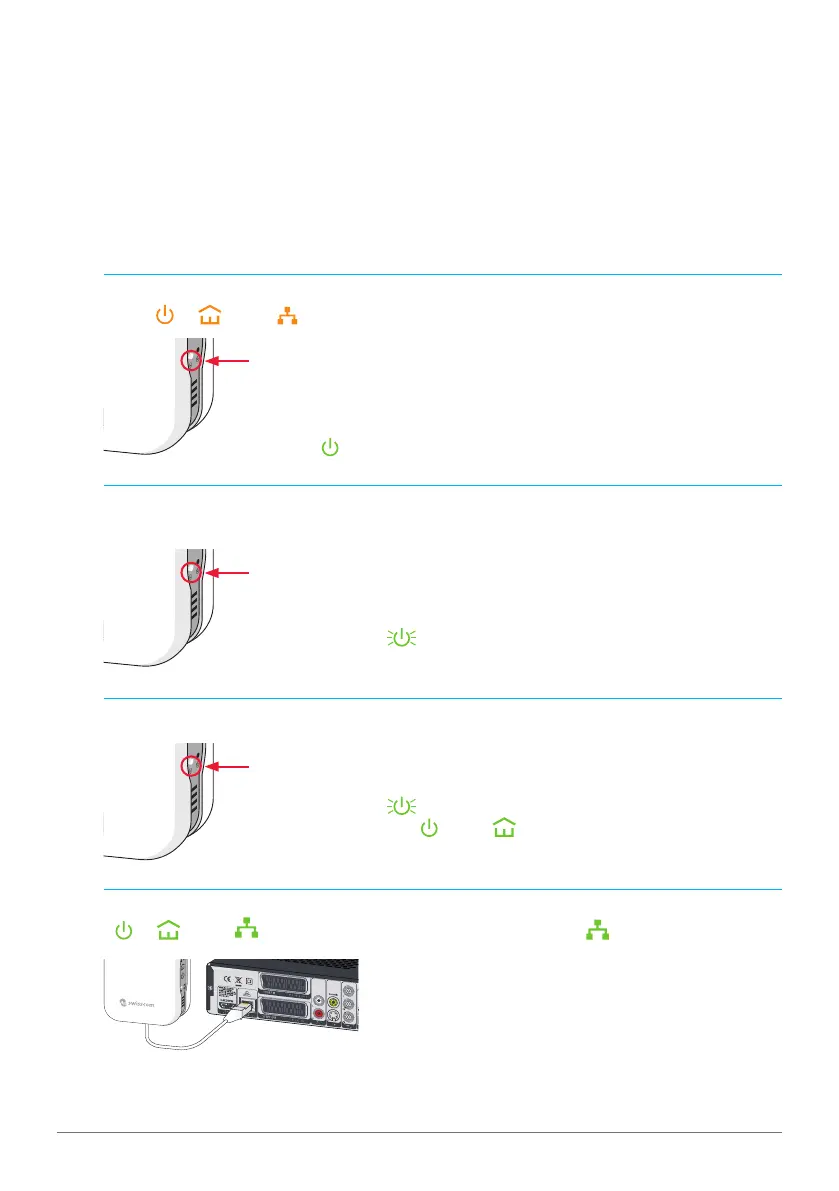
1 Plug the Powerline adapter into a power socket at the desired location.
2 Press approx. 15 seconds the Pairing button of your new Powerline adapter, until all
LEDs («
», « » und « ») light up in orange.
After a short while the LED indicating that your new adapter is in
service «
» will light up in green.
3 Press approx. half a second the Pairing button of one of your already existing Powerline
adapters.
The service LED «
» will start blinking in green.
Note: if it’s not blinking, repeat this step.
4 Press approx. half a second the Pairing button of your new Powerline adapter.
The service LED «
» will start blinking in green.
After a few seconds «
» and « » light up in green.
Note: if it’s not blinking, repeat this step.
5 Connect the Ethernet cable included in the package to your device.
(«
», « » and « » light up in green. If the device is not on, « » does not light up.)
Note: you can connect additional Powerline adapters from Swisscom by proceeding exactly
this way.
Press half a second then releaseNew
adapter
Press half a second then release1st or 2nd
adapter
Press until all LEDs light upNew
adapter



 To Next Page
 Loading...