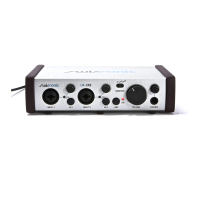
To enable this feature, move the two jumpers near
each assign switch to their «on» position. They are:
JP3 and JP4 for Mic1; JP7 and JP8 for Mic2; JP5 and
JP6 for Instrument 1; JP9 and JP10 for Instrument 2;
JP21 and JP22 for Phono; JP1 and JP2 for Stereo 1;
JP11 and JP12 for Stereo 2; JP13 and JP14 for
Stereo 3; JP15 and JP16 for Stereo 4; JP18 and
JP20 for Digital in.
USB Studio D’s digital input and output are completely
separated from the USB interface. They use very high
performance, 20-bit AD and DA converters, and
support both the optical and coaxial S/PDIF formats.
The digital input is treated like another input to the
mixer, with its own level control and assign switch. A
lock Led on the front panel shows when the unit has
locked to the incoming signal and the input is enabled.
A switch on the back selects between the coaxial and
optical input. If the lock led does not light after signal
is applied, there’s a good chance the opto/coax
switch is in the wrong position.
The digital output can be taken from either the rec or
the mon bus, as selected by the switch on the front.
An overload led lights when the signal to the digital out
is near clipping, and needs to be reduced. Both the
coaxial and optical outputs are driven simultaneously.
The sample clock of the digital input and output is
independent from that of the USB interface. This way,
the unit can perform high quality sample rate conversion
between the USB and the S/PDIF channels.
The digital input and output always run at exactly the
same sample rate. So, when the digital input is locked,
the digital output uses the sample clock recovered
from the input. When there is no input present, an
internal clock generator drives the digital output. The
sample rate of the internal generator is selected with
the 44,1/48 switch on the front panel.
The USB interface implements two digital stereo
channels over an USB bus: one channel towards the
computer – the recording channel, and one from the
computer – the playback channel.
The USB interface conforms to the generic audio
device standard as defined in the USB specification,
and as such, it doesn’t need a special driver; all it’s
functions are controlled by the generic driver provided
with the operating system.
When USB Studio is first plugged into the USB
12
Digital Input
and Output
USB Interface


 To Next Page
 Loading...