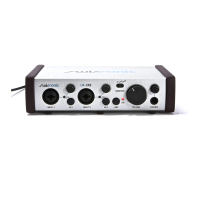
USB Studio uses one of the finest ultra-low noise
amplifier designs available. Its gain range allows the
use of virtually any type of microphone. True 48V
phantom power guarantees the USB Studio works
with every microphone made. The phantom power
supply can be turned on and off for each input via a
back panel switch. A Led on the front panel is lighted
when it’s turned on.
The level control used is combined with a gain trim.
Unlike a normal trim, it can be turned completely off.
Full input dynamic range is retained in the circuit.
An invert switch is provided on the back panel to solve
phasing problems when two mics are used in close
proximity. If the sound seems weak or thin (especially
a noticeable loss of bass) when both Mic or Mic and
instrument inputs are used, try using one of the invert
pushbuttons. This problem occurs when the same
sound reaches two inputs out of phase because of
their placement or wiring, and the outputs are cancel-
ing instead of combining.
USB Studio allows an external signal processor, such
as a compressor or effect unit to be inserted between
the output of the Mic channels and the mixer. A standard
TRS insert style (tip=send, ring=return) Y-cord gets
input and output from the Insert jack to the effects
unit. The «send» signal is taken after the level pot. The
return signal is added to the mix with fixed 0dB gain.
The instrument inputs of the USB Studio are very high
impedance, high gain range, low noise, unbalanced
inputs suitable for piezo or magnetic instrument pickups.
Unablanced microphone pickups can also be connected
here. As with the Mic inputs, the level controls are
combined with gain trims.
The phono preamplifier used in the USB studio is
suitable for use with moving magnet pickups. It has
the standard 50kΩ input impedace, and is provided
with jumpers (JP17 and JP19) that increase the input
capacitance from the nominal 40pF to 250pF, in order
to optimise pickup matching. The circuit provides
accurate RIAA equalisation. If the turntable is provided
with an earthing connection, make sure it is tied with
a thick wire to the grounding socket near the phono
inputs. A switch on the back panel disables the phono
preamp feature, enabling the input to be used as
a normal stereo input.
Microphone
Inputs
Insert Loops
Instrument
Inputs
Phono/Line
Input
10


 To Next Page
 Loading...