Operating Instructions
www.swordfi shsupport.com
Specifi cations
Model Product Code
Maximum
Paper Size
Maximum
Pouch Thickness
Maximum
LaminatingThickness
Warm-Up
Time
450HD
48152 (UK)
40046 (EU)
A2 2x250 [500] microns 1.0mm 4-8 mins
Installation
Plug the unit into the wall socket
DE
Schließen Sie das Gerät an eine Netzsteckdose an
FR
Brancher l’unité sur le secteur
IT
Collegare la spina elettrica dell’apparecchio alla presa a muro
ES
Enchufe la unidad a la red eléctrica
NL
Sluit het apparaat aan op het stopcontact
1
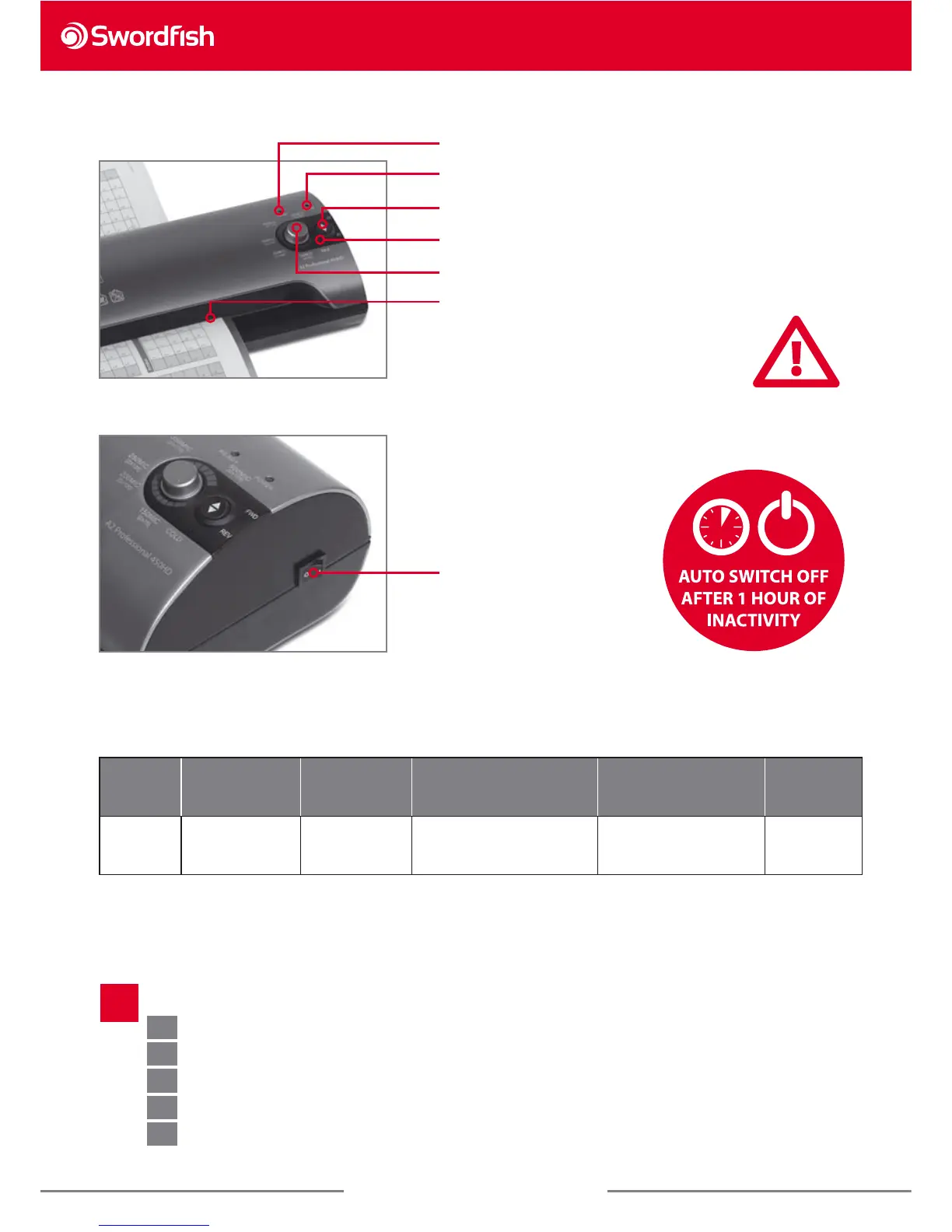
’Ready Hot’ Light
’Power On’ Light
’Fwd/Rev’ Switch
Cold Lamination
Temperature Control
Feed slot
Never laminate: Leaves, thermal fax paper,
damp documents (allow inkjet prints to
dry), documents that do not t the pouch
format (too small, too large), several smaller
documents in one large pouch, textiles, wax
prints, anything thicker than 1.0mm.
Power ’On/O ’ Switch



 To Next Page