EasyManua.ls Logo

Swordfish OmniPoint - User Manual

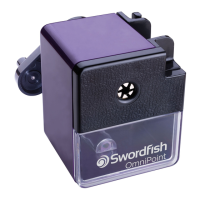
Swordfish OmniPoint
4 pages
Print Icon
To Next Page IconTo Next Page
Loading...
OmniPoint
Mechanical Pencil Sharpener
Operating Instructions
Question and Answer IconNeed help?

Do you have a question about the Swordfish OmniPoint and is the answer not in the manual?

Summary

Operating Instructions

How to Operate the Sharpener

Steps for securing the sharpener, opening jaws, inserting pencil, and sharpening.

Setting Pencil Sharpness

Adjusting pencil jaw diameter and sharpness control for desired point.

Sharpening Process

Instructions on turning the handle, pencil insertion, and completion of sharpening.

Shavings Tray Management

How to remove and manage the shavings tray to prevent damage.

Blade Assembly Maintenance

Guide on cleaning or replacing the blade assembly, including safety warnings.

Overview

The Swordfish OmniPoint Mechanical Pencil Sharpener is a robust and versatile tool designed for sharpening pencils of various diameters with precision and ease. This manual provides comprehensive instructions for its operation, setting, sharpening, and maintenance, ensuring optimal performance and longevity of the device.

Function Description:

The primary function of the Swordfish OmniPoint Mechanical Pencil Sharpener is to sharpen pencils. It features an automatic jaw adjustment system that accommodates pencils ranging from 8mm to 12mm in diameter, making it suitable for a wide array of standard and larger pencils. The sharpener is designed to be secured to a desktop using a provided clamp, ensuring stability during use. It offers a sharpness control feature, allowing users to select between a blunt or a sharp point according to their preference. The sharpening process is automated once the pencil is inserted and the handle is turned, with the sharpener drawing the pencil in and ceasing operation once the desired point is achieved.

Important Technical Specifications:

  • Pencil Diameter Compatibility: Automatically adjusts to fit pencils from 8mm to 12mm diameter.
  • Blade Assembly Code: Replacement blade assembly code is 40306.
  • Mounting: Designed to be secured to a desktop with a clamp.

Usage Features:

  1. Secure Mounting: Before operation, the sharpener must be securely fastened to a desktop using the provided clamp. This prevents movement and ensures safe and effective sharpening.
  2. Pencil Insertion:
    • To open the pencil jaws, press the button labeled 'A' (as indicated in the diagram).
    • Push the slide forward to extend the front plate, labeled 'B'.
    • Insert the pencil into the open jaws.
    • Release pressure on the button 'A' to secure the pencil.
  3. Automatic Jaw Adjustment: The pencil jaws automatically adjust to fit any pencil within the 8mm to 12mm diameter range, eliminating the need for manual adjustments based on pencil size.
  4. Sharpness Control: A dedicated control allows users to customize the sharpness of the pencil point:
    • Twist the sharpness control to the right for a blunt point.
    • Twist the sharpness control to the left for a sharp point.
  5. Sharpening Process:
    • Turn the handle in a clockwise direction.
    • The sharpener will automatically draw the pencil into the sharpening mechanism.
    • Sharpening will automatically cease once the desired point, as set by the sharpness control, has been achieved. This automatic stop feature prevents over-sharpening and extends pencil life.

Maintenance Features:

Regular maintenance is crucial for the optimal performance and longevity of the Swordfish OmniPoint Mechanical Pencil Sharpener.

  1. Shavings Tray Management:
    • Removal: To remove the shavings tray, pull it forward from the sharpener.
    • Warning: It is critical not to allow the shavings tray to over-fill. Over-filling can lead to permanent damage to the sharpener's internal mechanism. Regular emptying is recommended.
  2. Blade Assembly Cleaning and Replacement:
    • Safety Warning: The edges of the helical blade are sharp. Exercise extreme caution when handling the blade assembly.
    • Accessing the Blade:
      • Remove the shavings tray.
      • Remove the screw indicated in the diagram (marked with a '+' sign).
    • Withdrawal: Carefully withdraw the entire blade assembly from the sharpener.
    • Cleaning:
      • Use a stiff brush to clean the helical blade, removing any accumulated graphite or wood particles.
      • If there is a blockage, use a thin, sharp object to carefully clear it.
    • Replacement: The blade assembly should be replaced when it becomes blunt to ensure effective sharpening. The replacement blade assembly code is 40306.
    • Reassembly: After cleaning or replacement, reinsert the blade assembly and secure it with the screw, then replace the shavings tray.

Troubleshooting and Product Support:

For any troubleshooting issues or product support, users are directed to visit the manufacturer's website: www.snopakebrands.com. This resource likely provides additional guidance, FAQs, and contact information for further assistance.

In summary, the Swordfish OmniPoint Mechanical Pencil Sharpener is designed for ease of use, versatility, and durability, offering a reliable solution for maintaining sharp pencils for various applications. Its automatic features and clear maintenance instructions contribute to a user-friendly experience.

Swordfish OmniPoint Specifications

General IconGeneral
BrandSwordfish
ModelOmniPoint
CategoryPower Tool
LanguageEnglish

Related product manuals