4
Operating Instructions
LED desk lamp
Item no: 2481634
1 Intended use
The product is a desk lamp. Use the product to:
■
illuminate your work area
■
display the date, time, and temperature
■
set alarms
■
power/charge compatible devices via the USB port
■
wirelessly charge Qi compatible devices
The backup battery backs up the date and time settings in case of a power failure.
The product is intended for indoor use only. Do not use it outdoors.
Contact with moisture must be avoided under all circumstances.
If you use the product for purposes other than those described, the product may be damaged.
Improper use can result in short circuits, fires, electric shocks or other hazards.
The product complies with the statutory national and European requirements.
For safety and approval purposes, you must not rebuild and/or modify the product.
Read the operating instructions carefully and store them in a safe place. Make this product available to
third parties only together with the operating instructions.
All company names and product names are trademarks of their respective owners. All rights reserved.
2 Delivery contents
■
Product
■
Power adaptor
■
CR2032 battery
■
Operating instructions
3 Latest product information
Download the latest product information at www.conrad.com/downloads or scan the QR code shown. Fol-
low the instructions on the website.
4 Description of symbols
The symbol with the exclamation mark in
the triangle is used to indicate important
information in this document. Always
read this information carefully.
This product is constructed according to
protection class III.
This product must only be used in dry,
enclosed indoor areas. It must not be-
come damp or wet.
The Qi symbol indicates this is a Qi certi-
fied device
5 Safety instructions
Read the operating instructions carefully and especially observe the safety informa-
tion. If you do not follow the safety instructions and information on proper handling,
we assume no liability for any resulting personal injury or damage to property. Such
cases will invalidate the warranty/guarantee.
5.1 General
■
The product is not a toy. Keep it out of the reach of children and pets.
■
Do not leave packaging material lying around carelessly. This may become dangerous playing mater-
ial for children.
■
If you have questions which remain unanswered by this information product, contact our technical
support service or other technical personnel.
■
Maintenance, modifications and repairs must only be completed by a technician or an authorised re-
pair centre.
5.2 Handling
■
If it is no longer possible to operate the product safely, take it out of operation and protect it from any
accidental use. Safe operation can no longer be guaranteed if the product:
– is visibly damaged,
– is no longer working properly,
– has been stored for extended periods in poor ambient conditions or
– has been subjected to any serious transport-related stresses.
■
Handle the product carefully. Jolts, impacts or a fall even from a low height can damage the product.
■
Consult an expert when in doubt about the operation, safety or connection of the appliance.
5.3 Operating environment
■
Do not place the product under any mechanical stress.
■
Protect the appliance from extreme temperatures, strong jolts, flammable gases, steam and solvents.
■
Protect the product from high humidity and moisture.
■
Protect the product from direct sunlight.
5.4 Power adapter
Do not tamper with power supply components. Risk of death by electric shock!
■
Always ensure proper connection.
■
Never use damaged power supply components.
■
Do not modify power supply components.
■
Connect the appliance to a wall socket that can be accessed easily.
■
As power supply, only use the supplied mains adaptor.
■
Only connect the power adaptor to a normal mains socket connected to the public supply. Before
plugging in the power adaptor, check whether the voltage stated on the power adaptor complies with
the voltage of your electricity supplier.
■
Never connect or disconnect power adaptors if your hands are wet.
■
Never unplug the power adaptor from the mains socket by pulling on the cable; always use the grips
on the plug.
■
For safety reasons, disconnect the power adaptor from the mains socket during storms.
■
Do not touch the power adapter if there are any signs of damage, as this may cause a fatal electric
shock! Take the following steps:
– Switch off the mains voltage to the socket containing the power adapter (switch off the correspond-
ing circuit breaker or remove the safety fuse, and then switch off the corresponding RCD protective
switch).
– Unplug the power adapter from the mains socket.
– Use a new power adapter of the same design. Do not use the damaged adapter again.
■
Ensure that cables are not pinched, kinked or damaged by sharp edges.
■
Always lay cables so that nobody can trip over or become entangled in them. This poses a risk of in-
jury.
5.5 (Rechargeable) Battery
■
Correct polarity must be observed while inserting the (rechargeable) battery.
■
The (rechargeable) battery should be removed from the device if it is not used for a long period of
time to avoid damage through leaking. Leaking or damaged (rechargeable) batteries might cause acid
burns when in contact with skin, therefore use suitable protective gloves to handle corrupted (re-
chargeable) batteries.
■
(Rechargeable) batteries must be kept out of reach of children. Do not leave (rechargeable) batteries
lying around, as there is risk, that children or pets swallow them.
■
(Rechargeable) batteries must not be dismantled, short-circuited or thrown into fire. Never recharge
non-rechargeable batteries. There is a risk of explosion!
5.6 Connected devices
■
Also observe the safety and operating instructions of any other devices which are connected to the
product.
5.7 LED light
■
Do not look directly into the LED light!
■
Do not look into the beam directly or with optical instruments!
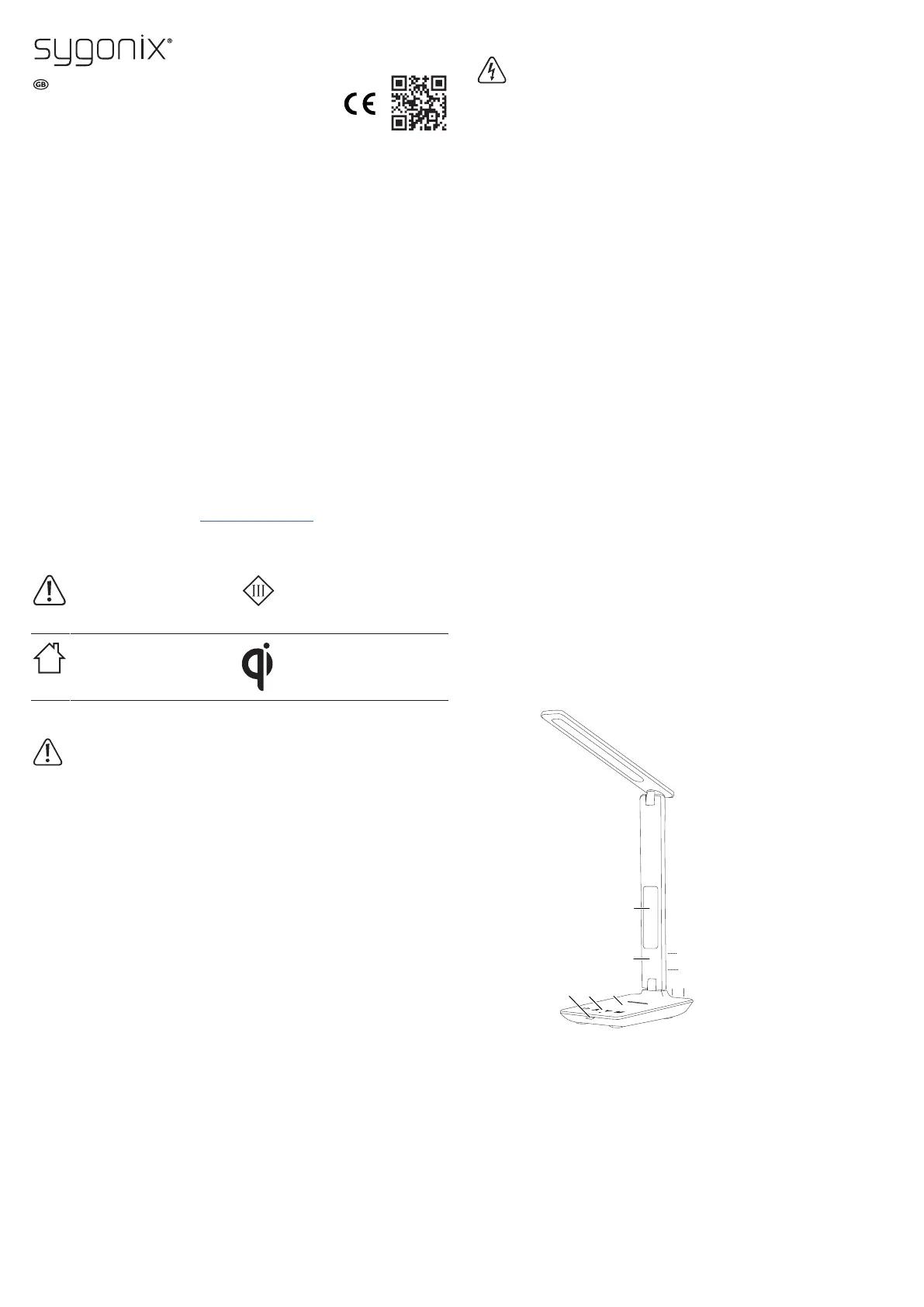
6 Product overview
1 Date, Time, Alarm, Temperature display 2 Alarm speaker cut-out
3 Wireless charging platform 4 Light control panel
5 Pull-out phone stand 6 Display control panel
7 Battery compartment 8 Power supply socket
9 USB power supply socket


 To Next Page
 Loading...