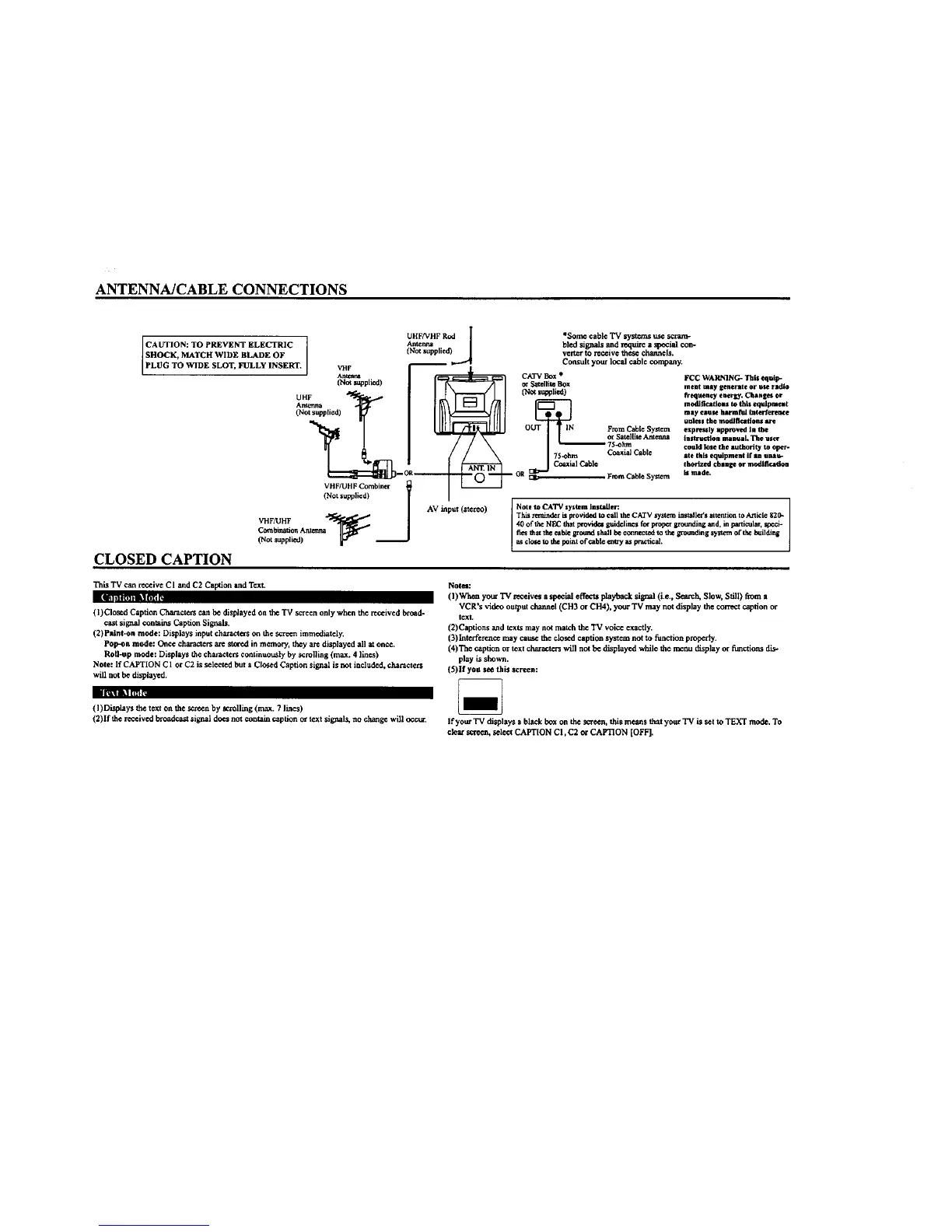
ANTENNA/CABLE CONNECTIONS
CAUTION: TO PREVENT ELECTRIC
SHOCK, MATCH WIDE BLADE OF
PLUG TO WIDE SLOT, FULLY INSERT.
VHF
At_teava
(NcX st_pplied)
UHF
Antenna
(Not supplied)
CLOSED CAPTION
VHF/UHF Combiner
(Not supplied)
VHF!UHF _ _
CombinationAntenna
(Not _uppli_ll
UHF/VHF Rod
*Some cable TV systems we scram-
bled signals and tequi_ a special con-
verter to receive tbes4:channels.
Cor_ult your local cable company.
75-ohm
Cmxial Cable
CATV Box *
or Satellite Box
(lqo_ supplied)
From Cable Syslem
or Satellite Antenna
75-ohm
Coaxial Cable
This TV can receive CI and C2 Caption and Text.
lIFtlt||l:l] tl| [_ r
(I) Closed Caption Characters can be displayed on the TV screen only wben the received b_ed-
cast sig_,al contains Caption Signals.
(2) Paint-on mode: Displays input charactcxs on the screen immediately.
Pop-on mode: Once characters are shred in memo_, they are displayed all at once.
Roll-up mode: Displays the characters continuously by scrolling (max. 4 lines)
Note: If CAPTION C 1 or C2 is scleeted but a Closed Caption signal is not included, characters
will not be displayed.
Note_l:
(I) Whe_ your TV receives a spe_tal effecte playix,tck signal (i.e., Search, Slow, Still) flora a
VCR's ,Adeo output channel (CH3 or CH4), your TV may not display the cor,'ect caption or
text.
(2)Captions and texts may not match die TV voice cxactiy.
(3)interference may cause the closed caption system not to function p_pefly.
(4)The caption or text characters will not be displayed while the menu display or functions dis*
play is shown.
(5)If yea see this screen:
IIIlk_ _ Iff'fi:
(I) lYtspthysdie text on die screen by scrolling (max.7 lines)
(2)If the receivedbroadcastslgnal doesnot containcaptionor textsig_ais, no change will occur. Ifyour"IVdisplays a blackbox on die screen, this means thatyourTV is set to TEXTmode.To
clearscreen, select CAFT[ONCI, C2 or CAPTION[OFF].




 To Next Page