15
Jupiter
6408 216th Street SW | Mountlake Terrace, WA 98043 USA
T +1.425.778.7728 F +1.425.778.7727 | www.symetrix.co
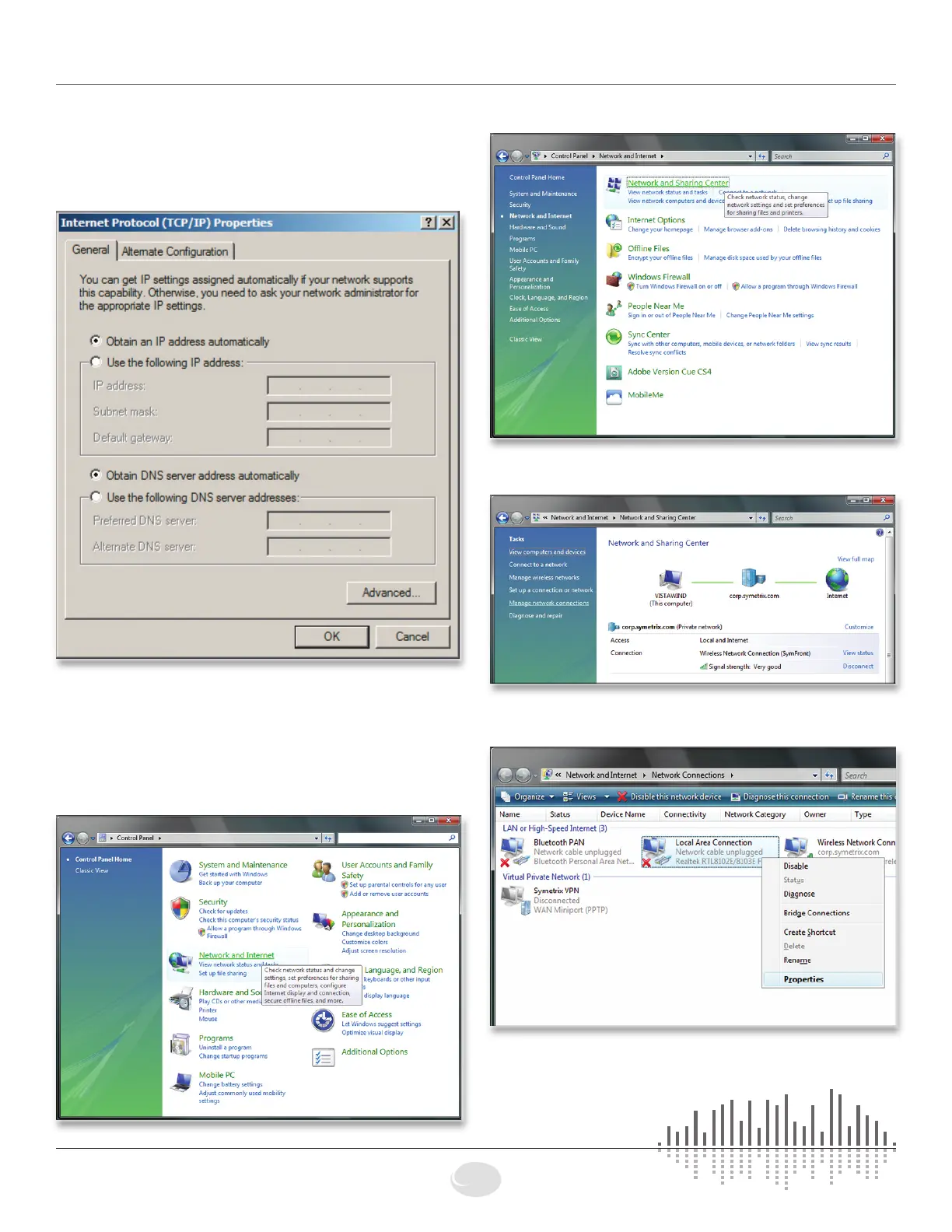
5. On the “General” tab, you may select “Use the following
IP address” to enter in the appropriate information if using
static assigned addresses. (DNS server is not required for
connection to Jupiter hardware). Otherwise, leave set to
“Obtain an IP address automatically” if using DHCP.
6.PressOKtosaveand“Close”toexitoutofthe“Local
Area Connection Properties”.
Configuring your computer for a network
connection: Windows
®
Vista or higher
1. Select “Start->Control Panel”.
2. Select “Network and Internet”.
3.Openthe“NetworkandSharingCenter”.
4.Choose“Managenetworkconnections”(“Change
adaptersettings”inWindows7)ontheleft.
5. Right-click the desired connection and choose
“Properties”.
Jupiter Networking



 To Next Page