Arm unit (left)
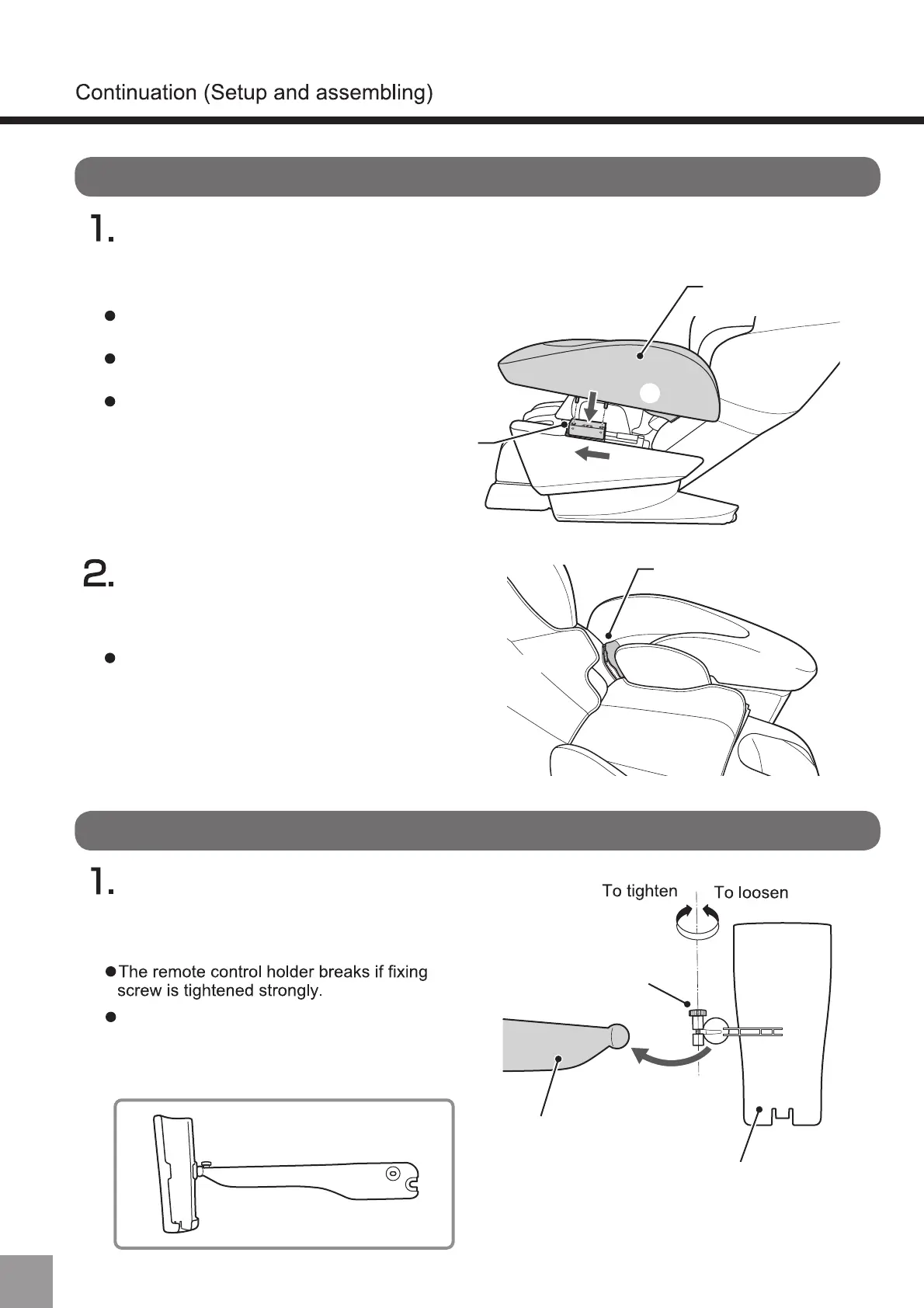
Back pad
seat
Arm unit
fastener
Arm unit mounting part
Move the mounting position of the arm unit to the front of the main body (①)
and insert the convex part of the arm unit into
the hole (②) of the mounting position.
Align and close the fastener on
the main body backrest and
the arm unit one.
Installation of arm unit ※Please install on both sides in the same way.
Please insert firmly. Otherwise, there is
risk of air leakage or falling.
Please install on both sides in the same way.
Install the arm unit while the back rest is in
a reclined position
Please install on both sides in the same way.
①
②
Loosen the screw holding the remote
holder, slide in the remote arm and
gently tighten the screw back.
Remote stand set up
Remote control stand
Remote control holder
Fixing screw
Remote control arm
If the remote control stand is forcibly moved
when the screw is tightened and fixed, this
may cause an excessive load on the movable
part and its fracture. Please pay attention to it.
12



 To Next Page