・The massage chair can keep connection information for up to 5 devices.
・After turning on the power, the massage chair will try to connect according
to the order of stored connection information. The connection may take
some time (about 30 seconds).
・If connection information of 5 devices are already stored, when connecting
with a new device the machine will not connect automatically from the
second time, even if the connection is completed according to the steps of
“connection for the first time (P52)”. If you want a new device to be
connected automatically, please refer to “About resetting pairing informa-
tion (P54)” to reset the pairing information.
In the following cases, pairing information must be reset.
・When you do not want the massage chair to automatically connect to the device.
・When you want it to automatically connect with a device after 5 have been already registered.
・When you want to restore the connection to its initial status.
Please note that after resetting pairing information, all previous connection information will be deleted.
[Note] After resetting the pairing information, the connection information must be deleted also on the connection
device. For a smartphone, please find the item of “Massage Chair H22” through the BLUETOOTH setting of the
setting App and cancel the pairing or cancel the pairing setting.
[Explanation] Information about the connection between the massage chair and the device will be stored in both
the massage chair and the connecting device. Since this information is bound through pairing or pairing setting,
when the connection information of one side is lost, that of the other side will also become invalid.
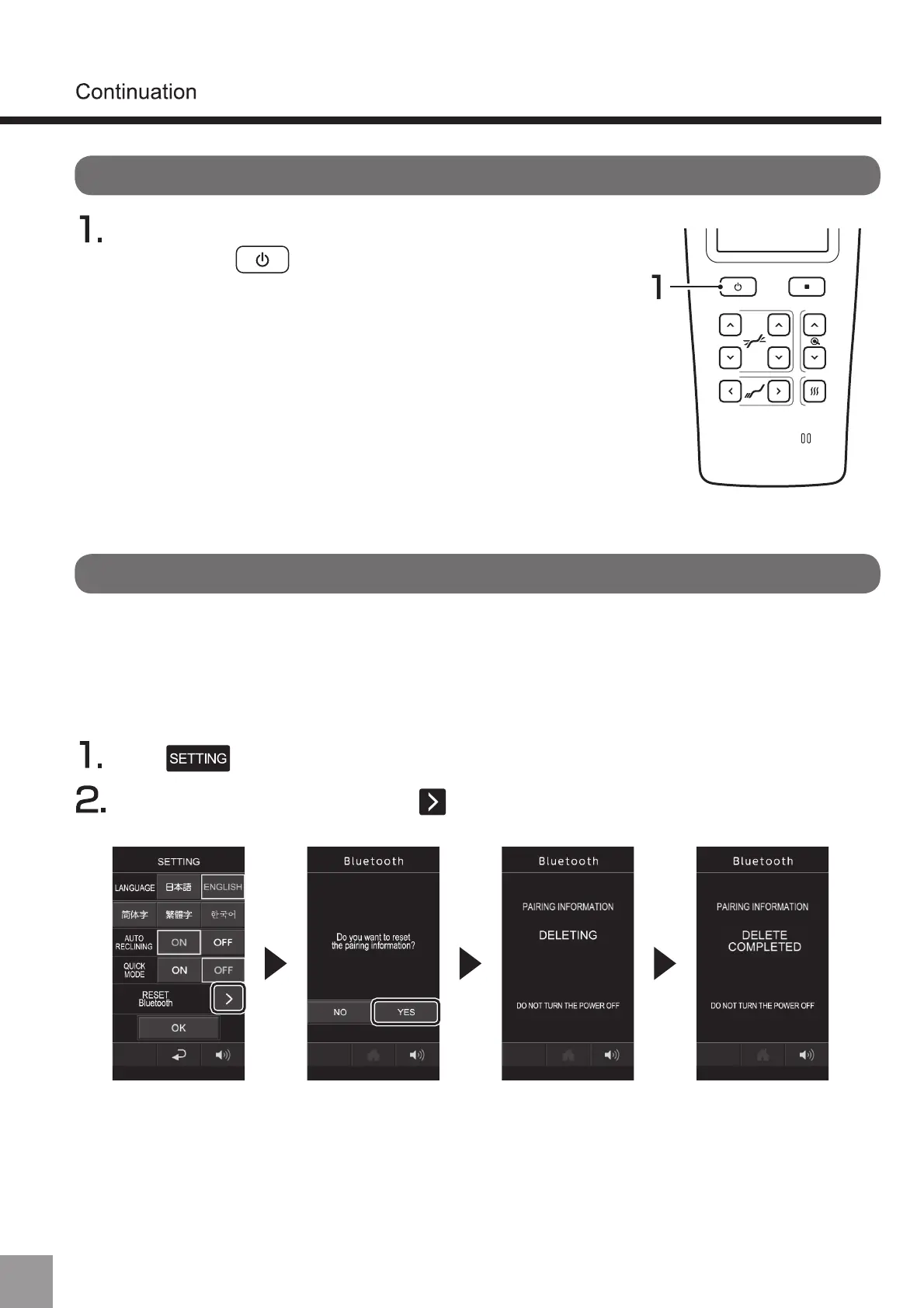
After turning on the power of the smartphone or other
device, press to turn on the power and it will
connect automatically.
When connecting from the second time
About resetting pairing information
After pressing BLUETOOTH reset and “Yes”, the pairing information will be reset.
Press on the course menu selection screen.
(Usage of BLUETOOTH speaker)
54


 To Next Page
 Loading...