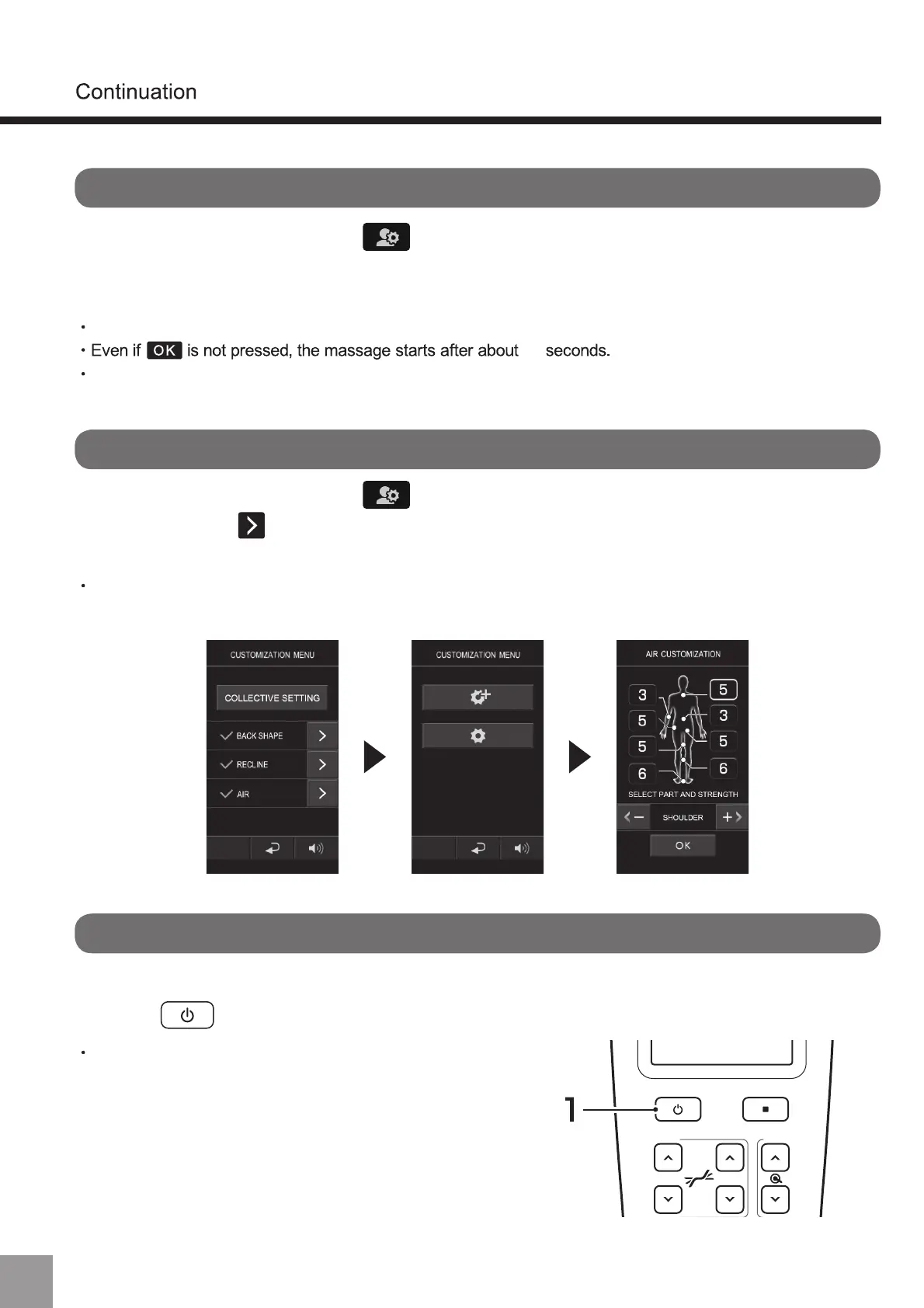
Batch setting (to reset the batch)
To edit the registered customized information
1. To switch from A to B, or from user customized mode (A/B) to Guest Mode,
press and then restart the power.
To switch to other modes
1. Log in to A or B, and press .
$IWHUSUHVVLQJ³%DWFKVHWWLQJ´VHWWLQJFXVWRPL]DWLRQLQRUGHURIEDFNOLQHĺ
UHFOLQLQJĺDLUSUHVVXUHZLOOVWDUW
1. Log in to A or B, and press .
After pressing to edit the customized information, the edit screen will be
displayed.
10
Do not turn off the power during registration, otherwise the registration of customized information
cannot be completed.
For various customization methods, please confirm the chapters on “Back Line (P58~59)”,
“Reclining (P60)” and “Air pressure (P61) ”.
When switching to other modes, please restart the power
before operation.
When customizing the air pressure, press “Skip” to skip the setting.
62
(About User Customized Mode)



 To Next Page