①
③
②
⑤ ⑤
④
①
・ The intensity adjustment action is repeated twice for each part. If “OK” is not pressed, the intensity will
be set to “7”.
・ To adjust the intensity on the confirmation screen, select the number corresponding to the target part
and adjust it through (⑤).
・ Do not turn off the power during registration, otherwise the registration of customized information
cannot be completed.
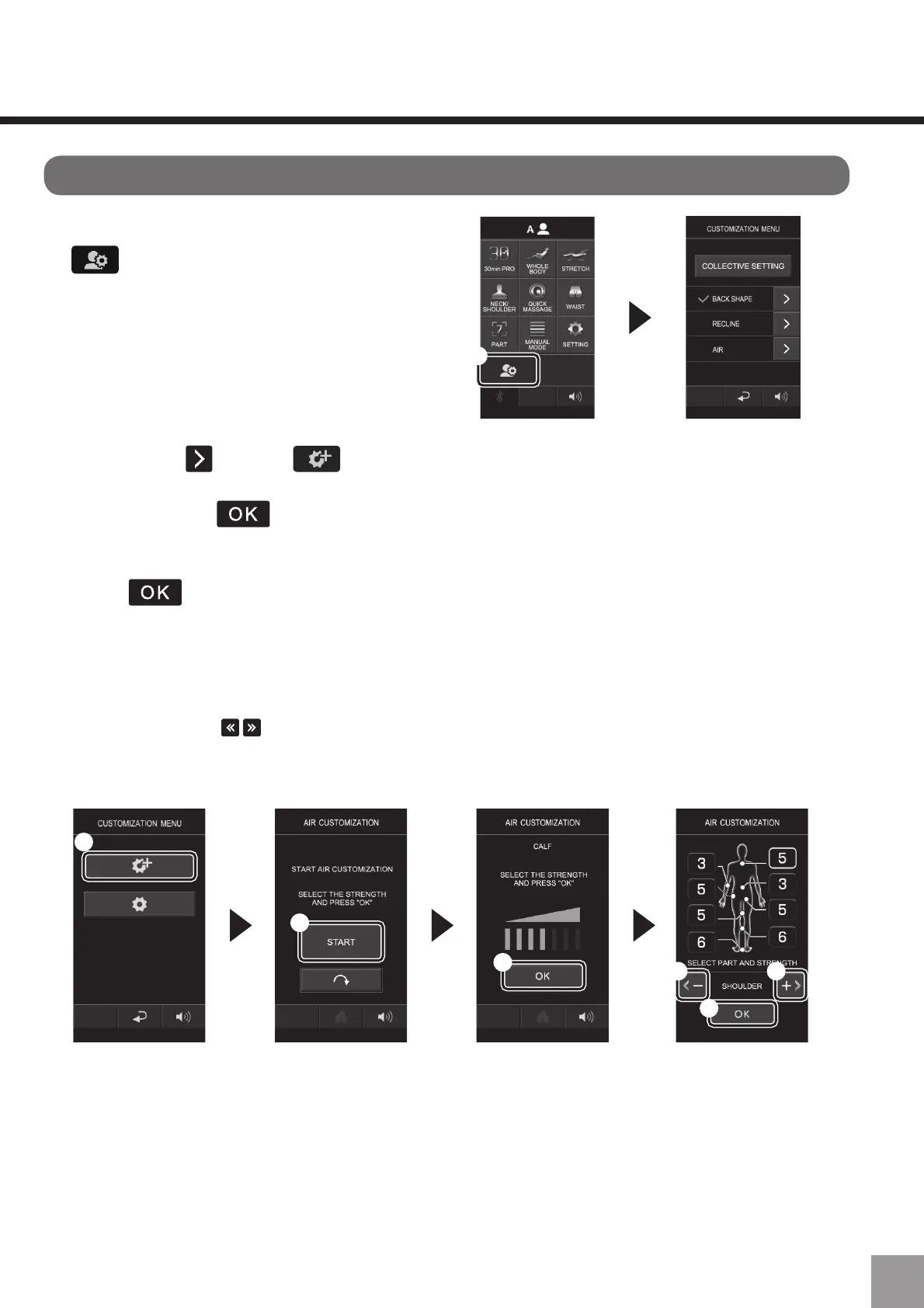
Customize airbags pressure
1. Log in to A or B, and press
(①).
2. Press "Air " , select (①) and press “Start (②)” to start the setting of
intensity for each part. When the air pressure of each part reaches the preferred
intensity, press (③).
VHWWLQJRUGHUDQNOHĺFDOIĺDUPĺWKLJKĺSHOYLVĺKLSĺZDLVWĺVKRXOGHU
ĺFRQILUP
Press (④) to confirm the intensity displayed on the screen.
If “Registration completed” is displayed, the registration is complete.
61



 To Next Page