User Manual - Hardware Features - 06
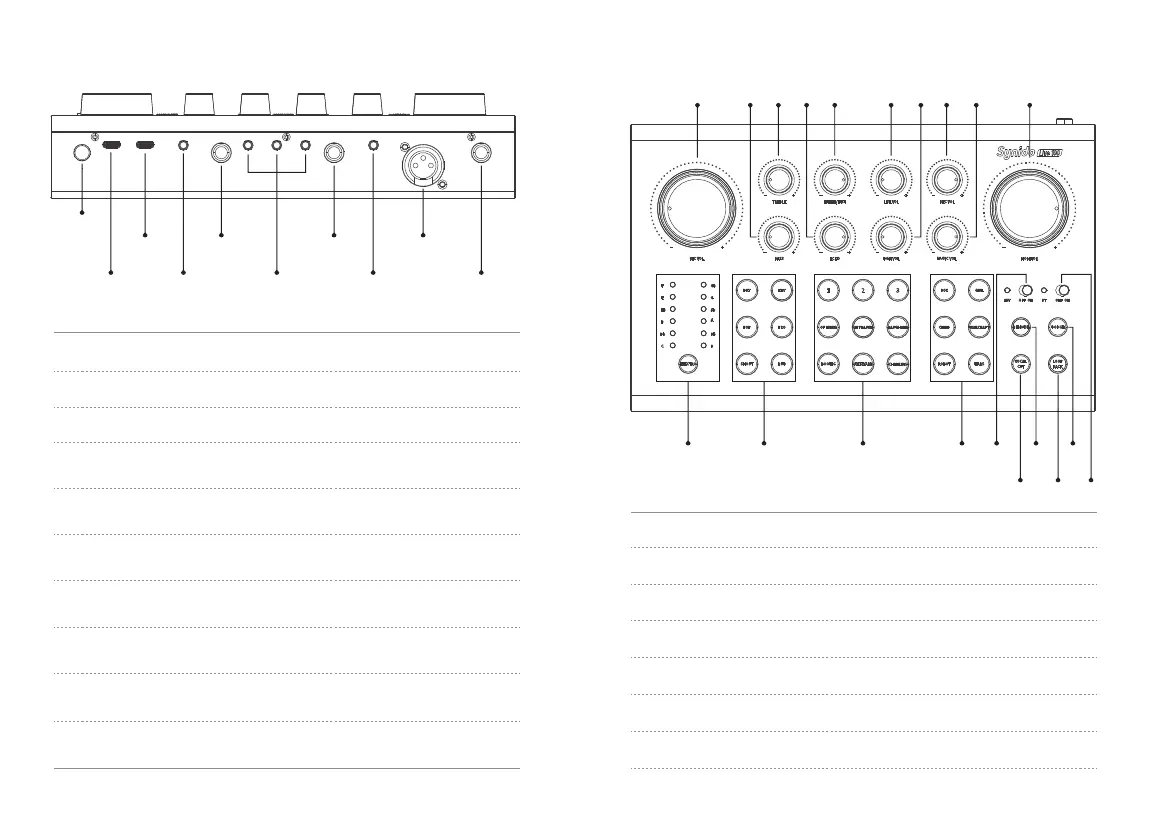
(4)
ON/OFF
(5)
DC 5V
(8)
HEADPHONE
(6)
PC
(10)
INST
(12)
MIC3
(7)
LINE OUT
(11)
LINE IN
(13)
MIC4
(9)
LIVE1/2/3
(4) ON/OFF: Main power switch.
(5) DC 5V: USB Type-C device power supply.
(6) PC: USB Type-C cable interface, supporting connection with computer/ phone.
(7) LINE OUT: 3.5mm speaker interface, supporting connection with external
passive speaker/speaker power amplifier.
(8) HEADPHONE: 6.35mm headphone jack, supporting connection with monitor
headphones.
(9) LIVE1/2/3: 3.5mm live broadcasting interface, supporting connection with
an external mobile phone/tablet for live broadcasting.
(10) INST: 6.35mm musical instrument interface, supporting musical instrument
input such as electric guitar and electronic keyboard.
(11) LINE IN: 3.5mm accompaniment interface, supporting external accompaniment
sound source, and mobile accompaniment input.
(12) MIC3: XXLR microphone interface, supporting connection with 48V
large-diaphragm condenser microphone.
(13) MIC4: 6.35mm microphone interface, supporting connection with dynamic
microphone.
2.2. Back View
(1) MIC VOL: Local microphone volume adjustment.
(2) BASS: Microphone low frequency compensation adjustment.
(3) TREBLE: Microphone high frequency compensation adjustment.
(4) ECHO: Echo intensity adjustment.
(5) LINE IN/INST: Line input, instrument input volume adjustment.
(6) LIVE VOL: Live streaming and 3 customized BGM sound effects volume adjustments.
(7) BGM VOL: 6 kinds of fixed BGM warm-up sound effect volume adjustment.
(1)
(11) (12) (13) (14) (15) (16) (17)
(18) (19) (20)
(2) (3) (4) (5) (6) (7) (8) (9) (10)
User Manual - Hardware Features - 05
2.3. Top View


 To Next Page