4
Chapter 1: Before You Start
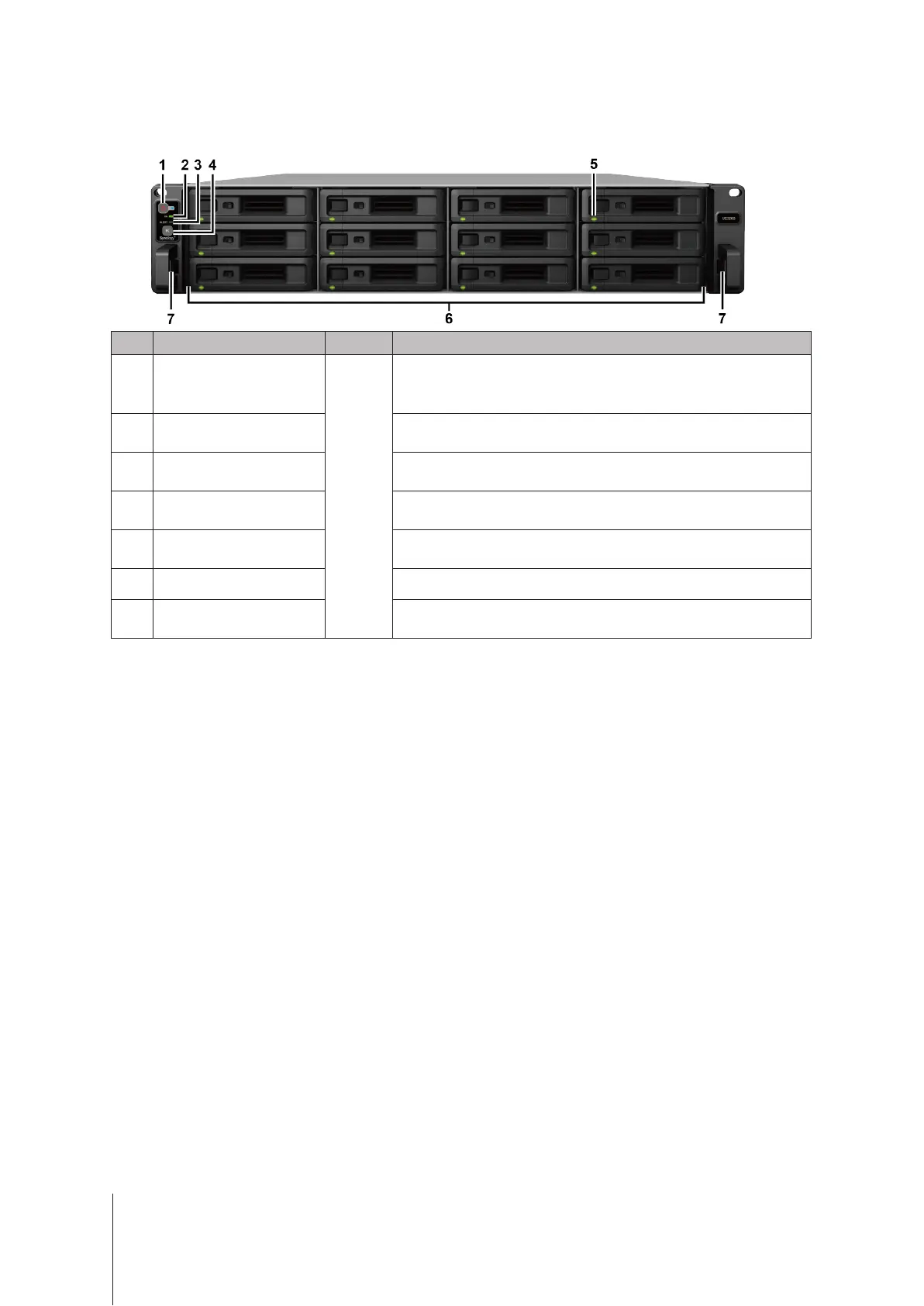
Synology UC3200 at a Glance
No. Article Name Location Description
1
Power Button and Indicator
Front
1. Press to power on your Synology Unied Controller.
2. To power o the Synology Unied Controller, press and hold until you
hear a beep sound and the Power LED starts blinking.
2
HA Status Indicator
Displays the status of the HA (High Availability). For more information, see
"LED Indicator Table."
3
Alert Indicator
Displays warnings regarding fan or temperature. For more information,
see "LED Indicator Table."
4
Beep O Button
Press to deactivate the beeping sound that is emitted when a malfunction
occurs.
5
Drive Status Indicator
Displays the status of drives. For more information, see "LED Indicator
Table."
6
Drive Tray Install drives (hard disk drives or solid state drives) here.
7
Rail Kit Release Tab
Push in and hold to release the Synology Unied Controller from the rail
kit lock.
1
1
For more information about the rail kit installation, please refer to the Quick Installation Guide that comes with the rail kit.



 To Next Page