TV Installation and Connection Guide
Identifying Front and Rear Panels
Rear Panel
I_ VGA_
Audio In (_)
Service E
Port
®
L®
Video ®
S Video @
Ig_! ANT_
03
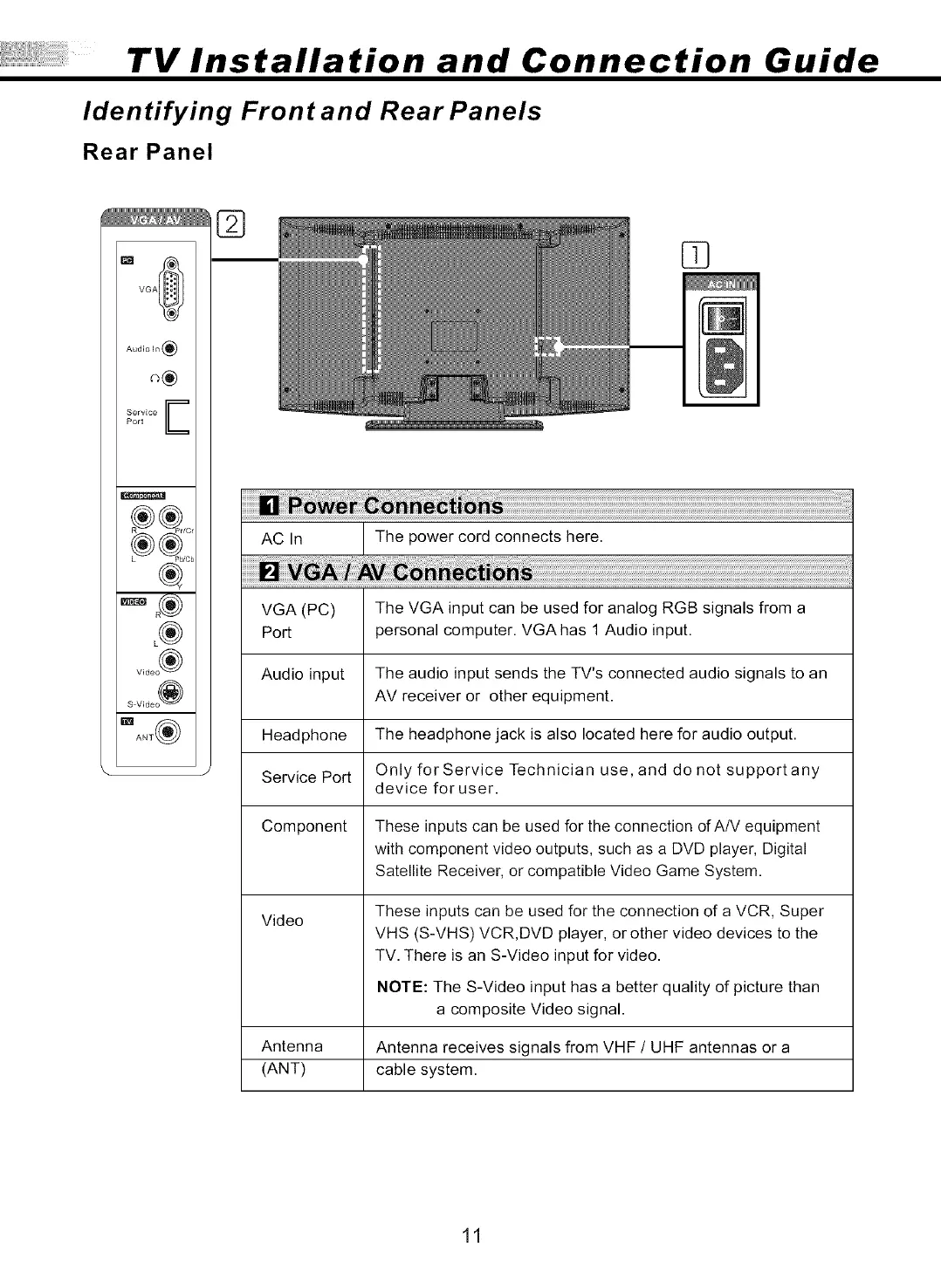
AC In The power cord connects here.
VGA (PC) The VGA input can be used for analog RGB signals from a
Port personal computer. VGA has 1 Audio input.
Audio input The audio input sends the TV's connected audio signals to an
AV receiver or other equipment.
Headphone The headphone jack is also located here for audio output.
Service Port Only for Service Technician use, and do not supportany
device for user.
Component These inputs can be used for the connection of A/V equipment
with component video outputs, such as a DVD player, Digital
Satellite Receiver, or compatible Video Game System.
Video
These inputs can be used for the connection of a VCR, Super
VHS (S-VHS) VCR,DVD player, or other video devices to the
TV. There is an S-Video input for video.
NOTE: The S-Video input has a better quality of picture than
a composite Video signal.
Antenna Antenna receives signals from VHF / UHF antennas or a
(ANT) cable system.
11



 To Next Page