Controls and Connectors
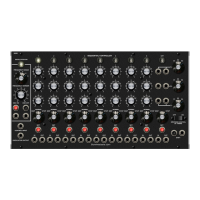
Oscillator Lamp
Indicates the on/off condition of the internal oscillator.
Oscillator Range
Selects one of 6 oscillator frequency ranges.
Range 1: .05Hz - .46Hz
Range 2: .13Hz - 1.2Hz
Range 3: .5Hz - 4.7Hz
Range 4: 2Hz - 19Hz
Range 5: 8Hz - 75Hz
Range 6: 31Hz - 280Hz
Frequency Vernier
Variable control of oscillator frequency. Approximately a 1 to 9 range.
Oscillator On/Off Buttons
Manual control of oscillator operation.
Oscillator On/Off Inputs
Voltage control of oscillator operation. Typically a gate (trigger) signal, Oscillator square wave, etc.
Oscillator Voltage Control Input
Voltage control of oscillator frequency. 1 Volt per octave, temperature compensated.
Oscillator Output
Pulse wave oscillator output with a 90% (Default) duty cycle. 0-5 volts.
Stage Lamp
Indicates a stage is active. Normally only one stage is active at a time.
Stage Control Knobs
The knobs of the active stage determine the voltage at the row outputs.
Stage Mode Switch
Selects Skip, Normal, or Stop modes. Normal: A stage comes on, stays on for the duration of the
oscillator cycle, then turns off and shifts to the next stage.
Skip: Removes the stage from the shifting sequence.
Stop: Prevents shifting to the next stage. The oscillator remains on.
Stage Set Buttons
Allows manual selection of a stage and resets the other stages.
Stage Trigger Inputs
Trigger (Gate) input signals cause stage selection and others to reset. This can be a keyboard gate,
a pulse from an oscillator, a trigger output from another stage or sequencer, etc.
Stage Trigger Outputs
When the stage is active, a trigger (Gate) output is available at this jack. The output stays on as long
as the stage is on.
Continued on next page…….
Q960 Sequential Controller
Sep 2014


 To Next Page
 Loading...